
The Ultimate Guide to Charging Your Nintendo Switch
Are you tired of running out of battery on your Nintendo Switch when you’re away from home? Look no further! In this comprehensive guide, we’ll show you how to charge your Switch using a variety of methods, including the official charger, power banks, and more.
Understanding The Nintendo Switch’s Battery Life
Before we dive into the charging methods, it’s essential to understand how long your Switch can last on a single charge. The battery life of the Switch depends on several factors, such as the brightness setting, game usage, and ambient temperature. On average, you can expect around 3-4 hours of playtime before needing to recharge.
Method 1: Using The Official Charger
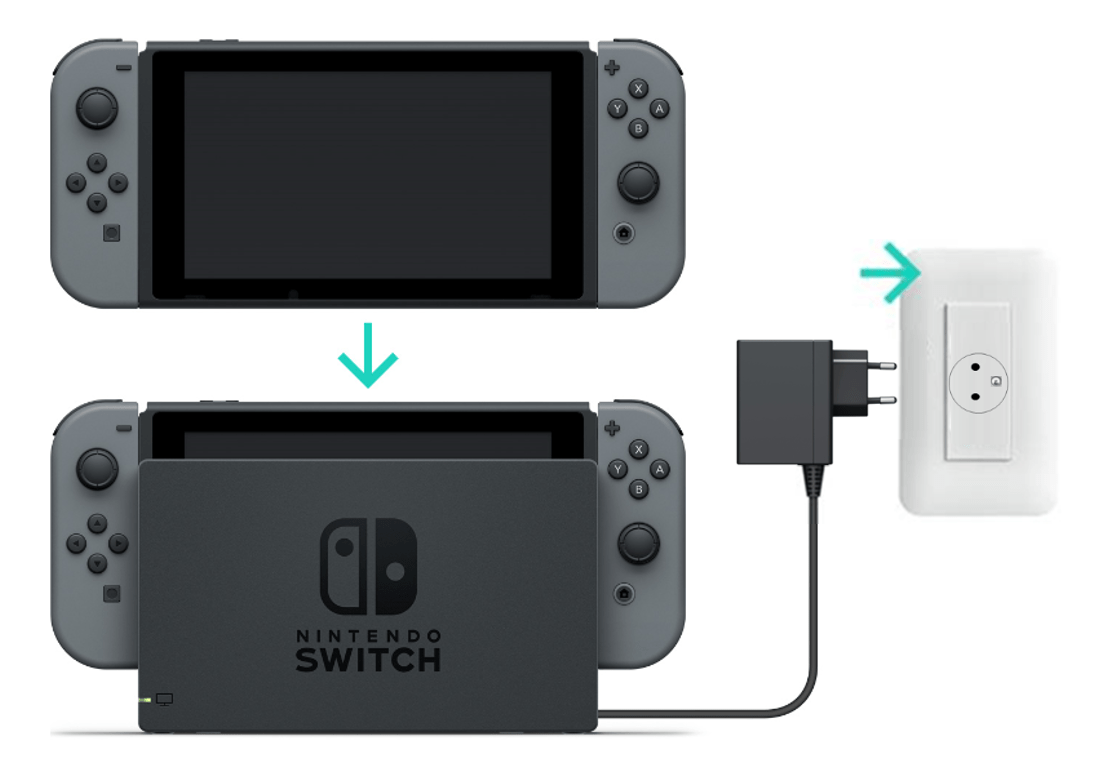
The most straightforward way to charge your Nintendo Switch is by using the official charger provided with the console. This charger uses a USB-C cable and is designed specifically for the Switch.
To use the official charger:
- Plug the charger into a power outlet.
- Connect the other end of the charger to the Switch’s USB-C port.
- Make sure the Switch is turned off before charging.
- The battery icon on the screen will indicate when the Switch is fully charged.
Method 2: Using a Power Bank
If you’re always on-the-go, using a power bank can be an excellent way to charge your Nintendo Switch. Power banks are portable and can be easily carried in a bag or backpack.
To use a power bank:
- Choose a power bank that’s specifically designed for the Nintendo Switch.
- Make sure the power bank is fully charged before attaching it to the Switch.
- Connect the power bank to the Switch using a USB-C cable.
- The battery icon on the screen will indicate when the Switch is fully charged.
Method 3: Using a Car Charger
If you’re driving around with your Nintendo Switch, a car charger can be a convenient way to keep it powered up. You can purchase a car charger specifically designed for the Switch or use a universal car charger with a USB-C adapter.
To use a car charger:
- Choose a car charger that’s specifically designed for the Nintendo Switch.
- Connect the car charger to your vehicle’s 12V outlet.
- Attach the other end of the charger to the Switch using a USB-C cable.
- The battery icon on the screen will indicate when the Switch is fully charged.
Method 4: Using an External Battery
If you’re in a pinch and need to charge your Nintendo Switch quickly, an external battery can be a lifesaver. External batteries are designed specifically for gaming consoles and can provide up to 6 hours of additional battery life.
To use an external battery:
- Choose an external battery that’s specifically designed for the Nintendo Switch.
- Connect the external battery to the Switch using a USB-C cable.
- The battery icon on the screen will indicate when the Switch is fully charged.
Method 5: Using a Battery Pack
A battery pack can be a convenient way to charge your Nintendo Switch without needing a separate charger or power bank. Battery packs are designed specifically for gaming consoles and can provide up to 6 hours of additional battery life.
To use a battery pack:
- Choose a battery pack that’s specifically designed for the Nintendo Switch.
- Connect the battery pack to the Switch using a USB-C cable.
- The battery icon on the screen will indicate when the Switch is fully charged.
Charging Your Joy-con Controllers
If you have Joy-Con controllers, you can also charge them separately. To do this:
- Use the official charger provided with the console to charge your Joy-Con controllers.
- Alternatively, you can use a power bank or external battery specifically designed for gaming controllers.
Conclusion
In conclusion, charging your Nintendo Switch is easier than ever! With these methods, you’ll never have to worry about running out of battery on the go. Remember to always follow the manufacturer’s instructions when using any of these methods, and enjoy your gaming experience with peace of mind!
Frequently Asked Questions (FAQs)
- Q: How Long Does it Take to Fully Charge my Nintendo Switch?
A: It takes around 3-4 hours to fully charge your Nintendo Switch. - Q: Can I Use Any Power Bank to Charge my Nintendo Switch?
A: No, you’ll need a power bank specifically designed for the Nintendo Switch. - Q: How do I Know When my Nintendo Switch is Fully Charged?
A: The battery icon on the screen will indicate when your Nintendo Switch is fully charged. - Q: Can I Use a Car Charger to Charge my Nintendo Switch?
A: Yes, you can use a car charger specifically designed for the Nintendo Switch. - Q: How do I Charge my Joy-con Controllers Separately?
A: You can use the official charger provided with the console or a power bank specifically designed for gaming controllers. - Q: Can I Use an External Battery to Charge my Nintendo Switch?
A: Yes, you can use an external battery specifically designed for the Nintendo Switch. - Q: How do I Know if my Power Bank is Fully Charged?
A: The manufacturer’s instructions will provide guidance on how to check the power level of your power bank. - Q: Can I Charge my Nintendo Switch in a Car?
A: Yes, you can use a car charger specifically designed for the Nintendo Switch.
We hope this guide has been helpful! If you have any further questions or concerns, please don’t hesitate to reach out.


