
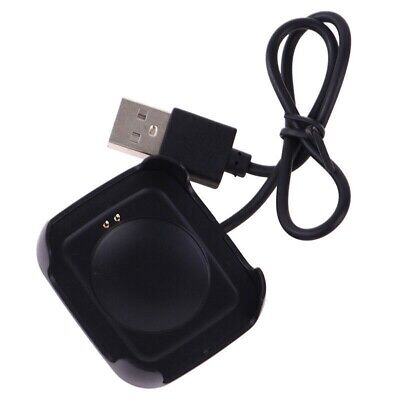
How to Charge Your Smartwatch: A Comprehensive Guide
Are you tired of wondering how to charge your smartwatch? Look no further! In this article, we will provide you with a step-by-step guide on how to charge your smartwatch in the most efficient way possible.
Table 1: Types of Smartwatch Charging Methods
| Method | Description |
|---|---|
| Wireless Charging | Charging your smartwatch wirelessly using a charging pad or dock. |
| Pin Charging | Charging your smartwatch using a cable and pin connector. |
The Burden of Not Knowing How to Charge Your Smartwatch
Have you ever found yourself in a situation where you need to charge your smartwatch but don’t know how? This can be frustrating, especially when you’re on the go and need to keep track of your fitness goals or receive important notifications.
How to Charge Your Smartwatch Wirelessy
Wireless charging is one of the most convenient methods of charging your smartwatch. It’s simple, easy to use, and doesn’t require any cables. Here’s how it works:
- Place your smartwatch on a wireless charging pad or dock.
- Make sure the pad or dock is properly aligned with the charging coils in your smartwatch.
- Wait for the charging process to begin.
How to Charge Your Smartwatch Using a Pin Connector
If you prefer to use a cable and pin connector, here’s how to do it:
- Locate the charging port on your smartwatch.
- Insert the pin connector into the charging port.
- Make sure the connector is securely connected to prevent any damage.
What to Do If You Forget Your Smartwatch Charger
If you forget your smartwatch charger at home, don’t panic! There are other ways to charge your device:
- Use a power bank: A power bank can be used to charge your smartwatch on the go.
- Ask a friend for help: If you have a friend with a charging dock or cable, ask them if they can lend it to you.
- Visit an authorized service center: If all else fails, visit an authorized service center and they will be able to provide you with a charger.
How to Check The State of Your Smartwatch Battery
It’s essential to keep track of your smartwatch battery level to avoid running out of charge when you need it most. Here’s how to check the state of your smartwatch battery:
- Open the settings app on your smartwatch.
- Look for the battery percentage indicator.
- If you have a power bank or charger, make sure it’s properly connected and charging.
Tips For Optimizing Your Smartwatch Battery Life
Here are some tips to help you optimize your smartwatch battery life:
- Disable features you don’t use: Disable any features that you don’t use regularly to conserve battery life.
- Adjust the screen brightness: Lowering the screen brightness can also help extend battery life.
- Turn off notifications: If you’re not using a feature, turn off notifications to prevent unnecessary battery drain.
Conclusion
Charging your smartwatch doesn’t have to be a hassle. With this comprehensive guide, you’ll know exactly how to charge your device using either wireless charging or a pin connector. Remember to check the state of your smartwatch battery regularly and optimize its performance by disabling features you don’t use and adjusting the screen brightness.
Frequently Asked Questions (FAQs)
Q: How do I know if my smartwatch is compatible with wireless charging?
A: Check your smartwatch’s user manual or manufacturer’s website to see if it supports wireless charging.
Q: Can I charge my smartwatch using a cable and pin connector from my phone?
A: No, you’ll need a separate charger specifically designed for your smartwatch.
Q: How do I check the state of my smartwatch battery?
A: Open the settings app on your smartwatch to see the battery percentage indicator.
Q: What should I do if my smartwatch runs out of charge when I’m on the go?
A: Use a power bank or ask a friend for help. If all else fails, visit an authorized service center.
Q: Can I use a power bank to charge my smartwatch?
A: Yes, you can use a power bank specifically designed for your smartwatch.
Q: How do I optimize my smartwatch battery life?
A: Disable features you don’t use, adjust the screen brightness, and turn off notifications to conserve battery life.


