
How to Check-in Online on Trenitalia: A Step-by-step Guide
Are you planning a journey by train in Italy? If so, this article is for you! In recent times, Trenitalia has introduced the practice of online check-in for regional trains, and it’s essential to understand how to do it correctly. Here’s a comprehensive guide on how to check-in online on Trenitalia, covering both PC and mobile devices.
What You Need to Know
Before we dive into the step-by-step guide, let’s quickly cover some basics.
- Online check-in is mandatory for regional trains.
- You can only check-in online if you have a Regional Digital Ticket.
- If you have a ticket for an Intercity or high-speed train (Frecciarossa, Frecciargento, and Frecciabianca), you don’t need to check-in online.
Why Do I Need to Check-in Online?
Online check-in validates your ticket and allows you to modify the date and hour of your journey until 23:59 On the day before the trip. This is helpful if you’re unsure about your schedule or have a change in plans.
Checking-in Online on PC
Here’s how to check-in online on Trenitalia using a PC:
- Access Your Email: Log in to your email account and look for the confirmation email from Trenitalia. This email contains a link to your Regional Digital Ticket.
- Click on The Link: Click on the “Check-in and Travel” button within the email body.
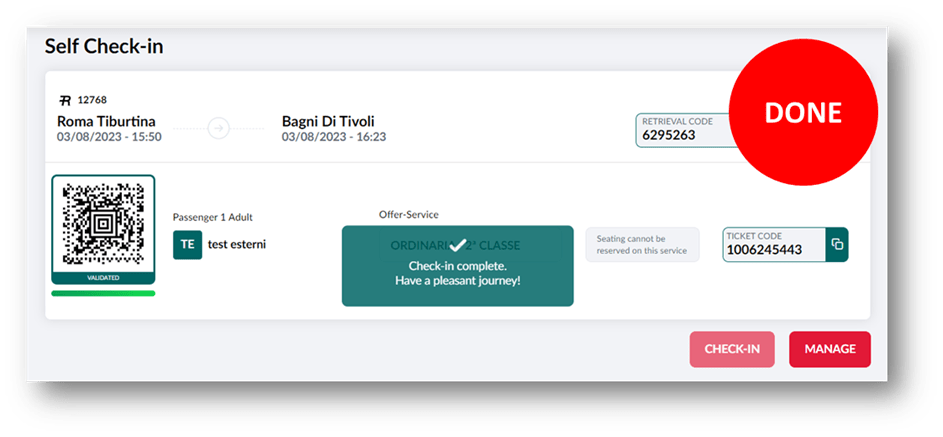
- Select The Tickets: Choose the tickets you want to validate by clicking on the red “Check-in” button next to each ticket.
- Validate Your Ticket: Confirm that your ticket is validated, and you’re ready to travel!
Alternative Ways to Check-in Online
If you don’t receive an email or prefer not to use it, there are alternative ways to check-in online:
- If you have a Trenitalia account, log in to your account on the official website, navigate to “My Voyages,” and find your tickets.
- If you can’t see your tickets, search for them using the “Search Ticket” feature. You can search by email, PNR/Code ticket, PNR and CP, or Code of recovery.
Checking-in Online on Smartphone And Tablet
Here’s how to check-in online on Trenitalia using a smartphone or tablet:
- Download The App: Download the Trenitalia app from the Google Play Store (for Android devices) or Apple App Store (for iOS/iPadOS devices).
- Log in to Your Account: Log in to your account, or if you don’t have one, select “Recorded” and follow the instructions.
- Access My Voyages: Tap on the icon “My Voyages” in the bottom left corner of the screen to find your Regional Digital Ticket.
- Search For Your Ticket: If you can’t find it, tap on “Recover Another Ticket” and search using PNR/Code ticket or Code of recovery.
- Validate Your Ticket: Once found, select the ticket you want to validate by tapping on the red “Check-in” button next to each ticket.
Conclusion
Checking-in online on Trenitalia is a straightforward process that ensures your ticket is validated and allows for easy modifications until the day before your trip. By following these steps, you’ll be well-prepared for your journey and avoid any potential issues.
Faqs
- What Happens if I Miss my Check-in Deadline?
If you miss the 23:59 Check-in deadline on the day before your trip, you won’t be able to make changes or validate your ticket. - Can I Modify my Ticket After Checking in Online?
Yes, you can modify your ticket until 23:59 On the day before your trip by following the same steps as above. - What if I Don’t Receive an Email Confirmation?
If you don’t receive an email, try searching for your ticket using the “Search Ticket” feature or access your account directly on the Trenitalia website. - Can I Check-in Online Without a Trenitalia Account?
Yes, you can check-in online using the app or by accessing the website and following the alternative steps provided. - What if I Encounter Issues During Check-in?
If you experience any problems during the check-in process, try contacting Trenitalia customer support for assistance.
By understanding how to check-in online on Trenitalia, you’ll be well-prepared for your journey and ensure a smooth travel experience.


