
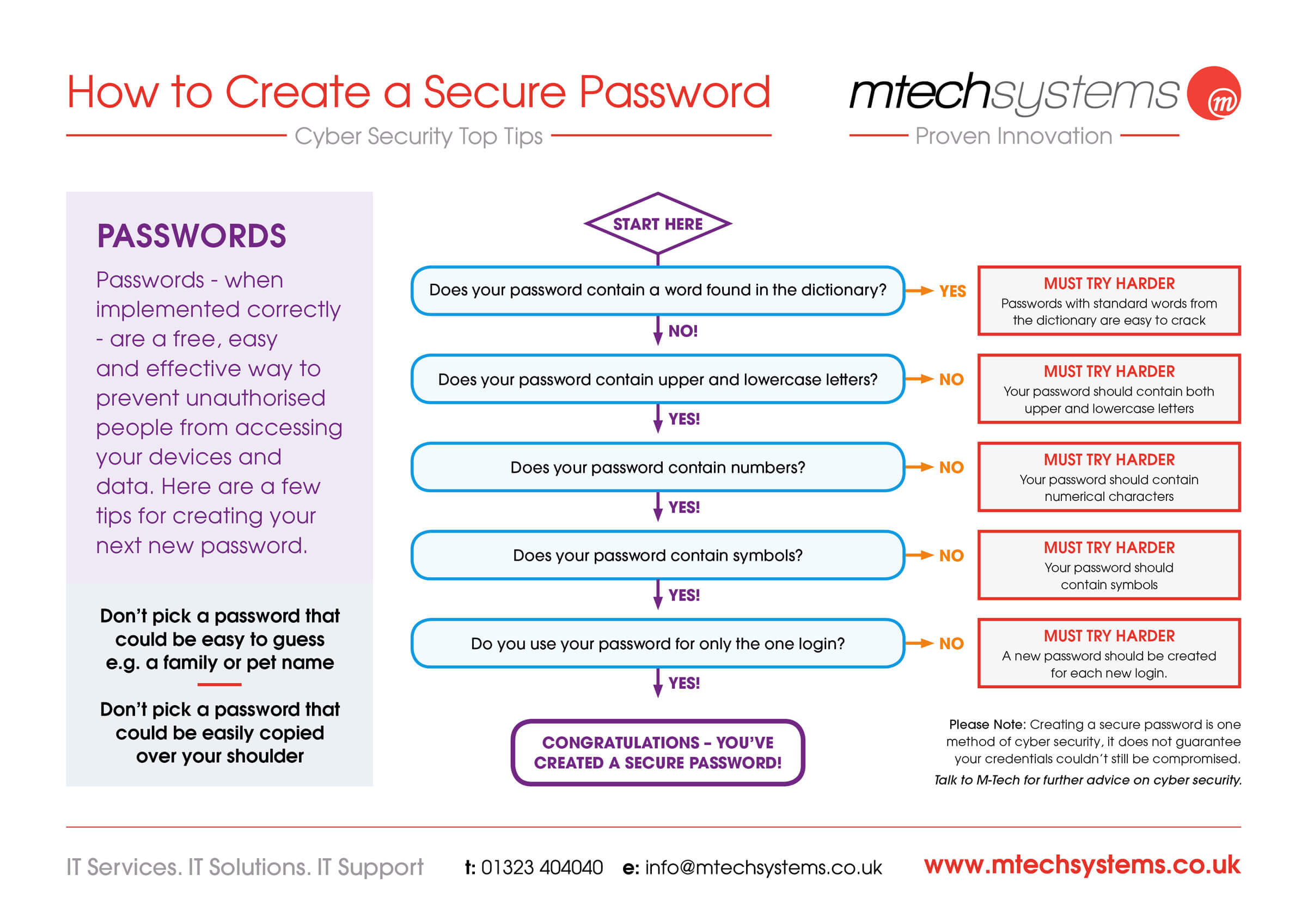
The Ultimate Guide to Choosing a Secure Password
Are you tired of using weak passwords that can be easily guessed by hackers? Do you want to protect your online accounts and sensitive information from cyber threats? Look no further! In this article, we will provide you with a comprehensive guide on how to choose a secure password.
Why is it Important to Choose a Secure Password?
In today’s digital age, passwords are the first line of defense against cyber threats. A weak password can compromise your entire online presence, leaving you vulnerable to identity theft, financial loss, and other malicious activities. By choosing a strong password, you can protect yourself from these risks and enjoy peace of mind.
What Makes a Good Password?
A good password should be:
- Long: Aim for at least 15-20 characters.
- Complex: Mix uppercase and lowercase letters, numbers, symbols, and special characters.
- Unique: Avoid using easily guessable information like your name, birthdate, or common words.
How to Choose a Secure Password
Here are some tips to help you choose a secure password:
- Use a passphrase: Create a sentence or phrase that is easy for you to remember but hard for others to guess.
- Avoid common patterns: Steer clear of patterns like “qwerty” or “123456.”
- Don’t reuse passwords: Use unique passwords for each account.
- Update your password regularly: Change your password every 60-90 days.
Tools to Help You Choose a Secure Password
There are several tools available that can help you generate and manage secure passwords:
- Password Generators: Tools like LastPass, Dashlane, or 1Password can create complex passwords for you.
- Password Managers: Services like NordPass, 1Password, or Bitwarden allow you to store and organize all your passwords in one place.
How to Store Your Passwords Safely
To protect your passwords from unauthorized access:
- Use a password manager: Store your passwords securely with a reputable password manager.
- Avoid browser storage: Don’t save your passwords in your browser, as they can be easily compromised.
- Keep your password manager safe: Choose a strong master password and keep your password manager up to date.
Conclusion
Choosing a secure password is an essential step in protecting yourself from cyber threats. By following the tips outlined above and using the tools available, you can create strong passwords that will safeguard your online presence. Don’t compromise your security – choose a secure password today!
Frequently Asked Questions
- Q: What Makes a Good Password?
A: A good password should be long, complex, unique, and hard to guess. - Q: How Often Should I Update my Password?
A: Update your password every 60-90 days to maintain maximum security. - Q: Can I Use a Common Word as my Password?
A: No, avoid using easily guessable information like your name or birthdate. - Q: What Tools Can Help me Generate Secure Passwords?
A: Password generators like LastPass and Dashlane, or password managers like NordPass and Bitwarden. - Q: How do I Store my Passwords Safely?
A: Use a password manager to securely store your passwords, avoiding browser storage and keeping your password manager up to date.
I hope you enjoyed this article!


