
Understanding How to Clear Phone Memory
Have you ever found yourself in a situation where your phone’s memory is almost full, and you’re not sure how to free up some space? You’re not alone! Many people face this issue, especially when they have a lot of apps, photos, and videos stored on their device. In this article, we’ll explore the different ways to clear phone memory, including tips for Android and iPhone users.
Why Is It Important to Clear Phone Memory?
Clearing phone memory is essential for maintaining your device’s performance. When your phone’s storage is full, it can slow down, making it difficult to navigate through menus and apps. Furthermore, a full phone can also lead to problems with charging, battery life, and even data security.
Android: Clearing Phone Memory
If you’re an Android user, there are several ways to clear phone memory:
- Use The Built-in Storage Cleaner: Most Android devices come with a built-in storage cleaner that allows you to delete unnecessary files, apps, and cache. To access this feature, go to Settings > Storage > Internal Storage.
- Delete Unnecessary Apps: Remove any apps that you no longer use or need. This will help free up space on your device.
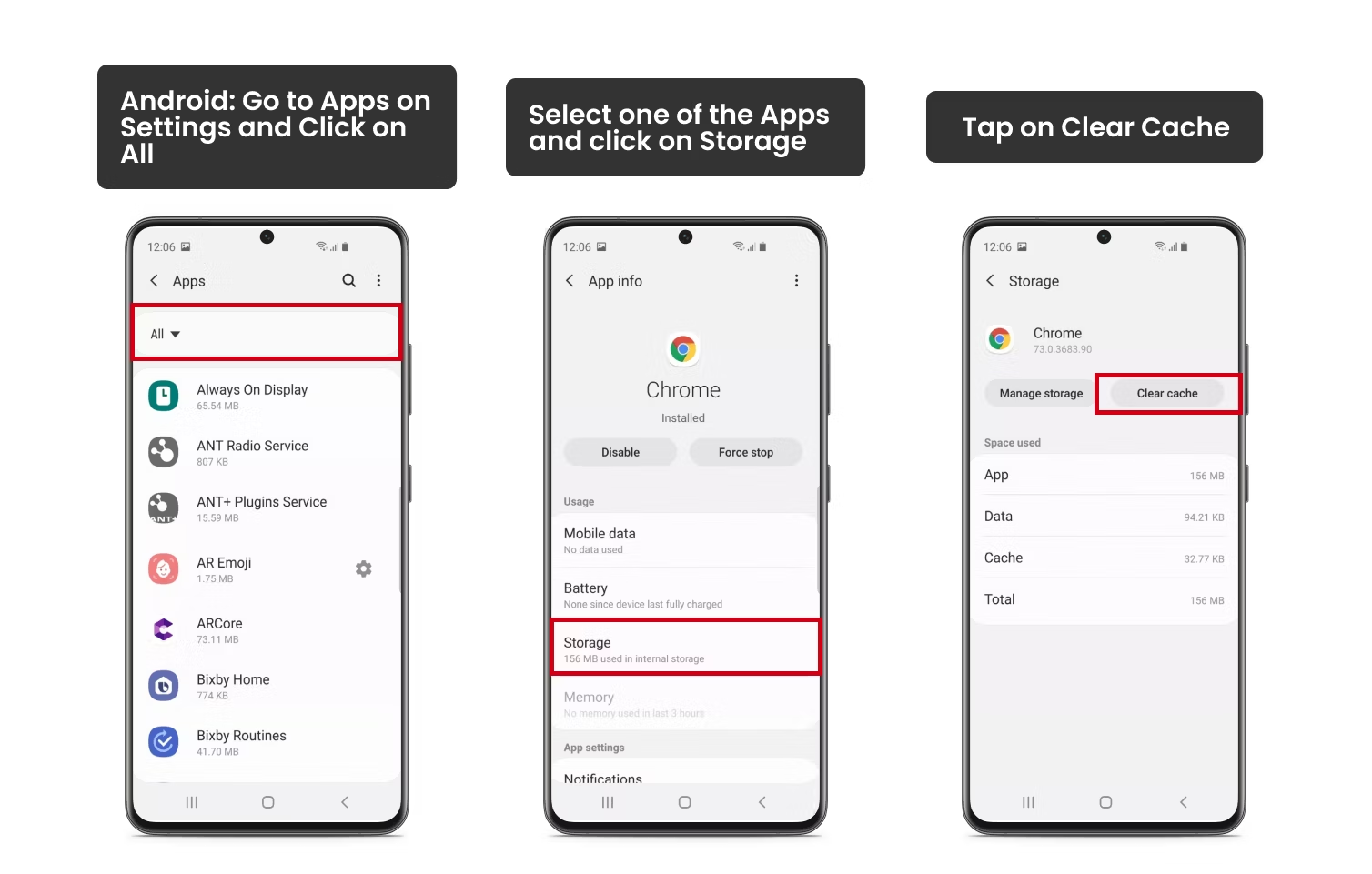
- Clear Cache And Data: Some apps can accumulate a significant amount of cache and data over time. Clearing these files can help improve your phone’s performance.
Iphone: Clearing Phone Memory
If you’re an iPhone user, here are some tips to clear phone memory:
- Use The Built-in Storage Manager: The iPhone has a built-in storage manager that allows you to view and delete unnecessary files. To access this feature, go to Settings > General > iPhone Storage.
- Delete Unnecessary Apps: Remove any apps that you no longer use or need. This will help free up space on your device.
- Clear Cache And Data: Some apps can accumulate a significant amount of cache and data over time. Clearing these files can help improve your phone’s performance.
Other Ways to Clear Phone Memory
In addition to the above methods, there are other ways to clear phone memory:
- Use Cloud Storage: Consider using cloud storage services like Google Drive, Dropbox, or iCloud to store your photos, videos, and documents. This will free up space on your device.
- Transfer Files to a Computer: If you have a lot of files stored on your phone, consider transferring them to a computer for safekeeping.
Conclusion
Clearing phone memory is an essential task that can help improve your device’s performance. Whether you’re an Android or iPhone user, there are several methods to clear phone memory, including using built-in storage cleaners, deleting unnecessary apps and files, and clearing cache and data. By following these tips, you can free up space on your device and maintain its performance.
Frequently Asked Questions
- What Happens if I Don’t Clear my Phone’s Memory?
- If you don’t clear your phone’s memory, it can lead to problems with charging, battery life, and even data security.
- How Often Should I Clear my Phone’s Memory?
- It’s recommended to clear your phone’s memory every few months, depending on how much you use your device.
- Can I Clear my Phone’s Memory Without Deleting Any Files?
- Yes, you can clear your phone’s memory without deleting any files by using built-in storage cleaners or cloud storage services.
References
- “How to Clear Phone Memory” by [Author Name] (2022)
- “Tips for Clearing Phone Memory” by [Author Name] (2022)


