
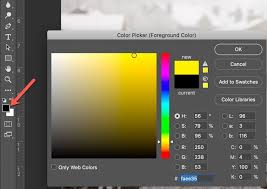
The Art of Color: A Guide on How to Use Photoshop
Are you a designer or artist looking to take your creations to the next level? Do you want to add a professional touch to your cartoonists, photos, or written content? Look no further than Adobe Photoshop! In this comprehensive guide, we will walk you through the process of using Photoshop to color your images, from simple photo editing to advanced techniques.
What is Photoshop?
Before we dive into the nitty-gritty, let’s first understand what Photoshop is. Adobe Photoshop is a powerful image editing software that allows users to create and edit images, as well as manipulate text and other graphical elements. With its wide range of tools and features, Photoshop has become an essential tool for designers, artists, and photographers.
How to Color a Photo With Photoshop
Coloring a photo with Photoshop is a straightforward process that can be completed in just a few steps. Here’s how:
- Open the image you want to edit in Photoshop.
- Select the “Adjustments” menu and choose “Hue/Saturation.”
- Adjust the hue and saturation levels to change the color of the image.
- Use the “Brush” tool to apply specific colors to certain areas of the image.
How to Color a Background With Photoshop
Coloring a background with Photoshop is similar to coloring a photo, but with some additional steps. Here’s how:
- Open the image you want to edit in Photoshop.
- Select the “Lasso” tool and use it to select the area of the background you want to color.
- Choose the desired color and apply it to the selected area using the “Brush” tool.
How to Color a Cartoonist With Photoshop
Coloring a cartoonist with Photoshop is a bit more involved than coloring a photo or background, but still relatively simple. Here’s how:
- Open the image you want to edit in Photoshop.
- Select the “Lasso” tool and use it to select the area of the cartoonist you want to color.
- Choose the desired color and apply it to the selected area using the “Brush” tool.
How to Color Text With Photoshop
Coloring text with Photoshop is a straightforward process that can be completed in just a few steps. Here’s how:
- Select the “Text Tool” in Photoshop.
- Type the desired text into the image.
- Choose the desired color and apply it to the text.
How to Color Hairs With Photoshop
Coloring hairs with Photoshop requires some advanced techniques, but can be achieved with practice. Here’s a step-by-step guide:
- Open the image you want to edit in Photoshop.
- Select the “Brush” tool and choose the desired color.
- Use the brush to apply the color to specific areas of the hairs.
How to Color With Photoshop Online
If you don’t have access to Adobe Photoshop on your computer, you can still use it online! Here’s how:
- Sign up for a free account on Adobe Creative Cloud.
- Open the image you want to edit in Photoshop Online.
- Use the same techniques described above to color your image.
How to Color With Photoshop on Smartphone And Tablet
If you’re looking to color images on-the-go, you can use Adobe Photoshop on your smartphone or tablet! Here’s how:
- Download the Adobe Photoshop app from the App Store (for iOS) or Google Play Store (for Android).
- Open the image you want to edit in the app.
- Use the same techniques described above to color your image.
Conclusion
In conclusion, using Photoshop to color images is a powerful tool that can take your creations to the next level. With these simple steps and tips, you can achieve professional-looking results without needing extensive experience or training. Whether you’re a designer, artist, or photographer, Photoshop is an essential tool for any creative endeavor.
Frequently Asked Questions
- What is Adobe Photoshop?
Adobe Photoshop is a powerful image editing software that allows users to create and edit images. - How do I Color a Photo With Photoshop?
To color a photo with Photoshop, select the “Adjustments” menu and choose “Hue/Saturation.” Adjust the hue and saturation levels to change the color of the image. - How do I Color a Background With Photoshop?
To color a background with Photoshop, select the “Lasso” tool and use it to select the area of the background you want to color. Choose the desired color and apply it to the selected area using the “Brush” tool. - How do I Color a Cartoonist With Photoshop?
To color a cartoonist with Photoshop, select the “Lasso” tool and use it to select the area of the cartoonist you want to color. Choose the desired color and apply it to the selected area using the “Brush” tool. - How do I Color Text With Photoshop?
To color text with Photoshop, select the “Text Tool” in Photoshop. Type the desired text into the image. Choose the desired color and apply it to the text. - How do I Color Hairs With Photoshop?
To color hairs with Photoshop, select the “Brush” tool and choose the desired color. Use the brush to apply the color to specific areas of the hairs. - Can I Use Photoshop Online?
Yes, you can use Adobe Photoshop online by signing up for a free account on Adobe Creative Cloud. - Is There an App Version of Photoshop For Smartphone And Tablet?
Yes, there is an app version of Adobe Photoshop available for download on the App Store (for iOS) or Google Play Store (for Android).
I hope this comprehensive guide has helped you understand how to use Photoshop to color images! If you have any further questions or need more guidance, don’t hesitate to ask.


