
How to Connect a Cordless Phone to a Fixed Line: A Step-by-step Guide
Are you tired of using your cordless phone in the midst of a power outage? Or perhaps you’re looking for a reliable way to connect your cordless phone to a fixed line without breaking the bank. Look no further! In this article, we’ll guide you through the process of connecting a cordless phone to a fixed line, exploring different scenarios and providing tips for a smooth connection.
Understanding Your Phone’s Requirements
Before diving into the nitty-gritty, it’s essential to understand your phone’s requirements. If you have a cordless phone that requires a manual recording process, don’t worry! We’ve got you covered.
Preliminary Operations
To ensure a seamless connection, follow these preliminary operations:
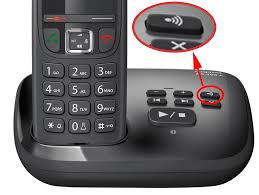
- Connect The Base Unit: Connect the base unit of your cordless phone to the current and press the designated button on both units.
- Wait For Automatic Recognition: Allow the two parts to acknowledge each other automatically within a few seconds.
- Access The Recording Menu (if Necessary): If the phone doesn’t recognize the base unit, access the recording menu using your cordless phone and press the designated button on the relative base.
Connecting to a Fixed Line (RTG or Pots)
If you have a fixed line classified as RTG or POTS, connecting your cordless phone is relatively straightforward. Here’s what you need to do:
- Locate an Available Phone Socket: Identify a free phone socket in the apartment.
- Insert The Rj-11 Connector: Insert the RJ-11 connector resulting from the base unit into the phone socket.
- Use an Adapter (if Necessary): If your phone has a tripolar input, you may need to acquire an adapter for the resulting cable.
Connecting to a Fixed Line With Voip (FTTC, Ftts, Ftth, Fwa)
If you have a fixed line classified as VoIP, the process is slightly different:
- Connect to Your Router: Physically connect the phone to your router using the RJ-11 connector.
- Configure The Parameters (if Necessary): If your router requires manual configuration for VoIP parameters, consult your service provider and configure accordingly.
Linking to The Router
Connecting your cordless phone directly to your router is the most straightforward scenario:
- Insert The Rj-11 Connector: Insert the RJ-11 connector from the base unit into the designated port on your router.
- Wait For Automatic Recognition: Allow the two parts to acknowledge each other automatically.
Rerouting The Telephone Network
If you have multiple phone sockets, you can reroute the telephone network within your apartment:
- Consult a Technician (recommended): If you’re not familiar with electrical work, consult a qualified electrician or technician for assistance.
- Route The Cables: Use the classic cable to connect each socket directly to the router.
Reconnecting Your Cordless Phone
After completing these steps, your cordless phone should be connected to your fixed line:
- Colleague The Base Unit: Connect the base unit to the current and press the designated button.
- Configure The Parameters (if Necessary): Configure any VoIP parameters manually.
Tips For a Smooth Connection
To ensure a smooth connection, keep these tips in mind:
- Consult your user manual or online resources if you’re unsure about any step.
- Make sure to acquire any necessary adapters or connectors before connecting your cordless phone.
- If you’re not comfortable with electrical work, seek the assistance of a qualified electrician or technician.
Conclusion
Connecting a cordless phone to a fixed line is easier than you think. By following these steps and tips, you can enjoy seamless connectivity and reliable communication without breaking the bank.


