
How to Connect a Router to a Modem
Connecting a router to a modem is a crucial step in setting up your home network. With so many options available, it’s essential to understand the different ways you can connect a router to a modem and how they can benefit you.
In this article, we’ll explore the three most common methods of connecting a router to a modem: In parallel, cascading, and repeater mode. We’ll also discuss the benefits and limitations of each method, so you can make an informed decision about which one is best for your needs.
Understanding Your Router And Modem
Before we dive into the different connection methods, it’s essential to understand how your router and modem work together.
A Router is a device that connects multiple devices to a network using a single internet connection. It receives data from the internet and sends it to the connected devices.
A Modem, on the other hand, is a device that connects your home network to the internet via a broadband connection (such as DSL or cable). It converts digital signals into analog signals so they can be transmitted over phone lines or coaxial cables.
Connecting Your Router to Your Modem: In Parallel
One of the most common methods of connecting a router to a modem is in parallel. This method involves connecting your router and modem directly together using an Ethernet cable, creating a single network that all devices can access.
To connect your router and modem in parallel:
- Connect the router’s WAN (Wide Area Network) port to the modem’s LAN (Local Area Network) port using an Ethernet cable.
- Configure the router to use the same IP address as the modem.
- Set up the router’s DHCP server to assign IP addresses to devices connected to it.
Benefits of Connecting in Parallel
Connecting your router and modem in parallel offers several benefits, including:
- Improved Network Performance: By connecting the router and modem directly together, you can enjoy faster internet speeds and improved overall network performance.
- Simplified Setup: This method is often easier to set up than other methods, as it eliminates the need for additional equipment or configuration.
Connecting Your Router to Your Modem: Cascading
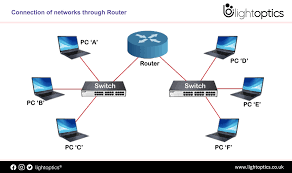
Another popular method of connecting a router to a modem is cascading. In this method, you connect your router and modem together using an Ethernet cable, but also add another device (such as a switch or another router) to extend the network.
To connect your router and modem in cascade:
- Connect the router’s WAN port to the modem’s LAN port using an Ethernet cable.
- Add a switch or another router to the network by connecting it to the router’s LAN ports.
- Configure the added device to assign IP addresses to devices connected to it.
Benefits of Cascading
Connecting your router and modem in cascade offers several benefits, including:
- Extended Network: By adding an additional device (such as a switch or another router) to the network, you can extend its reach and connect more devices.
- Improved Security: This method allows you to isolate sensitive devices from the main network, improving overall security.
Connecting Your Router to Your Modem: Repeater Mode
In repeater mode, your router acts as an amplifier for the modem’s signal. This method is useful when you need to extend the range of the modem’s signal or improve its strength in areas with poor coverage.
To connect your router to your modem in repeater mode:
- Connect the router’s WAN port to the modem’s LAN port using an Ethernet cable.
- Configure the router to use a different channel and IP address than the modem.
- Set up the router’s DHCP server to assign IP addresses to devices connected to it.
Benefits of Repeater Mode
Connecting your router to your modem in repeater mode offers several benefits, including:
- Improved Signal Strength: By amplifying the modem’s signal, you can improve its strength and coverage throughout your home.
- Increased Range: This method allows you to extend the range of the modem’s signal, making it more effective in areas with poor coverage.
Choosing The Right Connection Method
Now that we’ve explored the different connection methods, it’s essential to choose the one that best suits your needs. Here are a few factors to consider:
- Network Size: If you have a small network with only a few devices, connecting in parallel or cascade may be sufficient. However, if you need to connect multiple devices and extend the network’s reach, cascading or repeater mode might be more suitable.
- Signal Strength: If you experience poor signal strength or coverage, repeater mode may be the best option.
- Security: If you need to isolate sensitive devices from the main network, cascading may offer improved security.
Conclusion
In conclusion, connecting a router to a modem is a crucial step in setting up your home network. By understanding how to connect your router and modem using different methods (in parallel, cascading, and repeater mode), you can choose the best option for your needs and enjoy faster internet speeds, improved overall performance, and enhanced security.
Frequently Asked Questions
- What is The Difference Between a Router And a Modem?
A router connects multiple devices to a network using a single internet connection, while a modem connects your home network to the internet via a broadband connection. - How do I Connect my Router And Modem in Parallel?
To connect your router and modem in parallel, connect the router’s WAN port to the modem’s LAN port using an Ethernet cable, configure the router to use the same IP address as the modem, and set up the router’s DHCP server to assign IP addresses to devices connected to it. - What is Cascading?
Cascading involves connecting your router and modem together using an Ethernet cable and adding another device (such as a switch or another router) to extend the network. - How do I Connect my Router to my Modem in Repeater Mode?
To connect your router to your modem in repeater mode, connect the router’s WAN port to the modem’s LAN port using an Ethernet cable, configure the router to use a different channel and IP address than the modem, and set up the router’s DHCP server to assign IP addresses to devices connected to it. - What Are The Benefits of Connecting my Router And Modem in Repeater Mode?
Connecting your router to your modem in repeater mode improves signal strength and coverage throughout your home and increases the range of the modem’s signal. - How do I Choose The Right Connection Method For my Network?
To choose the best connection method, consider factors such as network size, signal strength, and security requirements. - Can I Connect Multiple Routers to a Single Modem?
Yes, you can connect multiple routers to a single modem using different methods (such as cascading or repeater mode). - Do I Need to Configure The Router’s Dhcp Server When Connecting it to my Modem?
Yes, you should set up the router’s DHCP server to assign IP addresses to devices connected to it, unless you’re using a static IP address configuration.
I hope this article has provided you with the information and guidance you need to connect your router to your modem effectively. If you have any further questions or concerns, please don’t hesitate to ask!


