
How to Connect Alexa to Your Wi-fi
Are you a proud owner of an Amazon Echo device but struggling to connect it to your Wi-Fi network? Don’t worry, you’re not alone! Many users face this issue when trying to set up their Echo devices, but with the right guidance, you’ll be enjoying hands-free voice control in no time.
Understanding The Basics
Before we dive into the nitty-gritty details, let’s understand the basics. Your Amazon Echo device is compatible with Wi-Fi networks operating on both 2.4GHz and 5GHz frequencies, as well as all wireless routers and standards (802.11A/b/g/n).
Configuring Your Echo Device
The process of configuring your Echo device varies depending on whether it has a display or not.
Devices Without Display
If you have an Amazon Echo, Echo Plus, or Echo Dot without a display, you’ll need to use the Alexa app on your smartphone or tablet. Here’s how:
- Download and install the Alexa app from the Google Play Store (for Android devices) or the App Store (for iOS devices).
- Launch the app and sign in with your Amazon account credentials.
- Select “Add a Device” and choose the Echo device you want to configure.
- Follow the prompts to connect your device to the Wi-Fi network.
Devices With Display
If you have an Echo Show, Echo Spot, or other devices with displays, things are slightly different. Here’s what you need to do:
- Turn on your Echo device and navigate to the settings menu by swiping from top to bottom.
- Select “Wi-Fi” and choose the network you want to connect to.
- Enter the Wi-Fi password and select “Connect.”
- Follow any additional prompts to complete the setup process.
Connecting Alexa Without The App
What if you don’t have a smartphone or tablet, or prefer not to use the app? Don’t worry! You can still connect Alexa to your Wi-Fi network using a web browser on your computer or mobile device.
- Go to the official Amazon website (alexa.Amazon.It) and sign in with your Amazon account credentials.
- Follow the prompts to initiate the configuration process.
- Connect your Echo device to the Wi-Fi network using the steps outlined above.
Connecting Alexa Without Wi-fi
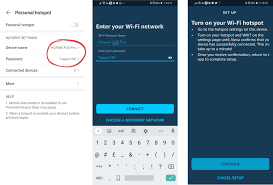
Perhaps you want to use Alexa on-the-go or don’t have a reliable internet connection? No problem! You can connect Alexa to your phone’s hotspot using the following method:
- Ensure your phone has a stable internet connection.
- Activate the hotspot and select “Connect Device” in the Alexa app.
- Choose your phone as the device to connect to and follow any additional prompts.
Troubleshooting Connectivity Issues
If you’re experiencing issues connecting your Echo device to your Wi-Fi network, try the following:
- Restart your router.
- Reboot your Echo device by unplugging it and plugging it back in.
- Check your Wi-Fi settings to ensure they’re set to WPA or WPA2 encryption.
- Consult Amazon’s support page for more information on resolving connectivity issues.
Conclusion
Connecting Alexa to your Wi-Fi network is a relatively straightforward process, even if you don’t have a smartphone or tablet. Remember to check the compatibility of your Echo device and ensure it’s properly configured before attempting to connect it to your network. If you’re still experiencing issues, consult Amazon’s support resources for further assistance.
Faqs
- Q: Can I Use Alexa Without Connecting it to Wi-fi?
A: Yes, you can use Alexa without a stable internet connection by connecting it to your phone’s hotspot or using Bluetooth connectivity. - Q: What Types of Encryption Are Supported by Echo Devices?
A: Echo devices support WPA and WPA2 encryption for secure connections. - Q: Can I Connect Multiple Echo Devices to The Same Wi-fi Network?
A: Yes, you can connect multiple Echo devices to a single Wi-Fi network using the Alexa app or web browser interface. - Q: How do I Reset my Echo Device if It’s Not Responding?
A: To reset your Echo device, unplug it and plug it back in. If that doesn’t work, try restarting your router and modem. - Q: Can I Use Alexa Without a Smartphone or Tablet?
A: Yes, you can use Alexa using only your voice commands and a web browser on a computer or mobile device. - Q: What Are The System Requirements For Connecting an Echo Device to Wi-fi?
A: Your Echo device must be compatible with your router’s Wi-Fi frequency (2.4GHz or 5GHz) and encryption type (WPA, WPA2, or AES). - Q: Can I Connect my Echo Device to a Guest Network?
A: Yes, but keep in mind that any voice commands will not be processed correctly if your Echo device is connected to a guest network. - Q: How do I Update The Alexa App on my Smartphone or Tablet?
A: To update the Alexa app, go to the Google Play Store (for Android devices) or App Store (for iOS devices), select “My Apps” and follow any prompts to update your app.


