
How to Connect Your Old Dvd Player to Your Smart Tv: A Step-by-step Guide
Are you tired of using your old DVD player as a mere decoration? Do you want to breathe new life into it by connecting it to your smart TV? You’re not alone! Many people are still holding onto their trusty DVD players, and with the rise of streaming services, there’s no need to get rid of them. In this article, we’ll show you how to connect your old DVD player to your smart TV in just a few simple steps.
Why Connect Your Old Dvd Player to Your Smart Tv?
Before we dive into the nitty-gritty of connecting your DVD player, let’s talk about why you might want to do so. Here are a few reasons:
- Preserve Your Collection: If you have a vast collection of DVDs that you’re not willing to part with, connecting them to your smart TV is a great way to preserve them.
- Convenience: Streaming services can be convenient, but sometimes it’s nice to have physical copies of movies and shows. Connecting your DVD player to your smart TV allows you to access those collections easily.
- Cost-effective: Instead of buying a new streaming device or upgrading to a 4K TV, connecting your old DVD player is a cost-effective solution.
What Do I Need to Connect My Dvd Player to My Smart Tv?
To connect your DVD player to your smart TV, you’ll need:
- A compatible cable (HDMI or SCART)
- The DVD player itself
- The smart TV
Connecting Your Dvd Player Using Hdmi
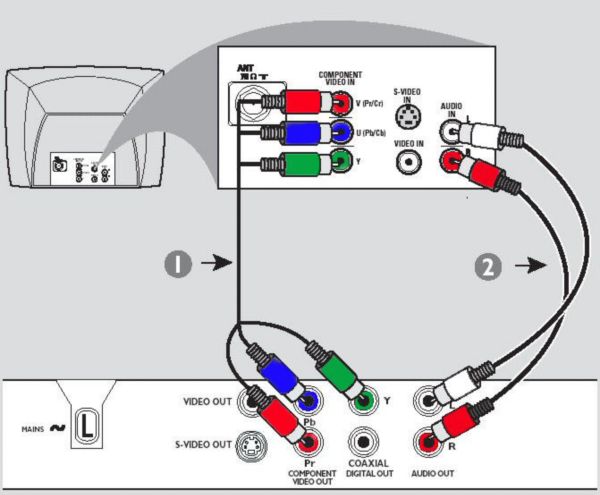
If your DVD player and smart TV both have an HDMI port, connecting them is relatively straightforward. Here’s what you need to do:
- Check The Type of Hdmi Port: Make sure that your DVD player has an HDMI output and your smart TV has an HDMI input.
- Get a Suitable Cable: You’ll need an HDMI-to-HDMI cable (or an HDMI extender, depending on the distance between your devices).
- Connect The Cables: Connect one end of the HDMI cable to the DVD player’s output and the other end to the smart TV’s input.
Step-by-step Guide: How to Connect Your Old Dvd Player to Your Smart TV
Here are some step-by-step instructions for connecting your old DVD player to your smart TV:
Step 1: Locate The Hdmi Port on Your Dvd Player
The first thing you need to do is locate the HDMI port on your DVD player. This port should be labeled as “HDMI” or have a symbol resembling an arrow.
Step 2: Get a Suitable Cable
Next, get a suitable cable that matches the type of HDMI port on your DVD player (e.G., HDMI-to-HDMI). Make sure it’s long enough to reach from the DVD player to the smart TV.
Step 3: Connect The Cables
Connect one end of the HDMI cable to the DVD player’s output and the other end to the smart TV’s input. Make sure it’s securely connected and not loose.
Step 4: Set Up Your Smart Tv
Set up your smart TV by selecting the correct input channel (HDMI). You may need to use a remote control or on-screen menu to do this.
Step 5: Test Your Connection
Test your connection by playing a DVD in the player. If everything is connected correctly, you should see the movie or show on your smart TV screen.
How to Connect Your Old Dvd Player Using Scart
If your DVD player and smart TV both have a SCART port (or an adapter), connecting them requires some additional steps:
- Get a Compatible Cable: You’ll need a SCART-to-HDMI cable or an adapter that converts the signal from SCART to HDMI.
- Connect The Cables: Connect one end of the SCART cable to the DVD player’s output and the other end to the smart TV’s input (or adapter).
Troubleshooting Tips
If you’re experiencing issues with your connection, here are some troubleshooting tips:
- Make sure all cables are securely connected.
- Check that the correct input channel is selected on your smart TV.
- Ensure that your DVD player is set to output the correct signal (HDMI or SCART).
- Restart both devices and try again.
Conclusion
Connecting your old DVD player to your smart TV is a relatively simple process. With these step-by-step instructions, you should be able to breathe new life into your trusty DVD player and enjoy your favorite movies and shows on your big screen.
Frequently Asked Questions (FAQs)
Here are some FAQs related to connecting your old DVD player to your smart TV:
Q: What type of cable do I need to connect my DVD player to my smart TV?
A: You’ll need an HDMI-to-HDMI cable or a SCART-to-HDMI adapter, depending on the type of ports available on your devices.
Q: Why won’t my DVD player connect to my smart TV?
A: Make sure all cables are securely connected and that the correct input channel is selected on your smart TV. Check also that your DVD player is set to output the correct signal (HDMI or SCART).
Q: Can I use a streaming device instead of connecting my DVD player directly to my smart TV?
A: Yes, you can use a streaming device such as a Chromecast or Fire Stick to connect your DVD player to your smart TV.


