
Connecting Your Iphone to a Car Using Bluetooth: A Comprehensive Guide
Are you tired of dealing with tangled cables and awkward phone-to-car connections? Look no further! In this article, we’ll guide you through the process of connecting your iPhone to a car using Bluetooth, making it easier than ever to enjoy music, make calls, and navigate while driving.
Why Connect Your Iphone to a Car Using Bluetooth?
Connecting your iPhone to a car using Bluetooth offers numerous benefits. Not only does it eliminate the need for cables, but it also allows you to:
- Enjoy seamless music playback from your iPhone
- Make hands-free phone calls and send texts
- Get turn-by-turn navigation without having to hold your phone
- Control your car’s audio system with ease
Step 1: Enable Bluetooth on Your Iphone
Before connecting your iPhone to a car using Bluetooth, make sure that Bluetooth is enabled on your device. To do this:
- Go to your iPhone’s Settings app.
- Tap on “Bluetooth.”
- Make sure the toggle next to “Bluetooth” is turned on (green).
Step 2: Locate Your Car’s Bluetooth System
Not all cars have a built-in Bluetooth system, but many modern vehicles do. If your car has Bluetooth integrated:
- Consult your car’s owner’s manual or manufacturer’s website for instructions on how to enable and use the Bluetooth system.
- Make sure that the Bluetooth system is turned on in your car.
Connecting Your Iphone to a Car Using Bluetooth
Now, let’s connect your iPhone to your car using Bluetooth:
- Open the “Settings” app on your iPhone.
- Tap on “Bluetooth.”
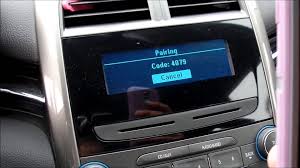
- Put your car’s Bluetooth system into pairing mode (consult your owner’s manual for instructions).
- Select your car’s name from the list of available devices on your iPhone.
- Enter the four-digit code displayed on your car’s screen when prompted.
- Wait a few seconds for the connection to be established.
Alternative Solutions
If your car doesn’t have Bluetooth integrated, don’t worry! There are alternative solutions:
- Bluetooth Aux Adapter: A small device that plugs into your car’s AUX input and connects wirelessly with your iPhone using Bluetooth. Price: Around €10-€20.
- FM Transmitter: A device that transmits music from your iPhone to your car’s stereo system via FM radio waves. Price: Around €5-€25.
- Voice Command System: Some cars come equipped with a voice command system, which allows you to control your phone and play music hands-free.
Carplay: The Ultimate Car Connectivity Solution
Some modern cars support Apple’s CarPlay system, which provides an even more seamless connection experience between your iPhone and car:
- Make sure that your car supports CarPlay.
- Connect your iPhone to the car using a Lightning cable (or certified USB-C cable).
- Follow on-screen instructions to set up CarPlay.
Conclusion
Connecting your iPhone to a car using Bluetooth is easier than ever, with numerous benefits for drivers and passengers alike. Whether you have a car with built-in Bluetooth or are looking for alternative solutions, we’ve provided you with the information and guidance needed to make hands-free phone calls, enjoy music playback, and navigate while driving.
Frequently Asked Questions (FAQs)
- Q: Can I Connect Multiple Devices to my Car Using Bluetooth?
A: Yes, but you may need to pair each device separately. - Q: Will Connecting my Iphone to a Car Using Bluetooth Drain Its Battery?
A: No, Bluetooth connections use minimal power and won’t significantly affect your phone’s battery life. - Q: Can I Connect my Iphone to a Car Using Bluetooth if it Doesn’t Have Bluetooth Integrated?
A: Yes, using alternative solutions like Bluetooth AUX adapters or FM transmitters. - Q: Do All Cars Support Carplay?
A: No, but many modern cars do, so be sure to check compatibility before purchasing. - Q: Can I Use my Iphone’s Voice Assistant (e.G., Siri) With a Car Using Bluetooth?
A: Yes, provided that your car supports voice command systems and you have an iPhone with a compatible operating system. - Q: Will Connecting my Iphone to a Car Using Bluetooth Affect my Phone’s Signal Strength?
A: No, Bluetooth connections won’t impact your phone’s signal strength or data usage. - Q: Can I Use a Third-party App to Connect my Iphone to a Car Using Bluetooth?
A: Yes, but be sure to choose an app from a reputable developer and follow the instructions provided by the app and manufacturer. - Q: Do All Car Manufacturers Support Bluetooth Connectivity?
A: No, but many major brands (e.G., Apple, Google) offer Bluetooth-compatible products and systems.
Bonus Resources
- For more information on setting up and using CarPlay, check out our in-depth guide: [Link to article]
- To learn more about the benefits of connecting your iPhone to a car using Bluetooth, read our companion article: [Link to article]


