
How to Connect Multiple Phones on a Voip Line: A Step-by-step Guide
Are you tired of being limited by the number of phones that can be connected to your VoIP line? Do you want to know how to connect multiple phones on a VoIP line without breaking the bank or needing an electrician’s expertise? Look no further! In this article, we will guide you through three simple and effective ways to connect multiple phones on a VoIP line.
Understanding Voip Lines
Before we dive into the solutions, it’s essential to understand how VoIP lines work. A VoIP (Voice over Internet Protocol) line is a type of internet connection that allows you to make voice calls using your router instead of a traditional phone line. This technology has revolutionized the way we communicate, offering cost-effective and feature-rich alternatives to traditional phone services.
However, one of the limitations of VoIP lines is that they often only allow a single phone to be connected directly to the router. But don’t worry; we’ve got you covered!
Solution 1: Using Cordless Phones With Dect Technology
One of the simplest and most cost-effective ways to connect multiple phones on a VoIP line is by using cordless phones that are compatible with DECT (Digital Enhanced Cordless Telecommunications) technology. These phones can communicate with each other over radio frequencies, allowing you to use multiple handsets in your home or office.
To set up this solution, follow these steps:
- Purchase a Dect-compatible Cordless Phone Duo: Look for phones that are specifically designed for VoIP lines and come with two handsets.
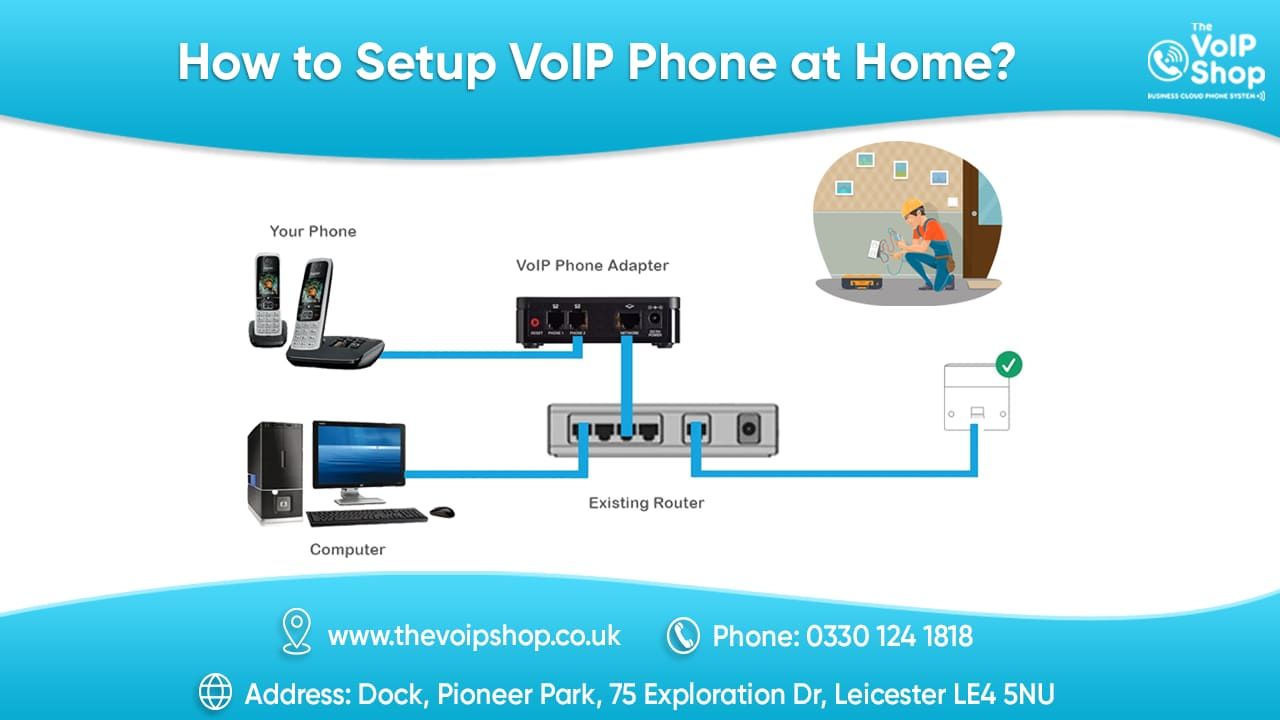
- Connect The Base Unit to Your Router: Plug one end of the DECT cord into the “PHONE” or “TEL” port on your router, and the other end into a wall socket.
- Pair The Handsets: Follow the manufacturer’s instructions to pair the second handset with the base unit.
- Start Making Calls: Once paired, you can use both handsets to make and receive calls as if they were directly connected to your VoIP line.
Solution 2: Implementing a Line Splitter or Converter
Another solution is to implement a line splitter or converter that allows multiple phones to be connected to the same VoIP line. This involves carrying out an operation called “reversal” of the existing telephone wiring in your home or office.
To set up this solution, follow these steps:
- Check With Your Internet Service Provider: Confirm whether your ISP supports multiple phone connections on a single VoIP line.
- Purchase a Line Splitter or Converter: Buy a device specifically designed for splitting or converting VoIP lines to accommodate multiple phones.
- Carry Out The Reversal Procedure: Hire an electrician or a skilled technician to perform the necessary wiring changes in your home or office.
Solution 3: Requesting a Secondary Line From Your Isp
Finally, if you cannot use the above solutions due to technical limitations, you may want to consider requesting a secondary line from your internet service provider. This will involve paying an additional fee for an extra VoIP line and configuring it manually on your router.
To set up this solution, follow these steps:
- Contact Your Isp: Reach out to your internet service provider to inquire about the possibility of adding a secondary VoIP line.
- Configure The Secondary Line on Your Router: If approved, you’ll need to configure the new line on your router using manual settings or an additional interface.
Conclusion
In conclusion, connecting multiple phones on a VoIP line is easier than you think! With these three simple solutions, you can enjoy the benefits of multi-phone connectivity without breaking the bank. Remember to consult with professionals if needed and always follow the manufacturer’s instructions for the best results.
Frequently Asked Questions (FAQs)
- Q: Can I Use Multiple Phones on a Voip Line?
A: Yes, you can connect multiple phones to a VoIP line using cordless phones or implementing a line splitter/converter. - Q: Which Type of Cordless Phone Should I Choose?
A: Look for DECT-compatible cordless phones specifically designed for VoIP lines and compatible with your router model. - Q: How do I Request a Secondary Line From my Isp?
A: Contact your internet service provider to inquire about the possibility of adding an additional VoIP line, and follow their configuration instructions. - Q: What’s The Cost of Implementing a Line Splitter/converter?
A: The cost varies depending on the device and expertise required (electrician or technician). - Q: Can I Use Multiple Phones if my Router Doesn’t Support It?
A: Unfortunately, not all routers allow multiple phone connections. Check your router’s specifications before proceeding.
Resources
- Amazon: Explore the best-selling cordless DECT-compatible phones for VoIP lines.
- Your ISP website: Learn more about secondary VoIP line configurations and pricing.
- Google Search: Find articles on implementing line splitters or converters for VoIP lines.


