
How to Connect Your Oppo Smartphone to a TV
In today’s world of connected devices, it’s not uncommon to want to share content from your smartphone on a larger screen, like a TV. Connecting an OPPO smartphone to a TV can be done in various ways, and we’ll explore the options available.
Why Connect Your Oppo Smartphone to a Tv?
There are several reasons why you might want to connect your OPPO smartphone to a TV:
- To share photos and videos with family and friends on a larger screen
- To enjoy movies and TV shows from streaming services like Netflix or Amazon Prime Video
- To play games on a bigger screen
- To use the TV as an additional display for presentations or work
Connecting Your Oppo Smartphone to a Tv: Wireless Options
There are two main wireless options to connect your OPPO smartphone to a TV:
Oppo Screencast
The first option is to use OPPO’s own screencasting technology, called OPPO Screencast. This feature allows you to mirror your smartphone screen onto the TV without the need for cables or adapters.
How to Use Oppo Screencast:
- Make sure both your smartphone and TV are connected to the same Wi-Fi network.
- Open the Settings app on your smartphone and go to “Connection & sharing”.
- Select “Screencast” and choose the TV as the display device.
- Follow the prompts to set up OPPO Screencast, which may include granting access to certain permissions.
Chromecast
The second option is to use Google’s Chromecast technology, which allows you to cast content from your smartphone onto a TV connected to the same Wi-Fi network.
How to Use Chromecast:
- Make sure both your smartphone and TV are connected to the same Wi-Fi network.
- Open the Google Home app on your smartphone and select the Chromecast device.
- Choose the content you want to cast from your smartphone onto the TV.
- Follow the prompts to set up Chromecast, which may include granting access to certain permissions.
Connecting Your Oppo Smartphone to a Tv: Wired Options
While wireless options are convenient, wired connections can provide better quality and fewer issues with lag or dropped signals.
Using an Hdmi Cable
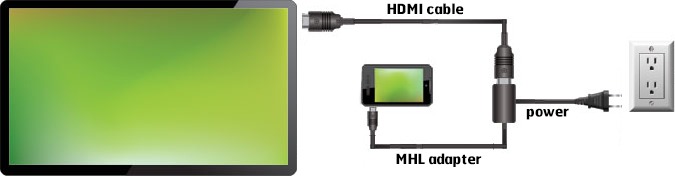
One option is to use an HDMI cable to connect your OPPO smartphone directly to the TV. This method requires a specialized adapter that converts the USB-C port on your smartphone into an HDMI output.
How to Use an Hdmi Cable:
- Purchase an HDMI cable and an adapter specifically designed for OPPO smartphones.
- Connect the adapter to the USB-C port on your smartphone.
- Connect the other end of the HDMI cable to the TV’s HDMI input.
- Set up the HDMI input on the TV to match the display output from the adapter.
Important Notes
- Currently, most OPPO smartphones do not support HDMI output directly.
- Using an HDMI cable may affect video quality or cause issues with certain content.
- Always check your smartphone’s manual and manufacturer’s website for specific guidance on using HDMI cables.
Conclusion
Connecting an OPPO smartphone to a TV can be done wirelessly using OPPO Screencast or Chromecast, or through a wired connection using an HDMI cable. While wireless options are convenient, wired connections may provide better quality and fewer issues with lag or dropped signals. Always check your smartphone’s manual and manufacturer’s website for specific guidance on the methods outlined above.
Frequently Asked Questions (FAQs)
- What is Oppo Screencast?
OPPO Screencast is a feature that allows you to mirror your smartphone screen onto a TV without cables or adapters.
- How do I Set up Oppo Screencast on my Oppo Smartphone?
To set up OPPO Screencast, go to Settings > Connection & sharing > Screencast and follow the prompts.
- What is Chromecast?
Chromecast is a technology that allows you to cast content from your smartphone onto a TV connected to the same Wi-Fi network.
- How do I Set up Chromecast on my Oppo Smartphone?
To set up Chromecast, open the Google Home app and select the Chromecast device, then choose the content you want to cast.
- Can I Connect my Oppo Smartphone to a TV Using an Hdmi Cable?
Yes, but you’ll need a specialized adapter that converts the USB-C port on your smartphone into an HDMI output.
- What Are The Benefits of Using a Wired Connection Versus Wireless?
Wired connections can provide better quality and fewer issues with lag or dropped signals compared to wireless options.
- Do All Oppo Smartphones Support Hdmi Output Directly?
No, currently most OPPO smartphones do not support HDMI output directly.
- Where Can I Find More Information on Connecting my Oppo Smartphone to a Tv?
Check your smartphone’s manual and manufacturer’s website for specific guidance on the methods outlined above.


