
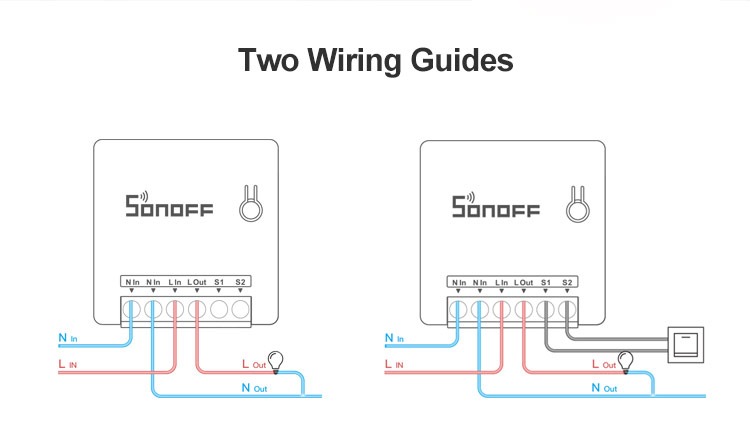
Setting Up Your Home Automation System: A Step-by-step Guide to Connecting Sonoff Mini
Welcome to this comprehensive guide on how to connect your Sonoff Mini device to various smart home systems, including Wi-Fi, Alexa, and Google Home. As a homeowner who’s interested in setting up an intelligent home automation system, you’re likely familiar with the benefits of such a setup. This article will walk you through each step of the process, ensuring that you have a smooth and hassle-free experience.
Understanding Sonoff Mini
Before we dive into the installation process, let’s take a moment to understand what Sonoff Mini is. Sonoff Mini is an innovative smart switch that allows you to control your lights or appliances remotely using your smartphone. With its compact design and user-friendly interface, Sonoff Mini is perfect for those looking to upgrade their home automation system.
Connecting Sonoff Mini to Wi-fi
To get started with setting up Sonoff Mini, follow these steps:
- Ensure Your Smartphone is Connected to The Same Network as Your Sonoff Mini Device. This is crucial for establishing a connection between your phone and the smart switch.
- Download And Install The Ewelink App on Your Smartphone. The eWeLink app serves as the central hub for managing all your smart devices, including Sonoff Mini.
- Launch The Ewelink App And Create an Account. This step is necessary to link your Sonoff Mini device to the app.
- Follow The In-app Instructions to Complete The Setup Process.
Once you’ve completed these steps, your Sonoff Mini should be successfully connected to Wi-Fi.
Connecting Sonoff Mini to Alexa
If you’re looking to integrate Sonoff Mini with Amazon’s popular voice assistant, Alexa, follow these steps:
- Install The Amazon Alexa App on Your Smartphone. Ensure that your phone is running the latest version of the app.
- Launch The Alexa App And Log in to Your Account.
- Navigate to The “Skills & Games” Section Within The Alexa App.
- Search For The Ewelink Skill And Enable It.
After completing these steps, you should be able to control your Sonoff Mini device using voice commands with Alexa.
Connecting Sonoff Mini to Google Home
To connect Sonoff Mini with Google Home, follow these steps:
- Install The Google Home App on Your Smartphone.
- Launch The Google Home App And Log in to Your Account.
- Navigate to The “Devices” Section Within The App.
- Select “Set Up” And Choose Ewelink Smart Home as The Device Type.
Once you’ve completed these steps, your Sonoff Mini should be successfully connected to Google Home.
Troubleshooting Common Issues
If you encounter any issues during the setup process or experience problems with your Sonoff Mini device, don’t hesitate to seek help. You can refer to the following resources:
- Online guides and tutorials specific to Sonoff Mini
- EWeLink customer support
By following these steps and troubleshooting common issues, you should be able to successfully connect your Sonoff Mini device to various smart home systems.
Conclusion
Setting up a home automation system with Sonoff Mini is a straightforward process that requires minimal technical expertise. By following the step-by-step guide outlined in this article, you can enjoy seamless control over your lights and appliances using your smartphone or voice commands with Alexa or Google Home.
Frequently Asked Questions
- What Are The Benefits of Connecting Sonoff Mini to Wi-fi?
- Connecting Sonoff Mini to Wi-Fi enables remote control and monitoring of your device through the eWeLink app.
- Can I Connect Multiple Sonoff Mini Devices to Alexa?
- Yes, you can connect multiple Sonoff Mini devices to Alexa by following the same setup process for each device.
- How do I Troubleshoot Issues With my Sonoff Mini Device?
- Refer to online guides and tutorials specific to Sonoff Mini or contact eWeLink customer support for assistance.
- What Are The System Requirements For Setting up Sonoff Mini With Google Home?
- Ensure that your smartphone meets the minimum system requirements for installing and running the Google Home app.
- Can I Use Voice Commands to Control my Sonoff Mini Device With Alexa or Google Home?
- Yes, you can use voice commands to control your Sonoff Mini device using Alexa or Google Home.
By understanding these key points, you’ll be better equipped to navigate the setup process and ensure a smooth experience with your Sonoff Mini device.


