
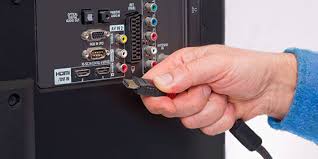
Connecting Your LG TV to External Speakers: A Step-by-step Guide
Are you tired of watching your favorite movies and TV shows on a mediocre sound system? Do you want to elevate your viewing experience with crystal-clear audio? Look no further! In this article, we’ll guide you through the process of connecting your external speakers to your LG TV.
Why Upgrade Your Sound System?
Upgrading your sound system can greatly enhance your overall entertainment experience. With better audio quality, you’ll be able to immerse yourself in the action, feel more connected to the characters, and enjoy a more engaging viewing experience.
Choosing The Right Connection Method
Before we dive into the step-by-step guide, let’s explore the different connection methods available for connecting external speakers to your LG TV:
- Cable Connection: This is the most common method of connecting speakers to a TV. You’ll need to purchase a cable that matches the type of audio output on your TV (3.5Mm, RCA, or optical).
- Bluetooth Connection: If you have Bluetooth-enabled speakers, you can connect them wirelessly to your LG TV.
- Hdmi Arc Connection: This method uses an HDMI Arc port on your TV and requires a separate adapter for the speaker.
Connecting Via 3.5Mm Jack
If your TV has a dedicated audio output jack (usually marked as “Headphones” or “AUX”), you can connect your speakers using a 3.5Mm cable. This is the simplest method, but keep in mind that it may not provide the best sound quality.
Step-by-step Guide: Connecting Via 3.5Mm Jack
- Locate the audio output jack on your TV.
- Connect one end of the 3.5Mm cable to the jack on your TV.
- Connect the other end of the cable to the input on your speakers.
- Turn on both devices and adjust the volume settings accordingly.
Connecting Via Rca Cables
If you have older speakers with RCA inputs, you’ll need to use RCA cables to connect them to your LG TV. This method is a bit more complicated, but it provides better sound quality than the 3.5Mm jack method.
Step-by-step Guide: Connecting Via Rca Cables
- Identify the RCA jacks on both your TV and speakers.
- Connect one end of each RCA cable to the corresponding input on your speakers.
- Connect the other ends of the cables to the output jacks on your TV (white for left channel, red for right channel).
- Turn on both devices and adjust the volume settings accordingly.
Connecting Via Optical Digital Audio
If you want the best sound quality possible, consider using an optical digital audio connection. This method uses a cable that converts the analog signal to a digital one, providing superior sound quality.
Step-by-step Guide: Connecting Via Optical Digital Audio
- Locate the optical output on your TV.
- Connect one end of the optical cable to the output on your TV.
- Connect the other end of the cable to the input on your speakers.
- Turn on both devices and adjust the volume settings accordingly.
Connecting Via Hdmi Arc
This method uses an HDMI Arc port on your TV and requires a separate adapter for the speaker. It provides high-quality audio and video, but it’s a bit more complicated to set up.
Step-by-step Guide: Connecting Via Hdmi Arc
- Locate the HDMI Arc port on your TV.
- Connect one end of the HDMI cable to the port on your TV.
- Connect the other end of the cable to the input on your speaker adapter.
- Turn on both devices and adjust the volume settings accordingly.
Connecting Via Bluetooth
If you have Bluetooth-enabled speakers, you can connect them wirelessly to your LG TV. This method is convenient but may not provide the best sound quality.
Step-by-step Guide: Connecting Via Bluetooth
- Put your speakers in pairing mode.
- Go to the settings menu on your LG TV and select “Bluetooth”.
- Select your speaker’s name from the list of available devices.
- Wait for the connection to be established, and then start playing audio.
Troubleshooting Common Issues
If you encounter any issues while connecting your speakers to your LG TV, refer to our troubleshooting guide:
- Check that all cables are securely connected.
- Ensure that both devices are turned on and set to the correct input/output settings.
- If using Bluetooth, ensure that your speaker is in pairing mode.
Conclusion
Connecting external speakers to your LG TV can greatly enhance your viewing experience. By following these step-by-step guides, you’ll be able to enjoy crystal-clear audio from your favorite movies and TV shows.
Frequently Asked Questions (FAQs)
- Q: What Type of Cables do I Need to Connect my Speakers to my LG Tv?
A: You can use 3.5Mm, RCA, or optical digital audio cables. - Q: How do I Connect my Speakers Wirelessly to my LG TV Via Bluetooth?
A: Put your speakers in pairing mode and follow the on-screen instructions on your TV. - Q: Can I Connect Multiple Speakers to my LG TV at Once?
A: Yes, but you’ll need to use a separate adapter or splitter for each additional speaker. - Q: What’s The Best Way to Ensure Optimal Sound Quality From my External Speakers?
A: Use high-quality cables and ensure that both devices are turned on and set to the correct input/output settings.
Get The Best Sound Experience With LG TV
Don’t compromise on sound quality anymore! With these step-by-step guides, you’ll be able to connect your external speakers to your LG TV and enjoy an immersive viewing experience.


