
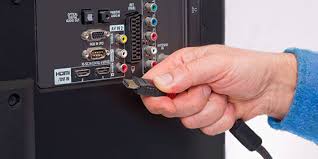
How to Connect Cases With Red And Black Cut to The TV
Are you tired of struggling with connecting your cases with red and black cut to your TV? Look no further! In this article, we will guide you through the simple process of connecting your audio cables to your TV and enjoying high-quality sound on your new cases.
What Are Red And Black Cut Cables?
Before we dive into the nitty-gritty, let’s quickly explain what these cables are. The red and black cut cables are used to convey analog audio signals from your TV to your cases or amplifier. These cables typically have a 3.5Mm jack on one end and an RCA connector on the other.
Connecting Cases With Red And Black Cut to The TV
To connect your cases with red and black cut to your TV, you’ll need the following:
- The red and black cut cables
- An amplifier (if not built-in to your cases)
- A device that can split the HDMI signal into audio and video (such as a switch or adapter)
Step 1: Connect The Red And Black Cut Cables
To connect the red and black cut cables to your TV, follow these steps:
- Insert the black extremity of the cable into the inner part of the white or black RCA connector on the back panel of the TV.
- Insert the red extremity of the cable into the inner part of the red RCA connector on the back panel of the TV.
Step 2: Connect The Amplifier (if Necessary)
If your cases do not have a built-in amplifier, you’ll need to connect them to an external amplifier. To do this:
- Insert the black and red extremities of the cable into the respective inputs on the back panel of the amplifier.
- Connect the output of the amplifier to the input of your cases.
Step 3: Connect The Switch or Adapter
If you’re using a switch or adapter to split the HDMI signal, follow these steps:
- Insert one end of the HDMI cable into the input of the device (such as a switch or adapter).
- Insert the other end of the HDMI cable into the input of your TV.
- Connect the output of the device to the input of your cases.
Alternative Methods: Connecting Cases With Red And Black Cut to The TV
There are alternative methods for connecting cases with red and black cut to the TV, including:
- Connecting Via Rca: This method involves using a cable that connects directly from the TV’s RCA outputs to the inputs on the back panel of your cases.
- Connecting Via 3.5Mm Jack: If your TV has a 3.5Mm jack output, you can use a cable with a 3.5Mm connector on one end and an RCA connector on the other.
Tips And Tricks
Here are some tips to keep in mind when connecting your cases with red and black cut to your TV:
- Make sure to connect the right channels (left and right) to the correct inputs on the back panel of your cases.
- Use high-quality cables to ensure clear sound quality.
- If you’re using an amplifier, make sure it’s matched to your cases.
Conclusion
Connecting cases with red and black cut to the TV is a simple process that requires minimal technical expertise. By following these steps and tips, you can enjoy high-quality sound on your new cases and enhance your overall viewing experience.
Frequently Asked Questions (FAQs)
- What Are The Advantages of Connecting Cases With Red And Black Cut to The Tv?
Connecting cases with red and black cut to the TV allows for clear and high-quality audio to be transmitted directly from the TV to the cases, eliminating the need for separate audio equipment. - Can I Use Any Type of Cable to Connect my Cases to The Tv?
No, it’s recommended to use a high-quality cable specifically designed for analog audio transmission. - What is The Purpose of an Amplifier in This Setup?
An amplifier is used to boost the audio signal from the TV to ensure clear sound quality on your cases. - Can I Connect Multiple Devices Using a Switch or Adapter?
Yes, some switches and adapters can handle multiple HDMI inputs and output them separately, allowing you to connect multiple devices at once. - What if my Cases Don’t Have a Built-in Amplifier?
If your cases don’t have a built-in amplifier, you’ll need to connect an external amplifier to the input of your cases using the red and black cut cables. - Can I Use a Different Type of Cable For Connecting my Cases to The Tv?
Yes, there are alternative methods such as connecting via RCA or 3.5Mm Jack, but these may require additional equipment or adapters.


