
How to Connect a Phone: A Step-by-step Guide
Are you looking for a simple guide on how to connect a phone? Look no further! In this article, we will walk you through the process of connecting a phone in a clear and concise manner.
Understanding Your Phone’s Connection Options
Before we dive into the step-by-step instructions, it’s essential to understand your phone’s connection options. Most phones have two types of connections: RJ-11 and RJ-45. The RJ-11 connector is the most common type used for telephone connections. It has four or six holes, with the red hole being the tip.
Tools You’ll Need
To connect a phone, you will need the following tools:
- A screwdriver
- Wire cutters
- A wire stripper (optional)
- A phone cord (RJ-11 or RJ-45)
Step 1: Identify Your Phone’s Connection Type
The first step is to identify your phone’s connection type. Look for a small metal piece with four or six holes, which indicates the type of connection.
Step 2: Remove The Existing Cable
If you’re replacing an existing cable, remove it from the phone and any other devices connected to it.
Step 3: Cut The New Cable (Optional)
If your new cable is longer than needed, cut it to the correct length using wire cutters. Be careful not to damage the wires inside the cable.
Step 4: Strip The Wires
Using a wire stripper, remove any insulation from the ends of the wires. This will expose the copper cores.
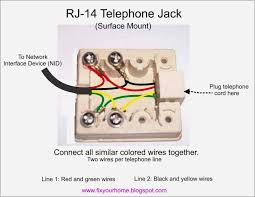
Step 5: Identify The Red And White Wires
Identify the red and white wires on your phone cord. The red wire is usually thicker than the white one.
Step 6: Connect The Wires to Your Phone
Connect the red wire to the red hole on your phone’s connector, and the white wire to the white hole.
Step 7: Secure The Connection
Use a screwdriver to secure the connection by tightening the screws. Make sure they are not too tight, as this can damage the wires.
Connecting Multiple Phones
If you want to connect multiple phones, follow these additional steps:
- Use a phone cord with two or more connectors
- Connect each phone’s red and white wire to the corresponding holes on the phone cord
Common Issues And Solutions
Some common issues when connecting a phone include:
- Difficulty stripping the wires
- Solution: Use a high-quality wire stripper or a pair of pliers to help loosen the insulation.
- Incorrectly identifying the red and white wires
- Solution: Double-check your phone’s documentation or consult an expert if you’re unsure.
Conclusion
Connecting a phone is a relatively simple process that requires some basic tools and knowledge. By following these steps, you should be able to successfully connect your phone to your desired device.
Faqs
- What Type of Cable do I Need For my Phone?
- The most common type of cable used for phones is RJ-11.
- How do I Identify The Red And White Wires on my Phone Cord?
- The red wire is usually thicker than the white one.
- Can I Use Any Phone Cord to Connect Multiple Phones?
- No, you’ll need a phone cord specifically designed for connecting multiple phones.
- What if I’m Not Comfortable Stripping Wires?
- You can consult an expert or purchase pre-stripped cables.
- How do I Troubleshoot Issues With my Phone Connection?
- Check your cable connections, ensure the wires are securely attached to both ends, and try using a different cable.
- Can I Connect my Phone to Any Device?
- Only connect your phone to compatible devices that have an RJ-11 or RJ-45 connector.
Additional Resources
If you’re still unsure about connecting your phone, consider consulting the following resources:
- Your phone’s documentation
- Online tutorials and guides
- Experts in electronics and telecommunications


