
How to Connect Your Phone to a Car: A Step-by-step Guide
Are you tired of being distracted while driving? Do you want to listen to music or take calls without having to reach for your phone? Connecting your phone to your car’s audio system is a simple and convenient solution. In this article, we will guide you through the different methods of connecting your phone to your car, including Bluetooth, AUX cable, USB cable, and adapters.
Method 1: Using Bluetooth
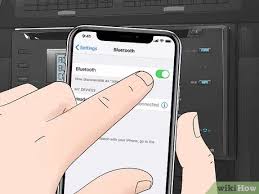
If your car has Bluetooth connectivity, connecting your phone is relatively easy. Here’s what you need to do:
- Ensure that your phone’s Bluetooth is turned on.
- Search for available devices on the car’s audio system.
- Select your phone from the list of available devices.
- Follow the prompts on the car’s display screen to complete the connection process.
Method 2: Using an Aux Cable
If your car doesn’t have Bluetooth connectivity or you prefer not to use it, you can connect your phone using an AUX cable. Here’s how:
- Purchase an AUX cable specifically designed for connecting phones to cars.
- Insert one end of the cable into the phone’s audio jack and the other end into the car’s AUX input.
- Turn on the car’s audio system and select the AUX input.
- Your phone should now be connected to the car’s audio system.
Method 3: Using a Usb Cable
Another option is to use a USB cable to connect your phone to the car. Here’s how:
- Purchase a USB cable specifically designed for connecting phones to cars.
- Insert one end of the cable into the phone’s USB port and the other end into the car’s USB input.
- Turn on the car’s audio system and select the USB input.
- Your phone should now be connected to the car’s audio system.
Method 4: Using an Adapter
If your car doesn’t have any of the above-mentioned inputs, you can use an adapter to connect your phone. Here are a few options:
- Adapter Box: This device is specifically designed for connecting phones to cars without Bluetooth or AUX/USB inputs.
- Aux Adapter: This adapter converts the phone’s audio signal into an AUX signal that can be inputted into the car’s audio system.
- Usb Adapter: This adapter allows you to connect your phone to the car using a USB cable.
Benefits of Connecting Your Phone to Your Car
Connecting your phone to your car has several benefits, including:
- Improved safety: You’ll be able to take calls and listen to music without having to reach for your phone.
- Convenience: You can control your music and receive notifications directly from the car’s audio system.
- Enhanced user experience: You’ll be able to enjoy high-quality audio and seamless connectivity.
Common Problems And Solutions
Some common problems that may arise when connecting your phone to your car include:
- Bluetooth Connectivity Issues: If you’re experiencing problems with Bluetooth connectivity, try restarting your phone or the car’s audio system.
- Aux Cable Issues: If your AUX cable is not working properly, try replacing it with a new one.
- Usb Cable Issues: If your USB cable is not working properly, try resetting your phone or the car’s audio system.
Conclusion
Connecting your phone to your car is a simple and convenient solution that can improve safety, convenience, and user experience. Whether you choose to use Bluetooth, an AUX cable, a USB cable, or an adapter, there are many options available to suit your needs. By following the step-by-step guides outlined in this article, you’ll be able to enjoy seamless connectivity between your phone and car’s audio system.
Faqs
- What is The Best Method For Connecting my Phone to my Car?
The best method depends on your specific car’s features and your personal preferences. - Do I Need a Special Cable or Adapter to Connect my Phone to my Car?
Yes, you’ll need a special cable or adapter depending on your car’s input options. - Can I Use an Aux Cable With my Iphone?
Yes, but you may need an adapter specifically designed for iPhones. - How do I Troubleshoot Bluetooth Connectivity Issues?
Try restarting your phone and the car’s audio system. - What Are Some Common Problems That May Arise When Connecting my Phone to my Car?
Bluetooth connectivity issues, AUX cable issues, and USB cable issues. - Can I Use an Adapter With a Non-bluetooth Car?
Yes, adapters are available for non-Bluetooth cars. - Is it Safe to Connect my Phone to my Car While Driving?
Yes, as long as you’re not distracted by the process of connecting your phone. - How do I Know if my Car is Compatible With Bluetooth or Other Connectivity Options?
Check your car’s manual or contact a professional for guidance.


