
Connecting Your TV to Internet: A Guide
Are you tired of not being able to connect your TV to internet? Look no further! This guide will show you how to connect your TV to internet using various devices and methods.
Introduction
In today’s world, having a TV that can connect to the internet is a must. It allows you to access a wide range of streaming services, watch live TV, and even use your TV as a smart home device. However, if your TV doesn’t have built-in internet connectivity, don’t worry! There are several devices and methods that you can use to connect your TV to the internet.
Method 1: Chromecast
The first device we’ll be looking at is the Google Chromecast. This small dongle connects to your TV’s HDMI port and allows you to stream content from your smartphone, tablet, or computer to your TV. The Chromecast supports a wide range of streaming services, including Netflix, Prime Video, and Disney+. It’s also very easy to use – simply plug it in, download the Google Home app on your device, and follow the instructions.
Method 2: Fire TV Stick/cube
The Amazon Fire TV Stick is another popular option for connecting your TV to the internet. This small device connects to your TV’s HDMI port and allows you to access a wide range of streaming services, including Netflix, Prime Video, and more. The Fire TV Stick also has a built-in voice remote that makes it easy to navigate and find what you’re looking for.
Method 3: Apple TV
If you’re an Apple fan, you might be interested in the Apple TV. This device connects to your TV’s HDMI port and allows you to access a wide range of streaming services, including Netflix, Prime Video, and more. The Apple TV also has a built-in Siri remote that makes it easy to navigate and find what you’re looking for.
Other Devices
In addition to the devices mentioned above, there are several other options available for connecting your TV to the internet. These include:
- Android TV Boxes: These small devices connect to your TV’s HDMI port and allow you to access a wide range of streaming services.
- Now Smart Stick: This device connects to your TV’s HDMI port and allows you to access the NOW streaming service.
- Consuls: If you have a gaming console, such as a PS4 or Xbox, you can use it to connect your TV to the internet.
- Decoders: Some decoders, such as those used for satellite TV, can also be used to connect your TV to the internet.
Conclusion
As you can see, there are several options available for connecting your TV to the internet. Whether you choose a Chromecast, Fire TV Stick, Apple TV, or one of the other devices mentioned above, you’ll be able to access a wide range of streaming services and enjoy all the benefits that come with having a smart TV.
Frequently Asked Questions
- What is The Best Device For Connecting my TV to The Internet?
The best device for connecting your TV to the internet will depend on your personal preferences and needs. If you’re looking for something simple and easy to use, the Chromecast might be the way to go. If you want more features and a wider range of streaming services, the Fire TV Stick or Apple TV might be a better option. - Can I Connect my TV to The Internet Without a Cable?
Yes, it is possible to connect your TV to the internet without a cable. You can use a device such as a Chromecast, Fire TV Stick, or Apple TV to connect your TV to the internet wirelessly. - How do I Connect my TV to The Internet Using a Smartphone?
To connect your TV to the internet using a smartphone, you’ll need to download and install an app on your phone that will allow you to stream content from your phone to your TV. You can then use this app to access streaming services and watch live TV. - Can I Connect Multiple Devices to my Tv’s Internet Connection?
Yes, it is possible to connect multiple devices to your TV’s internet connection using a device such as a Chromecast or Fire TV Stick. These devices allow you to stream content from multiple devices at once, making it easy to share what you’re watching with friends and family. - How do I Troubleshoot Issues With my Tv’s Internet Connection?
If you’re experiencing issues with your TV’s internet connection, there are several things you can try to troubleshoot the problem. These include restarting your device, checking your Wi-Fi signal strength, and ensuring that all cables are securely connected. - Can I Use my TV as a Smart Home Device?
Yes, many modern TVs can be used as smart home devices, allowing you to control other smart devices in your home using voice commands or the remote control. This feature is often referred to as “smart home” or “voice control.” - What Are Some of The Benefits of Having a TV With Internet Connectivity?
Some of the benefits of having a TV with internet connectivity include access to streaming services, live TV, and on-demand content. You can also use your TV as a smart home device, making it easy to control other smart devices in your home. - Can I Connect my TV to The Internet Using a Router?
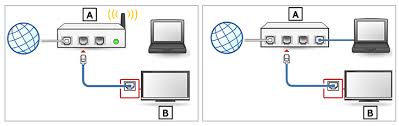
Yes, you can connect your TV to the internet using a router. Simply plug the router into your modem and then connect your TV to the router using an Ethernet cable or wirelessly using Wi-Fi.
I hope this guide has been helpful in answering your questions about connecting your TV to the internet!


