
How to Link Your Twitch Prime Account to Ubisoft
Are you a fan of video games and have been wondering how to take advantage of the exclusive benefits offered by Twitch Prime? Well, wonder no more! In this article, we will guide you through the process of linking your Twitch Prime account to Ubisoft, one of the leading game developers in the world.
What is Twitch Prime?
Twitch Prime is a premium subscription service that offers various benefits, including free games, in-game loot, and exclusive content. To be eligible for these rewards, you need to link your Twitch Prime account to your Ubisoft profile.
Why Link Your Account?
Linking your Twitch Prime account to Ubisoft will allow you to access exclusive rewards, such as free games, in-game items, and other benefits. These rewards can enhance your gaming experience and provide a competitive edge over others.
How to Link Your Account (Computer)
To link your Twitch Prime account to Ubisoft on a computer, follow these steps:
- Log in to Your Twitch Account: Open the official Twitch website and log in to your account.
- Click on Your Profile Icon: In the top right corner of the screen, click on your profile icon.
- Select Settings: From the dropdown menu, select “Settings.”
- Go to Links: On the left side of the page, navigate to the “Links” section.
- Connect With Ubisoft: Click on the “Connect with Ubisoft” button and follow the prompts to link your account.
How to Link Your Account (Mobile Device)
To link your Twitch Prime account to Ubisoft on a mobile device, follow these steps:
- Open The Twitch App: Open the official Twitch app on your smartphone or tablet.
- Log in to Your Twitch Account: Log in to your Twitch account using your credentials.
- Go to Settings: Tap on the three horizontal lines at the top left corner of the screen and select “Settings.”
- Select Links: In the settings menu, tap on “Links.”
- Connect With Ubisoft: Tap on the “Connect with Ubisoft” button and follow the prompts to link your account.
How to Link Your Account (Console)
To link your Twitch Prime account to Ubisoft on a console, follow these steps:
- Open The Browser: Open the browser integrated into your console.
- Log in to Your Twitch Account: Log in to your Twitch account using your credentials.
- Go to Settings: Navigate to the settings menu and select “Links.”
- Connect With Ubisoft: Click on the “Connect with Ubisoft” button and follow the prompts to link your account.
How to Claim Rewards
To claim rewards from Ubisoft, follow these steps:
- Log in to Your Twitch Account: Log in to your Twitch account using your credentials.
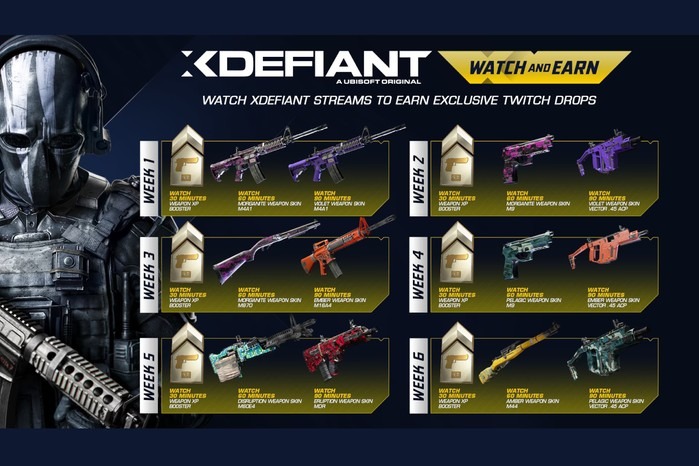
- Go to The Ubisoft Drops Website: Visit the official Ubisoft Drops website and log in to your account.
- Check For Available Rewards: Check if there are any available rewards from Ubisoft that you can claim.
Tips And Variations
- Make sure to link your account on both desktop and mobile devices to ensure that you receive all available rewards.
- If you have a Twitch Prime subscription, linking your account to Ubisoft will automatically grant you access to exclusive benefits.
- Be patient when claiming rewards, as it may take some time for them to be added to your account.
Conclusion
Linking your Twitch Prime account to Ubisoft is a simple process that can enhance your gaming experience and provide exclusive benefits. By following the steps outlined in this article, you will be able to access free games, in-game loot, and other rewards from Ubisoft.
Frequently Asked Questions (FAQs)
- Q: How do I Link my Twitch Prime Account to Ubisoft?
A: To link your Twitch Prime account to Ubisoft, follow the steps outlined in this article. - Q: What Benefits Can I Expect From Linking my Account?
A: By linking your Twitch Prime account to Ubisoft, you will gain access to exclusive rewards, such as free games and in-game loot. - Q: Do I Need a Twitch Prime Subscription to Link my Account?
A: No, you do not need a Twitch Prime subscription to link your account to Ubisoft. - Q: How Long Does it Take For Rewards to be Added to my Account?
A: Rewards may take some time to be added to your account, so be patient when claiming them. - Q: Can I Link my Account on Multiple Devices?
A: Yes, you can link your Twitch Prime account to Ubisoft on multiple devices, including desktop computers and mobile devices. - Q: What if I Have Trouble Linking my Account?
A: If you experience any issues when linking your account, contact Twitch support for assistance. - Q: Can I Claim Rewards From Other Game Developers Besides Ubisoft?
A: No, rewards are only available from Ubisoft through the link between your Twitch Prime and Ubisoft accounts. - Q: How do I Know if I Have Linked my Account Correctly?
A: If you have linked your account correctly, you should see a confirmation message on the Ubisoft Drops website or in the Twitch app.


