
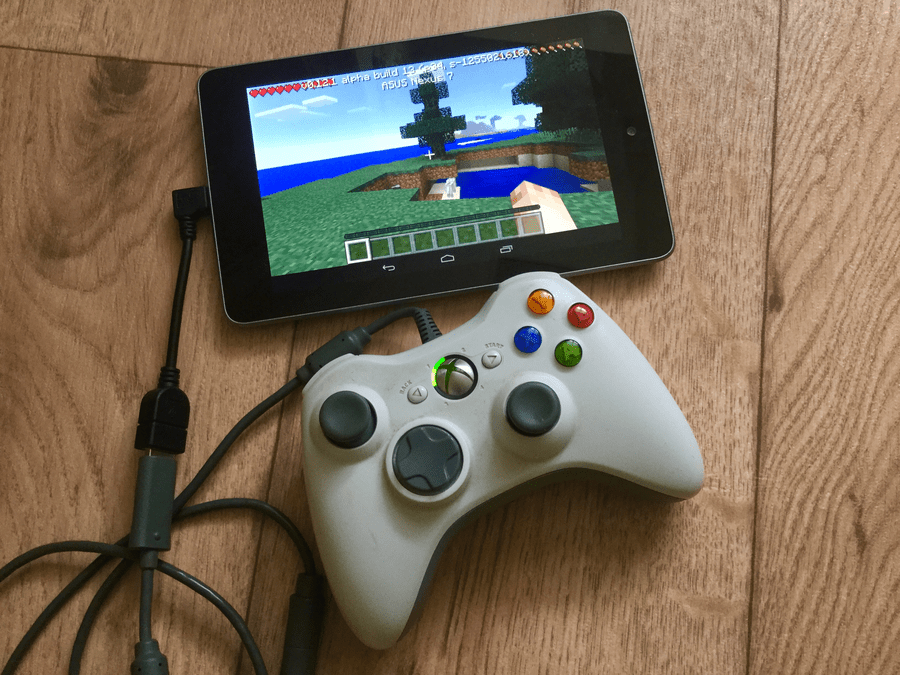
The Ultimate Guide to Connecting Your Xbox 360 Joystick to Your Smartphone
Are you tired of playing games on your phone, only to have the controls get in the way? Do you wish you could experience the thrill of gaming on a bigger screen without sacrificing control and precision? Look no further! In this article, we’ll show you how to connect your Xbox 360 joystick to your smartphone, giving you an unparalleled gaming experience.
Why Connect Your Xbox 360 Joystick to Your Smartphone?
Connecting your Xbox 360 joystick to your smartphone offers numerous benefits. For one, it allows you to play games that were previously only accessible on a larger screen. Additionally, the precision and control provided by the joystick make for a more immersive gaming experience. Whether you’re a casual gamer or a serious enthusiast, this setup is sure to take your mobile gaming to the next level.
What You’ll Need
Before we dive into the process of connecting your Xbox 360 joystick to your smartphone, let’s go over what you’ll need:
- An Xbox 360 joystick
- A compatible smartphone (Note: Not all smartphones are compatible with this setup)
- An OTG (On-The-Go) adapter
- A wireless receiver (compatible with your smartphone)
Preliminary Questions And Answers
Before we begin, it’s essential to note that not all devices are compatible with this setup. If you’re unsure about the compatibility of your device, consult the manufacturer’s website or contact their support team.
How to Connect Your Xbox 360 Joystick to Your Smartphone Without Wires
Connecting your Xbox 360 joystick to your smartphone without using wires is a straightforward process. Here’s how:
- Ensure that your smartphone and wireless receiver are compatible.
- Acquire an OTG adapter that matches the standard USB port on your smartphone.
- Connect the wireless receiver to your Xbox 360 joystick.
- Connect the OTG adapter to your smartphone.
- Follow the manufacturer’s instructions for pairing the devices.
How to Connect Your Xbox 360 Joystick to Your Smartphone With a Cavo (Cable)
Connecting your Xbox 360 joystick to your smartphone using a cable is also possible, but it requires an additional step:
- Ensure that you have a compatible smartphone.
- Acquire a USB OTG adapter and a wireless receiver (if not already attached to the joystick).
- Connect the wireless receiver to your Xbox 360 joystick.
- Connect the OTG adapter to your smartphone.
- Insert the cable from the joystick into the OTG adapter.
- Follow the manufacturer’s instructions for pairing the devices.
Step-by-step Guide to Connecting Your Xbox 360 Joystick
Now that we’ve covered the preliminary steps, it’s time to dive into the process of connecting your Xbox 360 joystick to your smartphone:
- Connect The Wireless Receiver: Connect the wireless receiver to your Xbox 360 joystick.
- Connect The Otg Adapter: Insert the OTG adapter into your smartphone.
- Pair The Devices: Follow the manufacturer’s instructions for pairing the devices.
- Test The Connection: Test the connection by pressing and holding the X button on the joystick.
Tips And Tricks
Here are some additional tips to keep in mind when connecting your Xbox 360 joystick to your smartphone:
- Ensure that your smartphone and wireless receiver are compatible.
- Acquire a high-quality OTG adapter for optimal performance.
- Use a stable power source for your smartphone to prevent connectivity issues.
Conclusion
Connecting your Xbox 360 joystick to your smartphone is a straightforward process that requires minimal setup. By following the steps outlined in this article, you’ll be able to experience the thrill of gaming on a bigger screen without sacrificing control and precision. Whether you’re a casual gamer or a serious enthusiast, this setup is sure to take your mobile gaming to the next level.
Frequently Asked Questions
Q: What smartphones are compatible with this setup?
A: Not all smartphones are compatible with this setup. Consult the manufacturer’s website or contact their support team for more information.
Q: Can I use any OTG adapter?
A: No, ensure that you acquire a high-quality OTG adapter specifically designed for your smartphone.
Q: Do I need to purchase additional hardware?
A: Yes, you’ll need an OTG adapter and wireless receiver (if not already attached to the joystick).
Final Thoughts
Connecting your Xbox 360 joystick to your smartphone is a simple yet effective way to enhance your mobile gaming experience. With this setup, you’ll be able to enjoy games on a bigger screen without sacrificing control and precision. Follow the steps outlined in this article, and you’ll be well on your way to becoming a mobile gaming master!


