
How to Contact EA Sports: A Step-by-step Guide
Are you experiencing problems with a game from EA Sports and want help? Do you know how to contact their customer service? If not, don’t worry! You’ve come to the right place. In this guide, we’ll explain how to contact EA Sports by phone, email, and chat.
Why Contact EA Sports?
EA Sports is a well-known game development company that produces some of the most popular games in the world. However, like any other game developer, they also face technical issues and problems with their games. If you’re experiencing difficulties with a game from EA Sports, contacting them can help resolve your issues quickly.
How to Contact EA Sports by Phone
The first way to contact EA Sports is by phone. You can call the number 02.94758303, Which is active from Monday to Friday between 10:00 And 19:00 Hours. The cost of the call will depend on your telephone operator’s tariff plan.
To speak with an operator, follow these steps:
- Dial the number 02.94758303.
- Listen to the welcome message.
- Press the *1 button to open a new support session.
- Choose the option corresponding to your problem (1 for shopping-related issues, 2 for technical problems, 3 for missing content, or 4 for account-related issues).
- Wait in line until an operator answers and refers to your problem.
How to Contact EA Sports by Email
Contacting EA Sports by email is another way to get assistance. Here’s how to do it:
- Visit the official support site of Electronic Arts.
- Select the game or service for which you need help.
- Fill out the contact form with your data.
- Specify the argument of your request and choose an option from the available ones.
- Click on the “Send” button to forward your message.
A consultant will answer within 72 hours.
How to Contact EA Sports by Chat
Yes, you can also contact EA Sports through chat! To do this:
- Visit the official support site of Electronic Arts.
- Log in with your account (if you have one) or create a new one.
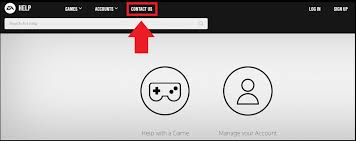
- Click on the “Contact us” button.
- Select the game or service for which you need help and choose an option from the available ones.
- Click on the “Select” option to contact them.
- Wait until an operator is available to chat with you.
Other Ways to Contact EA Sports
You can also contact EA Sports through social media platforms like Facebook and Twitter:
- Visit the official page of EA Help on Facebook.
- Tap on the icon to open Messenger.
- Insert your message in the text field.
- Forward it by clicking on the send button.
Or, you can try contacting them through Twitter:
- Open the app for Android or iPhone/iPad.
- Access your account (if you have one) or create a new one.
- Type @EAHelp and your message in the tweet field.
- Click on the “Tweet” button.
Conclusion
Contacting EA Sports can be a bit tricky, but with this guide, you should be able to do it easily. Whether you prefer to contact them by phone, email, or chat, there are options available for you. Don’t hesitate to reach out if you’re facing issues with an EA Sport game.
Frequently Asked Questions (FAQs)
- What is The Best Way to Contact EA Sports?
The best way to contact EA Sports depends on your personal preference and the type of issue you’re experiencing. Phone, email, or chat are all viable options.
- How Long Does it Take For an Operator to Answer my Call?
Wait times may vary depending on the time of day and the number of calls they receive.
- Can I Contact EA Sports Through Social Media?
Yes, you can contact EA Sport through their official pages on Facebook and Twitter.
- Will I Need to Provide Personal Data When Contacting EA Sports?
In some cases, yes, you may be asked for personal data to resolve your issue.
- How Long Does it Take For an Operator to Respond to my Email or Chat Request?
A consultant will typically respond within 72 hours.
- Can I Get Help With Something Unrelated to a Game, But Related to my Account or Purchase History?
It’s possible, but you may need to contact them separately for assistance with non-game-related issues.


