
How to Convert Odt Files to Doc Format: A Step-by-step Guide
Are you struggling to share documents between different office software users? Converting ODT files to DOC format can be a hassle, but it’s not impossible! In this article, we’ll walk you through the process of converting your OpenDocument Text (ODT) files to Microsoft Word-compatible DOC or DOCX format.
Why Convert Odt Files to Doc Format?
Before we dive into the conversion process, let’s quickly discuss why you might want to convert ODT files to DOC format. The main reason is that not everyone uses LibreOffice or other open-source office software. If you need to share your documents with colleagues who use Microsoft Office, converting them to DOC format can ensure seamless compatibility.
Programs to Convert Odt Files to Doc Format on Computer
Here are some popular programs and services that can help you convert ODT files to DOC format:
Libreoffice Writer (Windows/MacOS/Linux)
If you’re already using LibreOffice, converting ODT files to DOC format is a breeze. Here’s how:
- Open LibreOffice Writer and select the ODT file you want to convert.
- Go to File > Save As…
- Choose the location where you want to save the converted document.
- Select “Word 97-2003” or “Word 2007-365” as the format, depending on your needs.
Microsoft Word (Windows/MacOS)
You can also use Microsoft Word to convert ODT files to DOC format. Here’s how:
- Open Microsoft Word and select the ODT file you want to convert.
- Go to File > Save As…
- Choose the location where you want to save the converted document.
- Select “Word 97-2003” or “Word 2007-365” as the format, depending on your needs.
Other Programs to Convert Odt Files to Doc Format
If the above options don’t work for you, here are some alternative programs and services that can help:
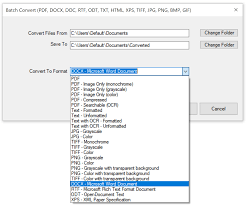
Doxillon Document Converter (Windows/MacOS)
This free program allows you to convert documents from one format to another. You can use it to convert ODT files to DOC format.
Apache Openoffice Writer (Windows/MacOS/Linux)
Another popular office software suite, Apache OpenOffice, also includes a writer program that can convert ODT files to DOC format.
Wordpad (Windows)
This free text editor comes pre-installed on Windows 7 and later versions. You can use it to convert ODT files to DOCX format.
Converting Odt Files to Doc Format Online
If you don’t have access to a computer or prefer an online solution, here are some web-based services that can help:
Google Documents
You can upload your ODT file to Google Drive and then open it in Google Docs. From there, you can export the document as a DOCX file.
Cloudconvert
This free universal converter can convert ODT files to DOC format. Simply upload your file, select the output format, and download the converted document.
Converting Odt Files to Doc Format on Smartphone And Tablet
If you need to convert ODT files on-the-go, here are some mobile apps that can help:
Microsoft Word (Android/iOS/iPadOS)
The mobile version of Microsoft Word allows you to open and convert ODT files. Simply upload your file from Google Drive or OneDrive, and then export it as a DOCX file.
Documents Google (Android/iOS/iPadOS)
This app allows you to access your Google Drive account and edit documents on the go. You can also convert ODT files to DOC format using this app.
Faqs
- What is The Difference Between Odt And Doc Formats?
- ODT is an open-standard document format, while DOC is a proprietary Microsoft format.
- Can I Convert Odt Files to Docx Format?
- Yes, you can convert ODT files to DOCX format using some of the programs and services mentioned above.
- Will Converting Odt Files to Doc Format Lose Any Formatting or Data?
- It’s possible that some formatting or data might be lost during conversion, especially if your document contains complex layouts or images.
- Can I Convert Multiple Odt Files at Once?
- Some programs and services allow you to batch-convert multiple files, while others require you to convert each file separately.
Conclusion
Converting ODT files to DOC format can be a straightforward process with the right tools and techniques. Whether you’re using LibreOffice, Microsoft Word, or online services like Google Documents or CloudConvert, we’ve got you covered. Just remember to choose the correct program or service for your needs, and take necessary precautions to ensure seamless compatibility between different office software users.
Conclusion Faqs
- Why Convert Odt Files to Doc Format?
- To ensure compatibility with Microsoft Office users.
- What Are Some Popular Programs to Convert Odt Files to Doc Format?
- LibreOffice Writer, Microsoft Word, Doxillon Document Converter, Apache OpenOffice Writer, and CloudConvert.
- Can I Use Online Services to Convert Odt Files to Doc Format?
- Yes, Google Documents and CloudConvert are two popular options.
- How do I Ensure Seamless Compatibility Between Different Office Software Users?
- By choosing the correct program or service for your needs and taking necessary precautions to preserve formatting and data.
I hope this article has provided you with a clear guide on how to convert ODT files to DOC format using various programs and services. If you have any further questions, please don’t hesitate to ask!


