
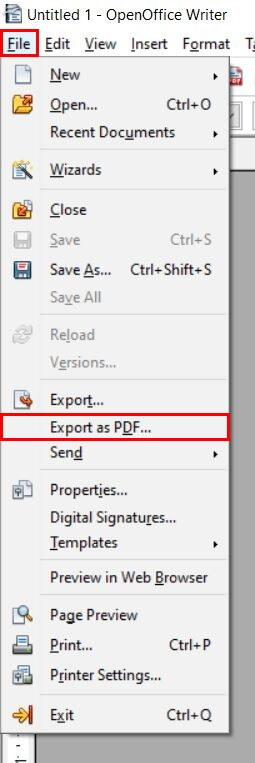
Converting Odt to Pdf: A Comprehensive Guide
Are you tired of dealing with file compatibility issues? Do you want to convert your OpenDocument Text (ODT) files to a more universally accepted format like PDF? Look no further! In this article, we’ll take you through the step-by-step process of converting ODT to PDF using various software and online services.
Why Convert Odt to Pdf?
Before we dive into the conversion process, let’s quickly discuss why you might want to convert ODT to PDF. PDFs are widely supported by most devices and operating systems, making them a convenient format for sharing documents. Plus, they’re easy to read and print, even on older devices.
Software Solutions: Converting Odt to Pdf Locally
You can convert ODT to PDF using various software applications on your computer. Here are some of the best options:
- Libreoffice: This free, open-source productivity suite is a great alternative to Microsoft Office. It’s available for Windows, macOS, and Linux.
- Open LibreOffice and click on the “Open” button.
- Select the ODT file you want to convert.
- Go to the menu bar and select “File” > “Export.”
- Choose the PDF format from the list of export options.
- Wordpad: This is a basic text editor that comes with Windows. You can use it to convert ODT files to PDFs.
- Open WordPad and click on the “Open” button.
- Select the ODT file you want to convert.
- Go to the menu bar and select “File” > “Print.”
- Choose the virtual printer option (Microsoft Print to PDF) and follow the prompts.
Online Solutions: Converting Odt to Pdf Online
If you don’t have software installed on your computer, or if you prefer online solutions, here are some great options:
- Pdf Candy: This online service allows you to convert ODT files to PDFs without installing any software.
- Upload your ODT file to the website.
- Choose the PDF format from the list of output options.
- Download your converted PDF file.
- Convertio: This is another popular online converter that supports various file formats, including ODT and PDF.
- Upload your ODT file to the website.
- Choose the PDF format from the list of output options.
- Download your converted PDF file.
Mobile Apps: Converting Odt to Pdf On-the-go
If you’re on-the-go and need to convert ODT files to PDFs, here are some great mobile apps:
- Collabora Office: This app is available for Android, iOS, and iPadOS.
- Open the app and select the ODT file you want to convert.
- Go to the menu bar and select “Export.”
- Choose the PDF format from the list of output options.
- Rows Converter: This app is available for Android and iOS devices.
- Open the app and select the ODT file you want to convert.
- Follow the prompts to complete the conversion process.
Conclusion
Converting ODT files to PDFs is a straightforward process that can be achieved using various software applications, online services, or mobile apps. By following the steps outlined in this article, you’ll be able to easily convert your ODT files to PDFs and share them with others.
Frequently Asked Questions (FAQs)
- Q: What is The Difference Between Odt And Pdf?
A: ODT stands for OpenDocument Text, which is a file format used by certain software applications. PDF stands for Portable Document Format, which is a widely supported file format that can be read on various devices. - Q: Can I Convert Multiple Odt Files to Pdfs at Once?
A: Yes, some software applications and online services allow you to batch convert multiple ODT files to PDFs. - Q: Will Converting my Odt File to a Pdf Affect The Formatting?
A: In most cases, yes, the formatting may change when converting an ODT file to a PDF. - Q: Can I Use These Conversion Tools For Other File Formats as Well?
A: Yes, some software applications and online services allow you to convert various file formats, including ODT, PDF, and more.


