
Converting Pdf Files: A Comprehensive Guide
Are you tired of dealing with PDF files that are not easily convertible? Look no further! In this article, we will guide you through the process of converting PDF files to various formats using different software and online tools.
What is a Pdf File?
A PDF file (Portable Document Format) is a type of electronic document that preserves the layout and formatting of a printed document. It’s widely used for sharing documents across different platforms and devices.
Why Convert Pdf Files?
There are several reasons why you might want to convert a PDF file:
- To edit or modify the contents
- To share the content in a more accessible format (e.G., Word, Excel)
- To merge multiple PDF files into one
Software Options For Converting Pdf Files
We’ll explore different software options that can help you convert PDF files. Keep in mind that some of these tools may require subscription or have limitations on file size.
Libreoffice: A Free And Open-source Solution
If you’re already using LibreOffice, you might find it convenient to convert PDF files within the same platform. Here’s how:
- Open your document (e.G., Word) in LibreOffice Writer.
- Click on “File” > “Export as…” And choose “PDF”.
- Select the desired options for layout, resolution, and more.
Adobe Acrobat: A Professional Option
If you’re looking for a more advanced solution with features like editing and commenting, Adobe Acrobat is worth considering:
- Download Adobe Acrobat (7-day free trial).
- Open your PDF file in Acrobat.
- Click on “File” > “Save As…” And choose “PDF”.
- Customize the settings as needed.
Microsoft Word: A Simple Conversion Tool
If you’re already using Microsoft Office, converting a PDF file to Word is relatively straightforward:
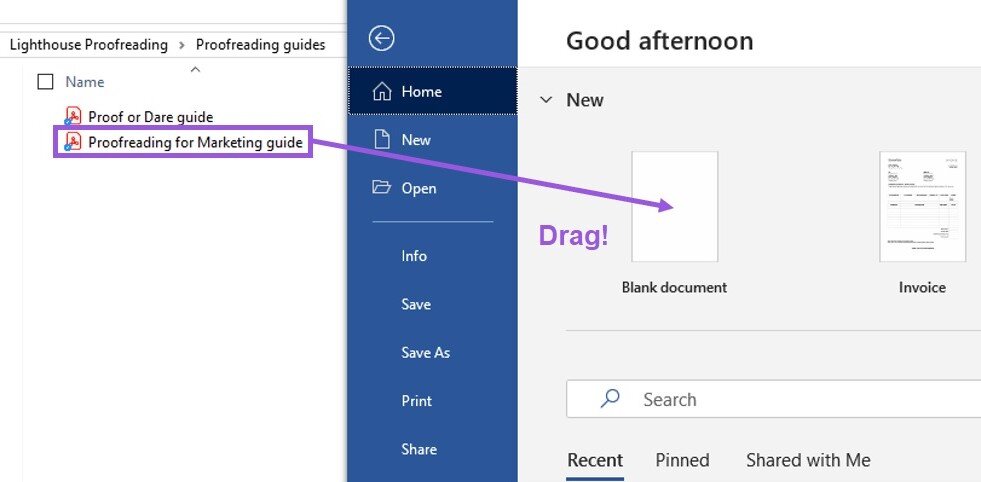
- Open your PDF file in Word (if it’s not opened automatically).
- Click on “File” > “Save As…” And choose “PDF”.
Online Tools For Converting Pdf Files
Sometimes, the simplest solution is the best one. Online tools like DocuPub, PDF24Tools, and more offer an easy way to convert PDF files without software installation:
Docupub: A Reliable Conversion Tool
- Visit the DocuPub website.
- Click on “Upload” and select your file.
- Choose the desired format (e.G., Word).
- Customize settings as needed.
Pdf24tools: Another Online Option
- Go to PDF24Tools.Com.
- Select the conversion type (e.G., PDF to Word).
- Upload your file or enter a URL.
- Follow the instructions for download and save.
Converting Pdf Files on a Mac
If you’re using a Mac, you can use Preview or other software to convert PDF files:
Using Preview: A Built-in Solution
- Open your PDF file in Preview.
- Click on “File” > “Save As…” And choose “PDF”.
- Customize settings as needed.
Conclusion
Converting PDF files is a straightforward process that can be accomplished using various software options or online tools. We’ve explored different methods for converting PDF files to various formats, including Word, Excel, and more. Whether you’re looking for a simple conversion tool or a professional-grade solution, this article has provided guidance on the best approaches.
Frequently Asked Questions (FAQs)
- What is The Maximum File Size Limit For Online Converters?
- Most online tools have a file size limit of 50 MB or more.
- Can I Convert a Pdf File to an Editable Format Like Word?
- Yes, many software options and online tools allow you to convert a PDF file to an editable format.
- How do I Merge Multiple Pdf Files Into One?
- Some online tools and software offer the option to merge multiple PDF files into one.
- Can I Edit a Converted Pdf File in Its Original Format?
- It depends on the conversion tool or software used; some allow editing, while others might not.
- Are There Any Free Options For Converting Pdf Files?
- Yes, many online tools and software offer free conversion services with limitations.
- Can I Convert a Pdf File to an Image Format Like Jpeg?
- Some online tools and software allow you to convert a PDF file to an image format.
- How do I Know Which Conversion Tool is Best For Me?
- Choose the tool that meets your specific needs, considering factors like ease of use, features, and compatibility.
- Can I Convert a Pdf File on my Smartphone or Tablet?
- Unfortunately, there are no dedicated apps for converting PDF files on mobile devices; however, online tools can be accessed using a browser.
We hope this comprehensive guide has helped you navigate the world of PDF conversions!


