
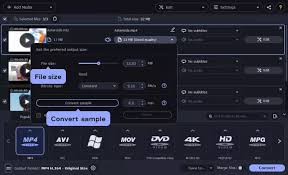
How to Convert Videos From One Format to Another
Are you tired of trying to convert videos from one format to another, only to end up with a frustrating experience? Look no further! In this article, we will explore the best ways to convert videos from one format to another, using free software and online services that are easy to use and guarantee optimum results.
The Problem With Video Formats
When you try to play a video on a device that doesn’t support its original format, it can be frustrating. This is because different devices have different video formats that they can play. For example, an iPhone can play videos in MP4 format, but not AVI or MOV format. Similarly, a PC may be able to play videos in MP4 format, but not on a tablet.
Solutions to Convert Videos From One Format to Another
Fortunately, there are several solutions that you can use to convert videos from one format to another. Here are some of the best ones:
Using Free Software
There are several free software programs available that can help you convert videos from one format to another. Some of these include:
Adapter
[H2] Adapter is a free software program that can be used to convert videos from one format to another. It supports a wide range of video formats, including MP4, AVI, MOV, and many others.
To use Adapter, simply download the software and follow the on-screen instructions. You can then select the video you want to convert, choose the output format, and start the conversion process.
Vlc
[H2] VLC is another free software program that can be used to convert videos from one format to another. It supports a wide range of video formats, including MP4, AVI, MOV, and many others.
To use VLC, simply download the software and follow the on-screen instructions. You can then select the video you want to convert, choose the output format, and start the conversion process.
Using Online Services
If you don’t have a computer or prefer not to install software on your device, there are several online services that can help you convert videos from one format to another. Some of these include:
Cloudconvert
[H2] CloudConvert is an online service that allows you to convert videos from one format to another. It supports a wide range of video formats, including MP4, AVI, MOV, and many others.
To use CloudConvert, simply upload the video you want to convert, choose the output format, and start the conversion process.
Convertio
[H2] Convertio is another online service that allows you to convert videos from one format to another. It supports a wide range of video formats, including MP4, AVI, MOV, and many others.
To use Convertio, simply upload the video you want to convert, choose the output format, and start the conversion process.
Using Apps For Smartphones And Tablets
If you have a smartphone or tablet, there are several apps that can help you convert videos from one format to another. Some of these include:
Media Converter (Android)
[H2] Media Converter is an app that allows you to convert videos from one format to another on your Android device.
To use Media Converter, simply download the app and follow the on-screen instructions. You can then select the video you want to convert, choose the output format, and start the conversion process.
The Converter Video (iOS/iPadOS)
[H2] The Converter Video is an app that allows you to convert videos from one format to another on your iOS or iPadOS device.
To use The Converter Video, simply download the app and follow the on-screen instructions. You can then select the video you want to convert, choose the output format, and start the conversion process.
Conclusion
Converting videos from one format to another doesn’t have to be a frustrating experience. With the right software or online service, you can easily convert your videos to any format you need. Whether you’re using a computer, smartphone, or tablet, there are many options available to you.
Frequently Asked Questions (FAQs)
- Q: What is the best way to convert videos from one format to another?
- A: The best way to convert videos from one format to another depends on your specific needs and preferences. Some popular options include using free software like Adapter or VLC, online services like CloudConvert or Convertio, or apps for smartphones and tablets.
- Q: How do I use Adapter to convert a video?
- A: To use Adapter, simply download the software and follow the on-screen instructions. You can then select the video you want to convert, choose the output format, and start the conversion process.
- Q: Can I use CloudConvert to convert videos from one format to another?
- A: Yes, you can use CloudConvert to convert videos from one format to another. Simply upload the video you want to convert, choose the output format, and start the conversion process.
- Q: How do I use Media Converter to convert a video on my Android device?
- A: To use Media Converter, simply download the app and follow the on-screen instructions. You can then select the video you want to convert, choose the output format, and start the conversion process.
- Q: Can I use The Converter Video to convert videos from one format to another on my iOS or iPadOS device?
- A: Yes, you can use The Converter Video to convert videos from one format to another on your iOS or iPadOS device. Simply download the app and follow the on-screen instructions.


