
How to Convert a Video: A Step-by-step Guide
Are you tired of dealing with video compatibility issues? Do you want to convert your favorite videos into formats that are compatible with all your devices? Look no further! In this article, we’ll guide you through the process of converting a video from one format to another.
What is Video Conversion?
Video conversion is the process of changing the format of a video file so that it can be played on different devices or platforms. This is often necessary when trying to share videos between friends or family members who use different operating systems or devices.
Why Convert Videos?
There are several reasons why you might want to convert a video:
- Compatibility Issues: If your device doesn’t support the original format of the video, conversion can resolve this issue.
- Space-saving: Converting videos into smaller file sizes can save space on your device.
- Sharing: Converted videos can be shared more easily between devices or platforms.
Methods For Converting Videos
There are several methods for converting videos:
- Software-based Conversion: Using software like HandBrake, Adapter, or Converter Video to convert the video format.
- Online Conversion Services: Websites like CloudConvert, Media.Io, or Convertio that allow you to upload and convert your video online.
Step-by-step Guide to Converting Videos
Let’s take a look at how to convert videos using software-based methods:
Using Handbrake
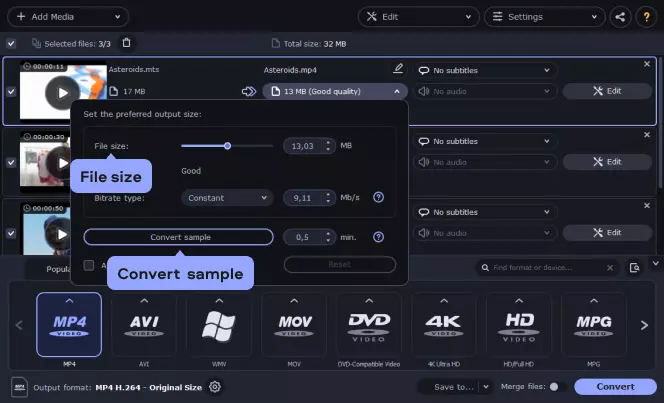
- Download And Install Handbrake: Go to the official website and download the software for your operating system.
- Launch Handbrake: Open the software and select the video you want to convert.
- Choose The Output Format: Select the desired format from the list of available options.
- Customize Settings (optional): You can adjust settings like resolution, bitrate, or codec if needed.
- Start The Conversion Process: Click on the “Convert” button and let HandBrake do its magic!
Using Adapter
- Download And Install Adapter: Get the software from the official website for your operating system.
- Launch Adapter: Open the software and select the video you want to convert.
- Choose The Output Format: Select the desired format from the list of available options.
- Customize Settings (optional): You can adjust settings like resolution, bitrate, or codec if needed.
- Start The Conversion Process: Click on the “Convert” button and let Adapter do its job!
Other Software Options
There are several other software options for converting videos, including:
- Mobile Media Converter: A free converter that supports multiple formats.
- Video to Video Converter: A simple tool for converting video formats.
- Smart Converter: A specific application for macOS users.
Online Conversion Services
If you prefer not to download software or want a more convenient option, online conversion services are available:
- Cloudconvert: A universal converter that supports over 200 formats.
- Media.Io: A free online service with a user-friendly interface.
- Convertio: Another popular online converter with a wide range of supported formats.
Converting Videos For Social Media
If you want to share your video on social media platforms like Facebook or Instagram, consider converting it into the required format:
- Mp4: A widely-supported format that’s ideal for sharing videos.
- Mp3: If you want to extract audio from a video and save it as an MP3 file.
Conclusion
Converting videos is a straightforward process that can be achieved using software or online services. Whether you’re dealing with compatibility issues, saving space, or sharing videos between devices, conversion can help resolve these problems.
Faqs
- What Are The Benefits of Video Conversion?
Video conversion offers several benefits, including resolving compatibility issues, saving space, and sharing videos more easily. - How do I Convert a Video Using Software-based Methods?
Using software like HandBrake or Adapter involves selecting the input file, choosing the output format, customizing settings (if needed), and starting the conversion process. - Can I Convert Videos Online Without Downloading Software?
Yes, there are several online services that allow you to upload and convert your video directly from a web browser. - What Formats Can be Converted Using Software or Online Services?
Most popular formats like MP4, MP3, AVI, MOV, and many more can be converted using the methods mentioned above. - How Long Does The Conversion Process Take?
The time it takes to convert a video depends on several factors, including the size of the file, the complexity of the format, and the processing power of your device. - Can I Convert Videos For Social Media Platforms Like Facebook or Instagram?
Yes, you can convert videos into formats like MP4 that are compatible with most social media platforms. - What Happens if my Video is Not Supported by a Particular Software or Online Service?
If your video is not supported by a particular software or online service, you might need to try another option or explore alternative methods for conversion.
By following this guide, you should be able to convert videos with ease and share them between devices or platforms without any issues. Happy converting!


