
How to Cool Down Your Notebook: Tips And Tricks
Are you tired of your notebook overheating during use? Do you find yourself struggling to keep it cool, especially in hot weather or during intense gaming sessions? Look no further! In this article, we’ll explore the best ways to cool down your notebook, from simple tips to more advanced techniques.
Understanding Why Notebooks Overheat
Before we dive into the solutions, let’s quickly understand why notebooks overheat in the first place. The main reason is that laptops are designed to be compact and portable, which means they can easily become hot and cramped inside their casing. Additionally, the heat generated by the CPU, GPU, and other components can build up quickly, leading to overheating.
Tip 1: Clean The Ventilation System
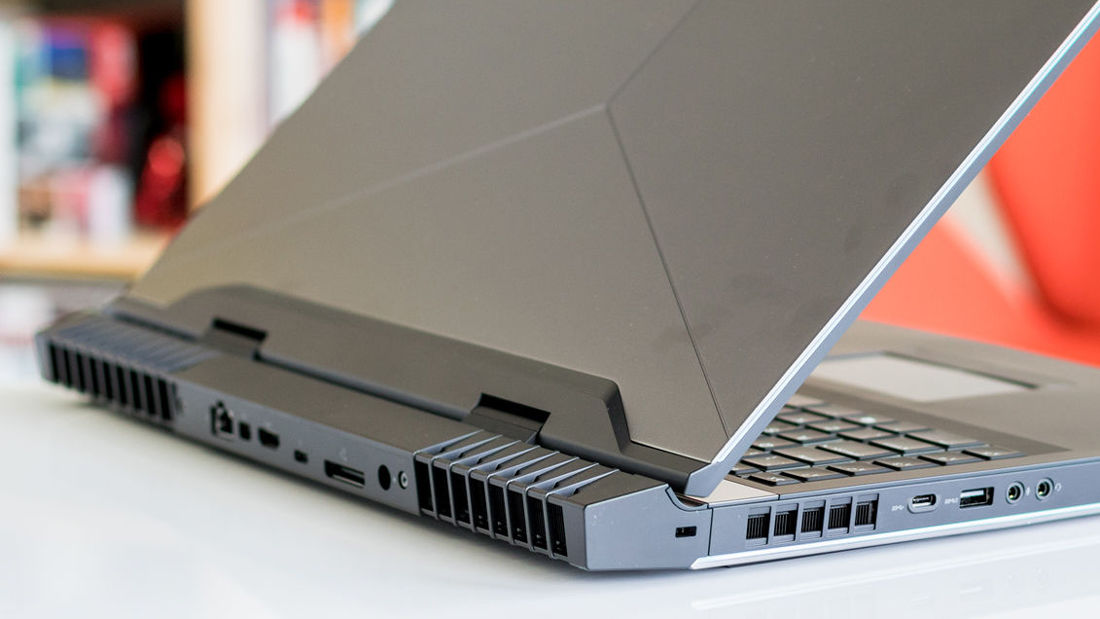
One of the simplest ways to cool down your notebook is to clean the ventilation system. Dust, dirt, and other debris can clog the vents and prevent hot air from escaping, causing the notebook to overheat. Use a soft brush or a can of compressed air to gently remove any blockages.
Tip 2: Avoid Rigid Surfaces
Using a rigid surface, such as a wooden table or a hard floor, can cause your notebook to heat up quickly. Instead, use a soft surface like a cushioned desk or a portable cooling pad.
Tip 3: Update Your Drivers And Firmware
Outdated drivers and firmware can cause your notebook’s cooling system to malfunction, leading to overheating. Make sure to regularly update your drivers and firmware to ensure optimal performance.
Tip 4: Use Lightweight Software
Heavy software programs can put a strain on your notebook’s cooling system, causing it to overheat. Try using lightweight alternatives or closing unnecessary programs to reduce the load on your notebook.
Tip 5: Monitor Your Notebook’s Temperature
Using specialized software, you can monitor your notebook’s temperature and adjust the fan speed accordingly. This can help prevent overheating and ensure optimal performance.
Tip 6: Use a Cooling Pad
A cooling pad is a simple and effective way to keep your notebook cool. These pads use fans or other cooling technology to dissipate heat away from your notebook, keeping it at a safe temperature.
Tip 7: Avoid Direct Sunlight
Direct sunlight can cause your notebook to overheat quickly. Try using your notebook in shaded areas or using a sunshade to block direct sunlight.
Tip 8: Regular Maintenance
Regular maintenance is key to preventing overheating. Clean dust from the vents, update drivers and firmware, and use lightweight software to keep your notebook running smoothly.
Conclusion
Cooling down your notebook doesn’t have to be a challenge. By following these simple tips and tricks, you can ensure optimal performance and prevent overheating. Remember to clean the ventilation system, avoid rigid surfaces, update drivers and firmware, use lightweight software, monitor your notebook’s temperature, use a cooling pad, avoid direct sunlight, and perform regular maintenance.
Frequently Asked Questions
- Q: How Often Should I Clean my Notebook’s Vents?
A: Clean your notebook’s vents every 2-3 months to prevent dust buildup. - Q: What Are The Best Lightweight Software Alternatives?
A: Some popular lightweight software alternatives include Google Chrome, Microsoft Edge, and LibreOffice. - Q: How Can I Monitor my Notebook’s Temperature?
A: Use specialized software like SpeedFan or HWMonitor to monitor your notebook’s temperature and adjust the fan speed accordingly. - Q: Can I Use a Cooling Pad on a Hard Floor?
A: Yes, you can use a cooling pad on a hard floor, but make sure it’s on a soft surface or cushioned area to prevent heat buildup. - Q: How Often Should I Update my Drivers And Firmware?
A: Regularly check for updates every 2-3 months to ensure optimal performance and prevent overheating. - Q: Can I Use a Notebook Cooling Pad With a Gaming Laptop?
A: Yes, notebook cooling pads can be used with gaming laptops to help dissipate heat and prevent overheating. - Q: How Can I Prevent Dust Buildup in my Notebook’s Vents?
A: Regularly clean your notebook’s vents using compressed air or a soft brush to prevent dust buildup.
Recommended Products
- Ewent Ew1256 Notebook Cooling Pad: A simple and effective cooling pad that uses fans to dissipate heat away from your notebook.
- Hama Aluminium 15.6″ Notebook Cooling Base: A compact and lightweight cooling base that uses aluminum for optimal heat dissipation.
- Aovuyck Portable PC Support: A sturdy and portable support that can be used with a variety of notebooks, including gaming laptops.
I hope this article has been helpful in providing you with the best ways to cool down your notebook!


