
The Ultimate Guide to Crafting a Name Tag on Minecraft
Are you tired of not knowing how to craft a name tag on Minecraft? Look no further! This comprehensive guide will take you through the process of creating a name tag, using it to assign names to your beloved pets and characters in the game.
What is a Name Tag in Minecraft?
Before we dive into the nitty-gritty details, let’s cover what a name tag actually does. A name tag allows you to give a unique nickname to any mob or character in Minecraft, including your domesticated pets and villagers. This feature adds an extra layer of personalization to your gameplay experience.
Why Craft a Name Tag?
Crafting a name tag might seem like a trivial task, but it’s actually quite useful. With a name tag, you can assign nicknames to your favorite mobs or characters, making them easier to identify and interact with. Plus, having a name tag in your inventory can be a great conversation starter among fellow Minecraft enthusiasts!
How to Craft a Name Tag on Minecraft
Unfortunately, crafting a name tag is not possible using the standard crafting table recipe. Unlike other items in the game, name tags cannot be crafted from specific materials or resources.
So, how do you obtain a name tag? Well, our next section will cover the various methods of acquiring one!
How to Get a Name Tag on Minecraft
There are several ways to get a name tag in Minecraft:
- Exploring The World: One method is to explore the world and search for hidden chests or other lootable containers. Sometimes, you’ll find a name tag as a reward.
- Lucky Finds: Another way to obtain a name tag is through lucky finds while fishing or exploring caves. You might get lucky and catch a name tag instead of a regular fish or item!
- Trading With Villagers: If you’re playing on the Creative mode, you can trade with villagers for a name tag.
- Enchanting Your Tool: In some cases, enchanting your tool or equipment with specific enchantments might drop a name tag.
How to Use a Name Tag
Now that we’ve covered how to get a name tag, let’s move on to using it!
Using a name tag is relatively straightforward:
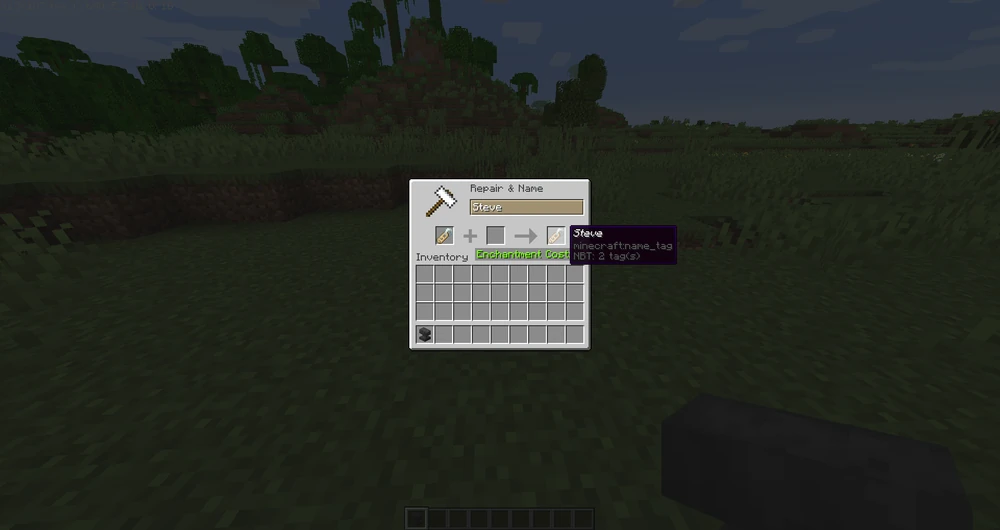
- Craft an Anvil: First, you’ll need to craft an anvil using 3 iron blocks and 4 iron ingots.
- Add The Name Tag: Next, place the name tag in the slot designated for it.
- Rename Your Mob: Finally, click on the mob or character you want to rename, and voilà! Their new nickname will be displayed.
The Secrets of Name Tags
Name tags have some hidden secrets that might not be immediately apparent. Some examples include:
- Easter Eggs: Certain names, like “Dinnerbone” or “Grumm,” will make your mob capsize and walk on its head!
- Sheep Behavior: Assigning the name “jeb_” to a sheep will cause its wool color to cycle through all the colors of the rainbow.
- Rabbit Behavior: Using the name “Toast” will modify the aesthetic appearance of rabbits.
Conclusion
Crafting a name tag might seem like an intimidating task, but it’s actually quite straightforward. By following these steps and experimenting with different methods, you’ll be well on your way to assigning unique nicknames to your favorite mobs and characters in Minecraft!
Frequently Asked Questions (FAQs)
- Q: Can I Craft a Name Tag Using The Standard Crafting Table Recipe?
A: No, unfortunately not. - Q: How do I Get a Name Tag on Minecraft?
A: You can find one by exploring the world, fishing, trading with villagers, or enchanting your tool. - Q: What Are Some Secret Names For Mobs in Minecraft?
A: Some examples include “Dinnerbone,” “Grumm,” and “jeb_” (for sheep). - Q: Can I Rename a Mob on The Fly Using a Name Tag?
A: Yes, simply click on the mob you want to rename. - Q: What Are Some Other Uses For a Name Tag Besides Renaming Mobs?
A: Name tags can be used to hold stroke of specific mobs in farms or label rare animals.


