
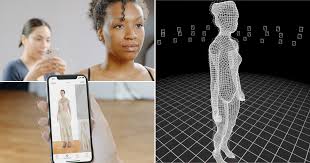
Creating An Avatar 3D Online: A Step-by-step Guide
Are you fascinated by the world of three-dimensional avatars? Do you want to create a digital representation of yourself or your favorite characters? Look no further! In this article, we will guide you through the process of creating an avatar 3D online using various tools and platforms.
What is an Avatar 3D?
An avatar 3D is a three-dimensional digital representation of a character or object. It can be used in various contexts, such as video games, social media, and even film-making. With the advancement of technology, creating avatars has become more accessible and easier to use.
Why Create an Avatar 3D Online?
Creating an avatar 3D online offers numerous benefits, including:
- Self-expression: You can create a digital representation of yourself or your favorite characters.
- Social Media: Use your avatar in social media platforms, such as Facebook, Instagram, and WhatsApp.
- Video Games: Create avatars for use in video games or virtual reality experiences.
- Film-making: Use avatars in film-making projects or animations.
Tools And Platforms
Several tools and platforms can help you create an avatar 3D online. Let’s explore some of them:
Bing Ai
Microsoft’s Bing AI is a powerful tool that allows you to generate images using artificial intelligence. You can use it to create avatars by describing the character or object you want to represent.
- How to Use: Visit the Bing website, click on the chatbot icon, and select the “Creative” option. Type in your description of the avatar you want to create.
- Tips: Be specific with your description, and use relevant keywords to ensure accurate results.
Other Solutions
Besides Bing AI, other tools can help you create avatars 3D online. Some popular options include:
- Capcut: A video editing app that also offers avatar creation features.
- Fotor: A photo editing platform that allows you to transform your photos into avatars.
- Dall·and/chatgpt: Integrated chatbots that can generate images, including avatars.
Software
If you want more control over the creation process, consider using software specifically designed for avatar creation. Some popular options include:
- Blender: A free, open-source 3D modeling software.
- Makehuman: A user-friendly software that allows you to create avatars with ease.
- Daz 3D: A powerful platform for creating 3D models and animations.
Social Media
Once you’ve created your avatar, you can use it in various social media platforms. Some popular options include:
- Facebook: Use your avatar as a profile picture or sticker.
- Instagram: Create a custom avatar for your Instagram profile.
- Whatsapp: Add your avatar to WhatsApp stickers.
Conclusion
Creating an avatar 3D online is easier than ever, thanks to the numerous tools and platforms available. By following this step-by-step guide, you can create a digital representation of yourself or your favorite characters. Remember to explore different options and experiment with various features to achieve the desired results.
Frequently Asked Questions (FAQs)
- Q: What is an avatar 3D?
A: An avatar 3D is a three-dimensional digital representation of a character or object. - Q: Why create an avatar 3D online?
A: Creating an avatar 3D online offers numerous benefits, including self-expression, social media usage, video game creation, and film-making. - Q: Which tools can I use to create an avatar 3D online?
A: You can use Bing AI, CapCut, Fotor, DALL·And/ChatGPT, Blender, MakeHuman, Daz 3D, Facebook, Instagram, and WhatsApp to create avatars 3D online. - Q: What software can I use for avatar creation?
A: Consider using software like Blender, MakeHuman, or Daz 3D for more control over the creation process.
Additional Resources
For more information on creating avatars 3D online, check out these additional resources:
- Microsoft’s Official Documentation: Visit Microsoft’s official website for detailed guides on using Bing AI and other tools.
- Blender’s Official Tutorials: Explore Blender’s official tutorials to learn more about using this powerful software.
- Makehuman’s Official Guide: Check out MakeHuman’s official guide for a comprehensive walkthrough of creating avatars with ease.
We hope you found this article informative and helpful in your journey to create an avatar 3D online.


