
Creating a Bot on Telegram: A Beginner’s Guide
Are you an avid user of Telegram? Do you want to create something that can simplify your life or surprise your friends? Look no further! In this article, we will guide you through the process of creating a bot on Telegram, and by the end of it, you’ll be able to create your very own bot.
What Are Bots on Telegram?
Before we dive into the creation process, let’s first understand what bots on Telegram are. A bot is an automated program that can interact with users on Telegram through chat messages. They can perform various tasks such as answering questions, sending videos or GIFs, and even tracking packages.
Types of Bots on Telegram
There are two types of bots on Telegram: Standalone bots and inline bots. Standalone bots have their own chat window where you can interact with them directly. Inline bots, on the other hand, can be summoned from within a chat by using the @botname command.
Creating a Bot on Telegram
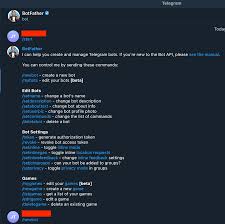
Now that we’ve covered what bots are and the types of bots available, let’s move on to creating one. The first step is to create a new bot using the Telegram Bot Father service. To do this:
- Open Telegram and search for BotFather.
- Click on the “New Bot” button.
- Give your bot a name and username (make sure it ends with ‘bot’).
- Choose a token that will be used to authenticate your bot.
Setting Up Your Bot
Once you’ve created your bot, you’ll need to set up its behavior. This involves creating a blank web page where the bot can receive instructions from users. For this example, we’ll use Hook.Io, a platform for hosting microservices.
- Create an account on Hook.Io.
- Choose a plan that suits your needs (free or paid).
- Set up a new service and give it a name.
- Configure the language to Python 3.
- Copy and paste the code provided below into the service:
“`Python
Import logging
From telegram import Update, ForceReply
From telegram.Ext import Updater, CommandHandler, MessageHandler, Filters, CallbackContext
Logging.BasicConfig(format=’%(asctime)s – %(name)s – %(levelname)s – %(message)’, level=logging.INFO)
Logger = logging.GetLogger(name)
Def start(update: Update, context: CallbackContext) -> None:
User = update.Effective_user
Update.Message.Reply_markdown_v2(
F’Hi {user.Mention_markdown_v2()}!’,
Reply_markup=ForceReply(selective=True),
)
Def help_command(update: Update, context: CallbackContext) -> None:
Update.Message.Reply_text(‘Aid!’)
Def echo(update: Update, context: CallbackContext) -> None:
Update.Message.Reply_text(update.Message.Text)
Def main() -> None:
Updater = Updater(“TOKEN”)
Dispatcher = updater.Dispatcher

Dispatcher.Add_handler(CommandHandler("start", start))
Dispatcher.Add_handler(CommandHandler("help", help_command))

Dispatcher.Add_handler(MessageHandler(Filters.Text & ~Filters.Command, echo))

Updater.Start_polling()

Updater.Idle()
If name == ‘main‘:
Main()
“`
Setting Up The Microservice
Once you’ve set up your bot and service, it’s time to configure the microservice. This involves setting up a webhook that will receive updates from Telegram.
- Open the Hook.Io dashboard.
- Select the service you created earlier.
- Click on the “Edit” button next to the “Webhook URL” field.
- Enter the following URL:
Https://Bees.Telegram.Org/botTOKEN/setWebhook?url=https://Hook.Io/TUONOMEACCOUNT/NOMEHOOK
Replace TOKEN with your bot’s token, and TUONOMEACCOUNT and NOMEHOOK with the name of your service.
Testing Your Bot
Once you’ve set up everything, it’s time to test your bot. Open Telegram and search for your bot’s username. Send a message to it, and if everything is set up correctly, your bot should respond!
Conclusion
Creating a bot on Telegram is a fun and rewarding experience. With this guide, you should be able to create your very own bot and start interacting with users on Telegram.
Faqs
- What are the requirements for creating a bot on Telegram?
You’ll need a computer that can run Python 3.X or any other programming language of your choice. - How do I set up my bot’s behavior?
You can create a blank web page where your bot can receive instructions from users, using Hook.Io or any other platform. - What are the different types of bots on Telegram?
There are standalone bots and inline bots. -
Can I use any programming language to create a bot on Telegram?
Yes, you can use Python 3.X, Node.Js, Java, PHP, and many more languages. -
How do I test my bot?
Open Telegram, search for your bot’s username, and send a message to it.
- What are some examples of bots that can be created on Telegram?
There are many examples, such as tracking packages, sending videos or GIFs, and even interacting with blog and websites using the provided BEES services.
- Can I create an inline bot?
Yes, you can create an inline bot by summoning it from within a chat by using the @botname command.
- Where can I find more information on creating bots on Telegram?
You can check out Hook.Io’s documentation for detailed instructions and guides on how to get started with creating bots on Telegram.


