
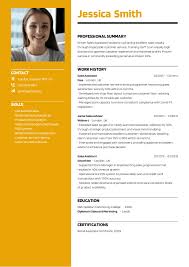
Creating a Curriculum Vitae (CV) Like a Pro: A Step-by-step Guide
Are you tired of creating a CV that looks like everyone else’s? Do you want to stand out in the job market with a unique and impressive document? Look no further! In this article, we will guide you through the process of creating a curriculum vitae (CV) like a pro.
What is a Curriculum Vitae (CV)?
A CV is a document that highlights your education, work experience, skills, and achievements. It’s an essential tool for job seekers to showcase their qualifications and demonstrate their suitability for a particular position.
Why is a Good CV Important?
A good CV can make all the difference in getting you noticed by potential employers. A well-written and visually appealing CV can help you stand out from the competition, increase your chances of getting an interview, and ultimately land your dream job.
How to Create a Curriculum Vitae (CV) Like a Pro
Creating a CV can be a daunting task, but with these simple steps, you’ll be able to create a professional-looking document that showcases your skills and experience.
Step 1: Gather Your Information
Before starting to write your CV, gather all the necessary information, including:
- Contact details
- Education and qualifications
- Work experience (including job titles, company names, and dates of employment)
- Skills and achievements
Step 2: Choose a Format
There are many different formats for CVs, so choose one that suits your style and profession. Some popular options include:
- Chronological format (best for those with extensive work experience)
- Functional format (ideal for those with little or no work experience)
- Combination format (a mix of chronological and functional)
Step 3: Write Your Cv
Now it’s time to write your CV. Start by writing a brief summary of your background, skills, and achievements. Then, list your education and qualifications, followed by your work experience.
- Use clear and concise language
- Emphasize your achievements rather than just listing your job responsibilities
- Use action verbs like “managed,” “created,” and “developed” to describe your experiences
Step 4: Add Relevant Sections
Depending on your profession, you may want to include additional sections in your CV. These can include:
- Skills section (list any relevant software or tools you’re proficient in)
- Achievements section (highlight any notable achievements or awards)
- Volunteer work section (if relevant to the job)
Step 5: Proofread And Edit
Once you’ve completed writing your CV, proofread it multiple times for spelling and grammar errors. Make sure everything flows well and is easy to read.
Tools to Help You Create a Curriculum Vitae (CV)
There are many tools available online that can help you create a professional-looking CV. Some popular options include:
- Resume Builder: A free online tool that allows you to create a custom CV in minutes.
- Wondershare Pdfelement: A powerful PDF editor that lets you create, edit, and manage your documents with ease.
- Microsoft Word Online: A web-based version of Microsoft Word that allows you to create and edit documents online.
How to Make Your Curriculum Vitae (CV) Stand Out
A good CV can make all the difference in getting you noticed by potential employers. Here are some tips on how to make your CV stand out:
- Use a Unique Layout: Avoid using the standard block format. Instead, use a more creative and visually appealing design.
- Highlight Your Achievements: Instead of just listing your job responsibilities, focus on highlighting your achievements and accomplishments.
- Use Action Verbs: Use powerful action verbs like “managed,” “created,” and “developed” to describe your experiences.
Conclusion
Creating a curriculum vitae (CV) can be a daunting task, but with these simple steps, you’ll be able to create a professional-looking document that showcases your skills and experience. Remember to gather all the necessary information, choose a format that suits your style and profession, write your CV clearly and concisely, add relevant sections, proofread and edit multiple times for spelling and grammar errors, and use tools like Resume Builder, Wondershare PDFelement, or Microsoft Word Online to help you create a custom CV.
Faqs
Here are some frequently asked questions about creating a curriculum vitae (CV):
Q: What is the difference between a CV and a resume?
A: A CV is a more detailed document that highlights your education, work experience, skills, and achievements. A resume is a shorter version of a CV that’s ideal for job applications.
Q: How long should my CV be?
A: Aim for 1-2 pages in length. Remember to keep it concise and focused on the most important information.
Q: What should I include in my CV?
A: Include your contact details, education and qualifications, work experience (including job titles, company names, and dates of employment), skills and achievements, and any relevant sections specific to your profession.
Q: Can I use a template for my CV?
A: Yes! There are many free templates available online that can help you get started with creating your CV.


