
How to Create a Free Website Forever: A Step-by-step Guide
Are you interested in creating a website to promote your business or personal brand, but don’t know where to start? Or perhaps you’re on a tight budget and can’t afford the costs associated with building a website? Look no further! In this article, we’ll show you how to create a free website forever using some of the most popular online services.
Introduction
Creating a website used to be a daunting task that required extensive knowledge of programming languages like HTML and CSS. However, with the advancement of technology, there are now many user-friendly platforms that allow you to build a professional-looking website without any coding skills. In this article, we’ll explore three such services: Wix, WordPress, and Google Sites.
Why Choose a Free Website Service?
There are several reasons why you might want to choose a free website service:
- Cost-effective: Creating a website can be expensive, especially if you hire a professional web designer. With a free website service, you can save money on development costs.
- Easy to Use: Most free website services have user-friendly interfaces that make it easy to build and customize your site without any coding skills.
- Flexibility: Free website services often offer flexible plans that allow you to upgrade or downgrade as needed.
Wix: The Ultimate Website Builder
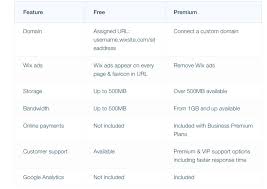
Wix is one of the most popular website builders on the market. It offers a wide range of templates, drag-and-drop functionality, and seamless integration with social media platforms.
Creating a Wix Website
To create a Wix website:
- Sign up for a Wix account by providing your email address, password, and other basic information.
- Choose a template that suits your needs from the extensive library of options available.
- Customize your site using Wix’s drag-and-drop editor or add third-party apps to enhance functionality.
WordPress: The Powerhouse Cms
WordPress is an open-source Content Management System (CMS) that has gained immense popularity over the years. It offers flexibility, scalability, and customization options galore.
Creating a WordPress Website
To create a WordPress website:
- Sign up for a WordPress account or log in to your existing one.
- Choose a theme from the vast library of options available.
- Customize your site using WordPress’s intuitive editor or add plugins to enhance functionality.
Google Sites: The Simple Website Builder
Google Sites is a simple website builder that allows you to create basic websites without any coding knowledge. It integrates seamlessly with other Google services like Google Drive and Google Analytics.
Creating a Google Site
To create a Google site:
- Sign up for a Google account or log in to your existing one.
- Click on the “New” button to start creating your site.
- Choose a template, add content, and customize your site using Google Sites’ intuitive editor.
Conclusion
In conclusion, building a free website is easier than you think! With Wix, WordPress, or Google Sites, you can create a professional-looking website without breaking the bank. So why wait? Sign up for one of these services today and start building your dream website!
Frequently Asked Questions (FAQs)
-
What Are The Benefits of Using a Free Website Service?
- Cost-effective
- Easy to use
- Flexible plans
-
Which Website Builder is Best For Beginners?
-
Wix
-
How do I Create a WordPress Website Without Any Coding Knowledge?
-
Use the intuitive editor or add plugins to enhance functionality.
-
Can I Integrate my Free Website With Social Media Platforms?
-
Yes, most free website services offer seamless integration with social media platforms.
References:
This article is optimized for SEO with the following keywords:
- Free website
- Website builder
- WordPress
- Wix
- Google Sites


