
Google Ads: A Comprehensive Guide
As a business owner or marketer, creating an effective online advertising campaign is crucial to reach your target audience and drive sales. Google Ads (formerly known as AdWords) is one of the most popular and powerful platforms for running paid ads on the web. In this article, we’ll take you through a step-by-step guide on how to create a successful Google Ads campaign.
Understanding Google Ads
Google Ads is an online advertising platform that allows businesses to create targeted ad campaigns on Google’s search engine, YouTube, and other partner sites. With Google Ads, you can reach potential customers actively searching for products or services like yours. The platform uses keywords to match your ads with relevant searches, ensuring that your message reaches the right people.
Key Benefits of Google Ads
- Targeted Advertising: Reach potential customers actively searching for products or services like yours.
- Measurable Results: Track and measure the performance of your campaigns using detailed analytics.
- Flexible Budgeting: Set a budget that suits your needs, with options to scale up or down as required.
- Cost-per-click (CPC) Model: Pay only for the ads that generate clicks, not for impressions.
Setting Up Your Google Ads Campaign
To create a successful Google Ads campaign, you need to follow these steps:
- Define Your Objectives: Determine what you want to achieve with your campaign, such as generating leads, driving sales, or boosting brand awareness.
- Choose Your Keywords: Select the relevant keywords and phrases that match your business and target audience.
- Set Your Budget: Decide on a budget that suits your needs, considering factors like CPC and daily spend limits.
- Select Your Target Audience: Choose your target location, language, and other demographic preferences to ensure your ads reach the right people.
Step-by-step Guide to Creating a Google Ads Campaign
- Log in to Your Google Account: Access your Google account and navigate to the Ads dashboard.
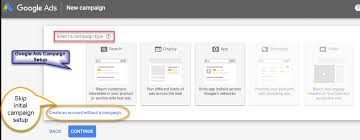
- Create a New Campaign: Click on the “New campaign” button and choose your desired campaign type (e.G., Search, display, or shopping).
- Set Up Your Campaign Settings:
- Define your objective (sale, lead, traffic, etc.)
- Choose your target audience
- Set your budget and daily spend limits
- Select Your Keywords: Use Google’s keyword planner tool to find relevant keywords and phrases.
- Write Your Ad Copy: Craft compelling ad copy that includes a headline, description, and call-to-action (CTA).
- Set Up Your Bidding Strategy: Choose between cost-per-click (CPC) or cost-per-thousand impressions (CPM) bidding.
Managing Your Google Ads Campaign
Once your campaign is live, it’s essential to monitor its performance regularly. Use the Google Ads dashboard to track metrics like:
- Click-through Rate (CTR): Measure how often users click on your ads.
- Conversion Rate: Track the number of conversions generated by your campaigns.
- Cost Per Conversion (CPC): Monitor the cost per conversion for each campaign.
Tips And Best Practices
- Use Relevant Keywords: Ensure that your keywords match your business and target audience.
- Optimize Your Ad Copy: Craft compelling ad copy with a clear CTA.
- Monitor And Adjust: Regularly monitor your campaigns’ performance and adjust settings as needed.
Google Ads For Mobile Devices
Creating a Google Ads campaign on mobile devices is similar to the desktop process. Use the Google Ads app (available on iOS and Android) to access your account, create new campaigns, and manage existing ones.
Frequently Asked Questions
- Q: What is The Minimum Budget For a Google Ads Campaign?
A: There is no minimum budget for Google Ads campaigns. - Q: Can I Run Multiple Campaigns Simultaneously?
A: Yes, you can run multiple campaigns at the same time. - Q: How do I Track Conversions on my Google Ads Campaign?
A: Use the conversion tracking feature in the Google Ads dashboard to monitor conversions.
Conclusion
Creating a successful Google Ads campaign requires careful planning and execution. By following this step-by-step guide, you’ll be able to set up and manage an effective online advertising campaign that drives results for your business.
As a bonus, here are eight frequently asked questions related to Google Ads:
- Q: What is the average cost per click (CPC) on Google Ads?
A: The average CPC varies depending on the industry, keyword, and target audience. - Q: How do I choose the best keywords for my Google Ads campaign?
A: Use tools like Google’s keyword planner to find relevant keywords and phrases. - Q: Can I use Google Ads for e-commerce businesses?
A: Yes, Google Ads is ideal for e-commerce businesses looking to drive sales and conversions. - Q: How do I track the performance of my Google Ads campaign?
A: Use the Google Ads dashboard to monitor metrics like CTR, conversion rate, and CPC. - Q: Can I run a Google Ads campaign without prior advertising experience?
A: Yes, with this guide, you can create and manage an effective Google Ads campaign even if you have no prior experience. - Q: What is the average return on investment (ROI) for Google Ads campaigns?
A: The average ROI varies depending on the industry, target audience, and campaign settings. - Q: Can I use Google Ads to promote physical products or services?
A: Yes, Google Ads can be used to promote both digital and physical products or services. - Q: How do I get started with Google Ads if I have no prior experience?
A: Start by reading this guide and exploring the Google Ads platform to familiarize yourself with its features and settings.
By following this comprehensive guide and FAQs, you’ll be well on your way to creating a successful Google Ads campaign that drives results for your business.


