
Creating a New Account: A Step-by-step Guide
Are you ready to start fresh and create a new digital identity? Look no further! In this comprehensive guide, we’ll walk you through the process of creating a new account on various popular services, including Gmail, Instagram, Microsoft, Brawl Stars, Facebook, Amazon, and more.
Why Create a New Account?
Sometimes, it’s necessary to start from scratch and create a new account due to various reasons such as:
- Changing phone numbers or email addresses
- Wanting a fresh start on social media platforms
- Needing to access different services with separate accounts
Whatever your reason may be, we’re here to help you through the process.
Creating a New Account on Gmail
To create a new account on Gmail, follow these steps:
- Go to the Google account creation page
- Click on “Create a new account”
- Fill out the required information, including name and surname (optional)
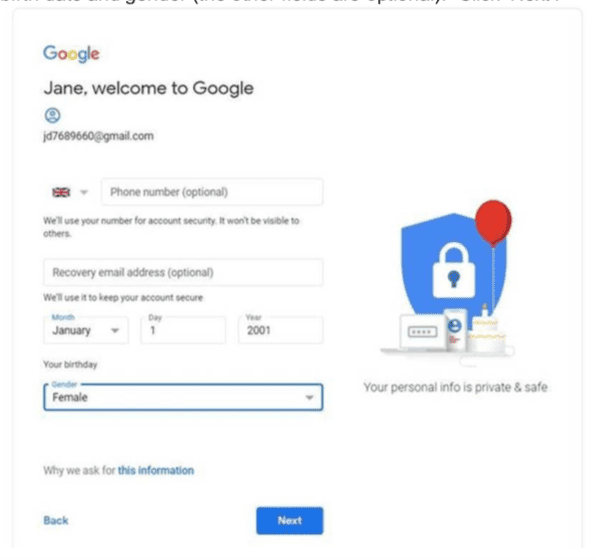
- Select your date of birth and gender
- Choose a secure password and confirm it
- Add an email recovery address (optional)
- Review and accept the terms of service
That’s it! Your new Gmail account is now ready to use.
Creating a New Account on Instagram
To create a new account on Instagram, follow these steps:
- Download and install the Instagram app from the App Store or Google Play
- Tap on “Create new account” in the bottom-left corner of the screen
- Enter your phone number or email address
- Select your date of birth and gender
- Choose a secure password and confirm it
- Add an image to your profile (optional)
- Review and accept the terms of service
Your new Instagram account is now ready to use.
Creating a New Account on Microsoft
To create a new account on Microsoft, follow these steps:
- Go to the Microsoft account creation page
- Click on “Create a new account”
- Fill out the required information, including name and surname (optional)
- Select your date of birth and country/region
- Choose a secure password and confirm it
- Add an email recovery address (optional)
That’s it! Your new Microsoft account is now ready to use.
Creating a New Account on Brawl Stars
To create a new account on Brawl Stars, follow these steps:
- Download and install the Brawl Stars app from the App Store or Google Play
- Tap on “Create profile”
- Select an avatar and customize your profile
- Fill out the required information, including name and surname (optional)
- Choose a secure password and confirm it
Your new Brawl Stars account is now ready to use.
Creating a New Account on Facebook
To create a new account on Facebook, follow these steps:
- Download and install the Facebook app from the App Store or Google Play
- Tap on “Create new account”
- Fill out the required information, including name and surname (optional)
- Select your date of birth and gender
- Choose a secure password and confirm it
- Add an image to your profile (optional)
That’s it! Your new Facebook account is now ready to use.
Creating a New Account on Amazon
To create a new account on Amazon, follow these steps:
- Go to the Amazon account creation page
- Click on “Create a new account”
- Fill out the required information, including name and surname (optional)
- Select your date of birth and country/region
- Choose a secure password and confirm it
That’s it! Your new Amazon account is now ready to use.
Creating a New Account on PC
To create a new account on your PC, follow these steps:
- Go to the Settings app (Windows 11) or System Preferences (macOS)
- Click on “Account”
- Select “Other users” and click on “Add user”
- Fill out the required information, including name and surname (optional)
- Choose a secure password and confirm it
That’s it! Your new account is now ready to use.
Conclusion
Creating a new account can seem daunting at first, but with this comprehensive guide, you’re now equipped to tackle any service you want to join. Remember to follow the steps carefully and ensure that your passwords are secure. Happy creating!
Faqs
- What if I Forget my Password?
Don’t worry! Most services have a password recovery feature. If you forgot your password, click on “Forgot password” or contact the service’s support team for assistance. - Can I Create Multiple Accounts on One Platform?
Yes, most platforms allow you to create multiple accounts, but be aware that each account may have its own settings and preferences. - How do I Secure my Account From Hackers?
To keep your account safe, always use strong passwords, enable two-factor authentication (2FA), and regularly review your account activity for any suspicious behavior. - What if I Need to Delete an Existing Account?
To delete an existing account, follow the service’s deletion process, which is usually found in the account settings or by contacting their support team. - Can I Transfer my Data From One Account to Another?
Some services allow you to transfer your data from one account to another, but be aware that this may require technical expertise and might not be possible for all types of data. - What if I’m Having Trouble Creating a New Account?
If you’re experiencing issues while creating a new account, try refreshing the page or checking your internet connection. If the problem persists, contact the service’s support team for assistance. - Can I Create an Account Without a Phone Number?
Yes, most services allow you to create an account without a phone number, but be aware that some features might not work without one. - What Are The Benefits of Creating Multiple Accounts?
Creating multiple accounts can help you keep your personal and professional life separate, ensure secure access to sensitive information, or simply have fun exploring different online identities!


