
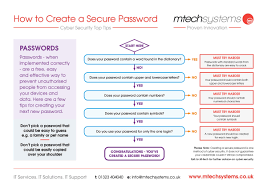
Creating a Secure Password: A Guide
In today’s digital age, having a secure password is crucial to protect your personal data from unauthorized access. With the rise of cyber threats, it’s essential to create passwords that are difficult to guess or crack. In this article, we will guide you through the process of creating a secure password and provide tips on how to choose the right password manager.
The Importance of Password Security
A weak password can put your entire digital life at risk. Hackers use various methods to obtain sensitive information, including guessing passwords, brute-force attacks, and dictionary attacks. A strong password is the first line of defense against these threats.
Requirements For a Secure Password
To create a secure password, follow these three fundamental requirements:
- Length: A longer password is more difficult to crack. Aim for 15-20 characters or more.
- Characters Used: Use a mix of uppercase and lowercase letters, numbers, symbols, and special characters to increase the complexity of your password.
- Meaning: Avoid using easily guessable information such as names, birthdays, or common words.
Tips For Creating a Secure Password
- Avoid Sequences: Don’t use sequences of numbers and letters that can be easily identified (e.G., “123456789” Or “asdfghjkl”).
- Use a Password Manager: Consider using a password manager to generate and store unique, complex passwords.
- Don’t Reuse Passwords: Use different passwords for each account to prevent a single weak password from compromising multiple accounts.
Password Managers: A Convenient Solution
Password managers are programs that securely store and manage your login credentials. They offer features such as:
- Password Generation: Generate unique, complex passwords for each account.
- Password Storage: Store your passwords securely in a vault.
- Two-factor Authentication: Add an extra layer of security with two-factor authentication.
Popular Password Managers
- Nordpass: A user-friendly password manager available on multiple devices and operating systems.
- Bitwarden: A free, open-source password manager with optional paid features.
- Lastpass: A popular password manager with advanced features such as two-factor authentication and encryption.
Creating a Password For Instagram
If you want to create a new password for your Instagram account, follow these steps:
- Open the Instagram app.
- Tap on your profile picture or the three horizontal lines in the top right corner.
- Select “Settings and privacy” and then “Account centre.”
- Tap on “Privacy and safety” and then “Change password.”
Creating a Password For a Folder
If you want to protect a folder with a password, consider using programs like VeraCrypt or Encripto.
Conclusion
Creating a secure password is essential in today’s digital age. By following the requirements and tips outlined in this guide, you can create strong passwords that will help protect your personal data from unauthorized access. Remember to use a password manager to generate and store unique, complex passwords for each account.
Frequently Asked Questions (FAQs)
- Q: How Long Should my Password Be?
A: Aim for 15-20 characters or more. - Q: What Characters Should I Use in my Password?
A: Use a mix of uppercase and lowercase letters, numbers, symbols, and special characters. - Q: Why Should I Avoid Reusing Passwords?
A: Reusing passwords can put your entire digital life at risk if one weak password is compromised. - Q: What is a Password Manager?
A: A program that securely stores and manages your login credentials. - Q: Which Password Manager is The Best?
A: The best password manager for you will depend on your specific needs and preferences. - Q: How do I Create a Strong Password For Instagram?
A: Follow the steps outlined in this guide to create a new password for your Instagram account. - Q: Can I Use a Password Manager to Generate Passwords For my Folders?
A: Yes, consider using programs like VeraCrypt or Encripto to protect your folders with passwords. - Q: Why is it Important to Use Two-factor Authentication?
A: Two-factor authentication adds an extra layer of security and helps prevent unauthorized access to your accounts.


