
How to Create a Photo Mosaic: A Step-by-step Guide
Are you tired of looking at your vacation photos as individual images? Do you want to create something truly unique and eye-catching? Look no further than the art of creating a photo mosaic! In this article, we’ll guide you through the process of turning your favorite photos into stunning mosaics using various software programs and online services.
What is a Photo Mosaic?
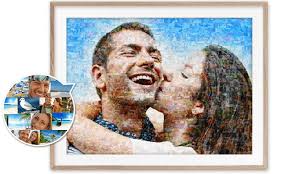
A photo mosaic is a type of image that is created by combining multiple small images to form a larger picture. The small images are called “tiles” or “pieces,” and they can be arranged in a grid pattern to create the final mosaic. This technique has been used for centuries, but with the advent of digital technology, it’s now easier than ever to create stunning photo mosaics.
Software Programs For Creating Photo Mosaics
There are several software programs available that allow you to create photo mosaics on your computer. Here are a few options:
- Andreamosaic (Windows/macOS/Linux): This is a free software program that allows you to create photo mosaics using images from your computer or online sources.
- Imosaic (Windows): Another option for Windows users, iMosaic offers a range of features and settings to customize your mosaic.
How to Create a Photo Mosaic Using Andreamosaic
To create a photo mosaic using AndreaMosaic, follow these steps:
- Download and install the software on your computer.
- Open the program and select the “Generate Mosaic” option.
- Choose the image you want to use as the base for your mosaic.
- Select the images you want to use as tiles for your mosaic.
- Customize the settings, such as the size and resolution of your mosaic.
Creating a Photo Mosaic Online
If you don’t have access to a computer or prefer not to download software, there are several online services that allow you to create photo mosaics directly in your browser. Here are a few options:
- Mosically: This service allows you to upload your photos and create a mosaic using various settings and effects.
- Fotor: Another online service that offers a range of features, including a photo mosaic creator.
How to Use Mosically
To use Mosically, follow these steps:
- Visit the website and select the “Create My Photos Mosaic” option.
- Choose the image you want to use as the base for your mosaic.
- Upload additional images to use as tiles for your mosaic.
- Customize the settings, such as the size and resolution of your mosaic.
Other Options For Creating Photo Mosaics
There are many other software programs and online services available that allow you to create photo mosaics. Some popular options include:
- Pro Photo Mosaic Creator (Android/iOS/iPadOS): This app allows you to create stunning photo mosaics on your mobile device.
- Mosaic Art Lab (Android): Another option for Android users, this app offers a range of features and settings.
Conclusion
Creating a photo mosaic is a fun and creative way to showcase your favorite photos. With the software programs and online services available, it’s now easier than ever to create stunning mosaics using various settings and effects. Whether you’re looking to create a personalized gift or simply want to try something new, creating a photo mosaic is a great way to express yourself.
Frequently Asked Questions
Here are some frequently asked questions about creating photo mosaics:
- What Software Programs Are Available For Creating Photo Mosaics?
- There are several software programs available, including AndreaMosaic and iMosaic.
- How do I Create a Photo Mosaic Using Andreamosaic?
- Follow the steps outlined above to create a photo mosaic using AndreaMosaic.
- Can I Create a Photo Mosaic Online?
- Yes, there are several online services available that allow you to create photo mosaics directly in your browser.
- What is The Best Software Program For Creating Photo Mosaics?
- The best software program for creating photo mosaics will depend on your specific needs and preferences.
- Can I Use a Mobile Device to Create a Photo Mosaic?
- Yes, there are several apps available that allow you to create photo mosaics using your mobile device.
Conclusion
Creating a photo mosaic is a fun and creative way to showcase your favorite photos. With the software programs and online services available, it’s now easier than ever to create stunning mosaics using various settings and effects. Whether you’re looking to create a personalized gift or simply want to try something new, creating a photo mosaic is a great way to express yourself.


