
How to Create a Website With WordPress And Hostinger
Have you always dreamed of creating your own website but don’t know where to start? Look no further! In this article, we will guide you through the process of creating a website with WordPress and Hostinger, two powerful tools that will make your web-building experience a breeze.
Why Choose WordPress And Hostinger?
WordPress is one of the most popular Content Management Systems (CMS) in the world, used by over 60 million websites. Its flexibility, customizability, and vast community support make it an ideal choice for creating any type of website. On the other hand, Hostinger is a leading web hosting provider that offers reliable, secure, and scalable solutions for all types of websites.
Pricing Plans of Hostinger
Before we dive into the process of creating your website, let’s take a look at Hostinger’s pricing plans:
- Premium: 2.99€ + VAT per month for 48 months with 3 free months additional; 5.99€ Per month to renew.
- Business: 3.99€ + VAT per month for the first 48 months + 3 free months additional; 7.99€ Per month to renew.
- Cloud Startup: 9.99€ + VAT per month for the first 48 months + 3 free months additional; 16.99€ Per month to renew.
Step-by-step Guide to Creating a Website With WordPress And Hostinger
Now that we have covered the pricing plans, let’s move on to the step-by-step guide of creating your website:
- Sign up For Hostinger: Go to Hostinger’s official website and sign up for an account.
- Choose a Plan: Select one of the three pricing plans (Premium, Business, or Cloud Startup) that suits your needs.
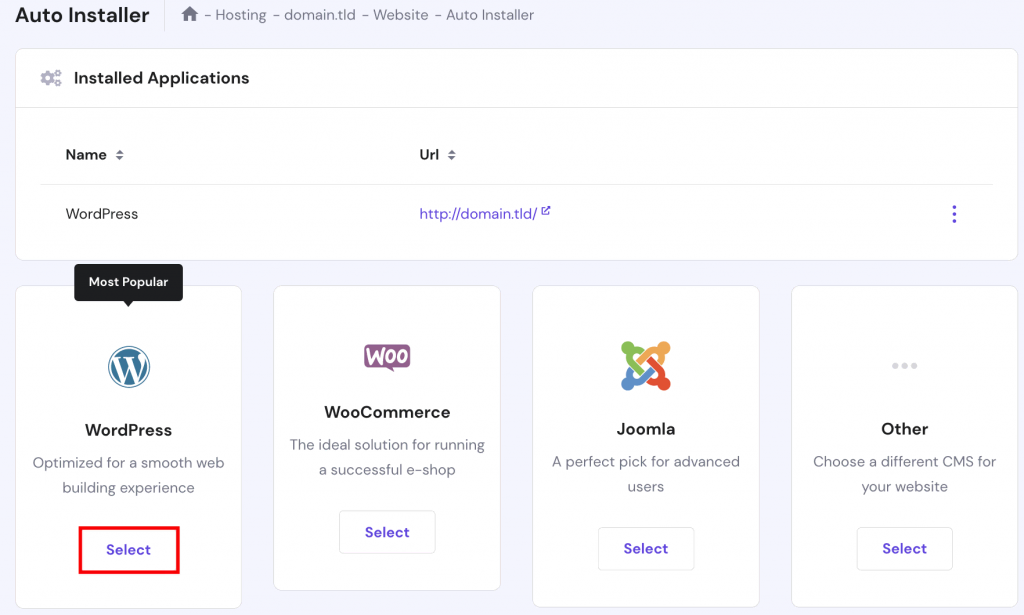
- Install WordPress: With Hostinger, you can install WordPress with just one click. This will save you time and effort in setting up your website.
- Choose a Theme: Browse through Hostinger’s vast library of free and premium themes to find the perfect one for your website.
- Customize Your Website: Use the drag-and-drop editor to customize your theme, add plugins, and optimize your website for search engines.
What’s Included in Hostinger’s Plans?
Hostinger’s plans come with a range of features that will help you create and manage your website effectively:
- Free Automatic WordPress Installation
- Automatic Updates of The Cms
- Scanning Vulnerability
- Support For WordPress Multisite
- Wp-cli And Ssh Access
- Website Builder
- Ai-powered Content Creation
Creating a Website With Hostinger’s Ai-powered Tools
Hostinger has incorporated artificial intelligence (AI) into its tools to make your website-building experience smoother. With their AI-powered content creation feature, you can:
- Generate Blog Posts, Pages, Images, And Logotypes
- Optimize Your Website For Search Engines
- Create a More Engaging And User-friendly Interface
Conclusion
Creating a website with WordPress and Hostinger is an easy and straightforward process that requires minimal technical expertise. With their powerful tools and AI-powered features, you can create a professional-looking website in no time.
Faqs
- What Are The System Requirements For Creating a Website With WordPress And Hostinger?
- Your computer must have Windows 7 or higher, macOS High Sierra (10.13) Or higher, or Linux.
- Can I Use my Existing Domain Name With Hostinger?
- Yes, you can transfer your existing domain to Hostinger.
- How do I Migrate my Website to Hostinger?
- You can migrate your website using Hostinger’s migration tool.
- What is The Difference Between Hostinger’s Premium And Business Plans?
- The Premium plan comes with 100 websites, while the Business plan allows you to create up to 300 websites.
- Can I Use Hostinger For E-commerce Purposes?
- Yes, Hostinger offers a range of e-commerce tools, including WooCommerce and Shopify integrations.
- What is The Support Provided by Hostinger?
- Hostinger provides 24/7 priority support via phone, email, or live chat.
Final Words
Creating a website with WordPress and Hostinger is an exciting experience that will help you establish your online presence. With their powerful tools and AI-powered features, you can create a professional-looking website in no time.


