
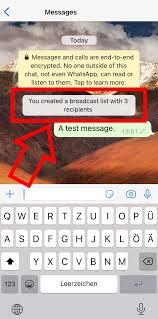
How to Create a Broadcast List on Whatsapp
Are you looking for ways to send messages to multiple contacts at once without them seeing each other’s names? Look no further! In this article, we will guide you through the process of creating a broadcast list on WhatsApp, which can be super helpful in various situations.
What is a Broadcast List on Whatsapp?
A broadcast list on WhatsApp allows you to send messages to multiple contacts at once without them seeing each other’s names. This feature can be useful for sending reminders, updates, or even marketing messages to your customers or subscribers.
Benefits of Using a Broadcast List on Whatsapp
Using a broadcast list on WhatsApp has several benefits, including:
- Easy Communication: You can communicate with multiple contacts at once without having to send individual messages.
- Time-saving: It saves you time and effort by allowing you to send messages to multiple contacts simultaneously.
- Increased Productivity: With a broadcast list, you can focus on other important tasks while your messages are being delivered.
How to Create a Broadcast List on Whatsapp (Android)
To create a broadcast list on WhatsApp for Android devices, follow these steps:
- Open Whatsapp: Open the WhatsApp app and navigate to the chat screen.
- Tap on The Three Dots: Tap on the three dots at the top right corner of the screen.
- Select New Broadcast: Select “New Broadcast” from the menu options.
- Choose Contacts: Choose the contacts you want to add to your broadcast list.
- Give a Name: Give a name to your broadcast list for easy identification.
- Create List: Tap on the “Create List” button to create the broadcast list.
How to Create a Broadcast List on Whatsapp (iPhone)
To create a broadcast list on WhatsApp for iPhone devices, follow these steps:
- Open Whatsapp: Open the WhatsApp app and navigate to the chat screen.
- Tap on The New Message Icon: Tap on the new message icon at the bottom left corner of the screen.
- Select Broadcast Lists: Select “Broadcast Lists” from the menu options.
- Choose Contacts: Choose the contacts you want to add to your broadcast list.
- Give a Name: Give a name to your broadcast list for easy identification.
- Create List: Tap on the “Create List” button to create the broadcast list.
How to Modify or Delete a Broadcast List on Whatsapp
To modify or delete a broadcast list on WhatsApp, follow these steps:
- Open Whatsapp: Open the WhatsApp app and navigate to the chat screen.
- Tap on The Three Dots: Tap on the three dots at the top right corner of the screen.
- Select Broadcast Lists: Select “Broadcast Lists” from the menu options.
- Choose List: Choose the broadcast list you want to modify or delete.
- Modify/ Delete List: Tap on the “Modify” or “Delete” button to make changes or remove the list.
Frequently Asked Questions (FAQs)
Here are some frequently asked questions about creating a broadcast list on WhatsApp:
- Q: How do I Create a Broadcast List on Whatsapp?
A: To create a broadcast list on WhatsApp, follow the steps mentioned above for Android and iPhone devices. - Q: Can I Modify or Delete a Broadcast List on Whatsapp?
A: Yes, you can modify or delete a broadcast list on WhatsApp by following the steps mentioned above. - Q: Will my Contacts See Each Other’s Names When I Send Them Messages Through a Broadcast List?
A: No, your contacts will not see each other’s names when you send them messages through a broadcast list.
Conclusion
Creating a broadcast list on WhatsApp can be super helpful in various situations, such as sending reminders or updates to multiple contacts at once. By following the steps mentioned above, you can create, modify, and delete a broadcast list on WhatsApp for both Android and iPhone devices.


