
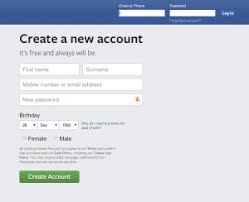
Creating a Facebook Account: A Step-by-step Guide
Are you ready to join the world’s largest social network? Creating a Facebook account is easier than ever, and we’re here to guide you through it.
Why Create a Facebook Account?
With over 2.7 Billion monthly active users, Facebook is an essential platform for staying connected with friends and family, sharing updates, and discovering new things. Whether you’re looking to expand your social circle or simply want to stay in touch with loved ones, a Facebook account is a great way to go.
Creating a Facebook Account on Smartphone And Tablet
If you have a smartphone or tablet, you can create a Facebook account using the official app. Here’s how:
- Download The Facebook App: Get the Facebook app from the App Store (for iOS devices) or Google Play Store (for Android devices).
- Install The App: Follow the prompts to install the app on your device.
- Launch The App: Open the Facebook app and tap “Create New Account.”
- Fill Out Your Information: Enter your name, surname, date of birth, and phone number or email address.
- Choose a Password: Create a strong password for your account.
- Verify Your Account: Receive a verification code via SMS or email and enter it to confirm your account.
Creating a Facebook Account on Computer
If you prefer using a computer, creating a Facebook account is still relatively straightforward:
- Visit The Facebook Website: Go to www.Facebook.Com in your web browser.
- Click “Create New Account”: Click the “Create New Account” button at the top of the page.
- Fill Out Your Information: Enter your name, surname, date of birth, and phone number or email address.
- Choose a Password: Create a strong password for your account.
- Verify Your Account: Receive a verification code via SMS or email and enter it to confirm your account.
The Benefits of Creating a Facebook Account
By creating a Facebook account, you’ll gain access to:
- A vast network of friends and acquaintances
- The ability to share updates, photos, and videos with others
- Access to various Facebook features, such as Groups, Events, and Marketplace
Tips For Using Facebook Effectively
To get the most out of your Facebook experience, be sure to:
- Set up a profile picture and cover photo that accurately represent you
- Connect with friends and family who share similar interests
- Join relevant Groups to engage in discussions and stay informed about topics that matter to you
Frequently Asked Questions (FAQs)
- How Long Does it Take to Create a Facebook Account?
- Creating a Facebook account typically takes around 10-15 minutes.
- What Information do I Need to Provide to Create a Facebook Account?
- You’ll need to provide your name, surname, date of birth, and phone number or email address.
- How Secure is my Facebook Account?
- Facebook has implemented various security measures to protect user accounts, including password protection, two-factor authentication, and data encryption.
- Can I Use Facebook on Multiple Devices?
- Yes, you can access your Facebook account from any device with an internet connection.
- How do I Report a Problem or Issue With my Facebook Account?
- You can contact Facebook’s support team through the Help Center or by visiting their website.
Conclusion
Creating a Facebook account is a simple and straightforward process that offers numerous benefits for staying connected, sharing updates, and discovering new things. By following these step-by-step guides, you’ll be well on your way to joining the world of Facebook and enjoying all it has to offer!


