
How to Create Custom Fonts
Are you tired of using the same old fonts for your projects? Do you want to add some personality and flair to your designs? Creating custom fonts is easier than you think! In this article, we’ll show you how to create custom fonts using various software and online tools.
Why Create Custom Fonts?
Creating custom fonts allows you to add a unique touch to your designs. Whether it’s for personal or professional use, custom fonts can make your projects stand out from the crowd. Plus, creating custom fonts is a fun and creative way to express yourself!
Software Options For Creating Custom Fonts
There are several software options available for creating custom fonts. Here are some of the most popular ones:
- Fontforge: FontForge is a free, open-source software that allows you to create and edit fonts. It’s available for Windows, macOS, and Linux.
- Fontstruct: FontStruct is an online tool that lets you create and edit fonts using a simple and intuitive interface.
How to Create Fonts With Fontforge
To create a font with FontForge, follow these steps:
- Download and install FontForge on your computer.
- Launch FontForge and select the font you want to edit or create from scratch.
- Use the various tools and menus to edit and modify the font.
- Save your changes and export the font in a compatible format.
How to Create Fonts With Fontstruct
To create a font with FontStruct, follow these steps:
- Go to the FontStruct website and sign up for an account.
- Click on the “New” button to start creating a new font.
- Choose a template or start from scratch.
- Use the various tools and menus to edit and modify the font.
- Save your changes and download the font in a compatible format.
Other Options For Creating Custom Fonts
In addition to FontForge and FontStruct, there are several other software options available for creating custom fonts. Some popular ones include:
- Glyphr Studio: Glyphr Studio is an online tool that allows you to create and edit fonts using a simple and intuitive interface.
- Birdfont: BirdFont is a free, open-source software that allows you to create and edit fonts.
- Type Light: Type Light is a free software that allows you to create and edit fonts.
How to Create Custom Fonts With Illustrator
If you’re already familiar with Adobe Illustrator, you can use it to create custom fonts. Here’s how:
- Launch Illustrator and select the font tool from the toolbar.
- Choose a template or start from scratch.
- Use the various tools and menus to edit and modify the font.
- Save your changes and export the font in a compatible format.
How to Create Custom Fonts With Photoshop
If you’re already familiar with Adobe Photoshop, you can use it to create custom fonts. Here’s how:
- Launch Photoshop and select the font tool from the toolbar.
- Choose a template or start from scratch.
- Use the various tools and menus to edit and modify the font.
- Save your changes and export the font in a compatible format.
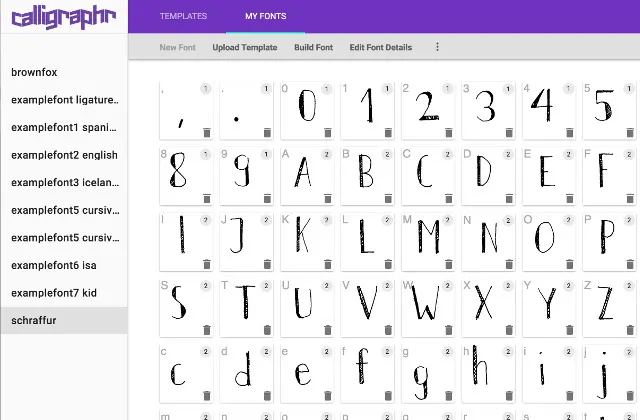
How to Create Custom Fonts With Calligraphr
If you want to create custom fonts using your handwriting, Calligraphr is a great tool to use. Here’s how:
- Go to the Calligraphr website and sign up for an account.
- Click on the “Create a template” button to start creating a new font.
- Choose a template or start from scratch.
- Use the various tools and menus to edit and modify the font.
- Save your changes and download the font in a compatible format.
How to Create Custom Fonts With Fonty
If you want to create custom fonts using your smartphone or tablet, Fonty is a great app to use. Here’s how:
- Download and install Fonty on your device.
- Launch Fonty and select the font tool from the toolbar.
- Choose a template or start from scratch.
- Use the various tools and menus to edit and modify the font.
- Save your changes and export the font in a compatible format.
Conclusion
Creating custom fonts is easier than you think! With these software options and online tools, you can create unique and personalized fonts for your projects. Whether it’s for personal or professional use, custom fonts can add a touch of personality to your designs. So why not give it a try?
Faqs
- What Are The Benefits of Creating Custom Fonts?
Creating custom fonts allows you to add a unique touch to your designs and make them stand out from the crowd. - What Software Options Are Available For Creating Custom Fonts?
FontForge, FontStruct, Glyphr Studio, BirdFont, Type Light, Illustrator, Photoshop, Calligraphr, and Fonty are some of the most popular software options available. - How do I Create a Font With Fontforge?
To create a font with FontForge, download and install the software, launch it, select the font you want to edit or create from scratch, use the various tools and menus to edit and modify the font, save your changes, and export the font in a compatible format. - How do I Create a Font With Fontstruct?
To create a font with FontStruct, go to the website, sign up for an account, click on the “New” button to start creating a new font, choose a template or start from scratch, use the various tools and menus to edit and modify the font, save your changes, and download the font in a compatible format. - Can I Create Custom Fonts Using my Handwriting?
Yes, you can create custom fonts using your handwriting with Calligraphr or Fonty.
I hope this article has been helpful! If you have any questions or need further assistance, feel free to ask.


