
How to Create a Gmail Account: A Step-by-step Guide
Are you looking to create a new email account using Google’s popular service, Gmail? Look no further! In this article, we will guide you through the process of creating a Gmail account on your PC, smartphone, and other devices. We will also cover some additional features and tips to help you get started with your new email account.
What is Gmail?
Gmail is a free email service provided by Google that allows users to create an email address and send and receive emails online. It is one of the most popular email services in the world, known for its simplicity, ease of use, and robust features.
Benefits of Creating a Gmail Account
Creating a Gmail account has numerous benefits, including:
- A free email address with unlimited storage space
- Access to Google’s suite of productivity tools, such as Google Drive, Docs, and Calendar
- Integration with other Google services, such as YouTube and Google Photos
- Advanced security features to protect your account and data
Step-by-step Guide to Creating a Gmail Account on PC
Creating a Gmail account on your PC is a straightforward process that can be completed in just a few minutes. Here’s how:
- Open Your Web Browser: Open your web browser, such as Google Chrome or Mozilla Firefox.
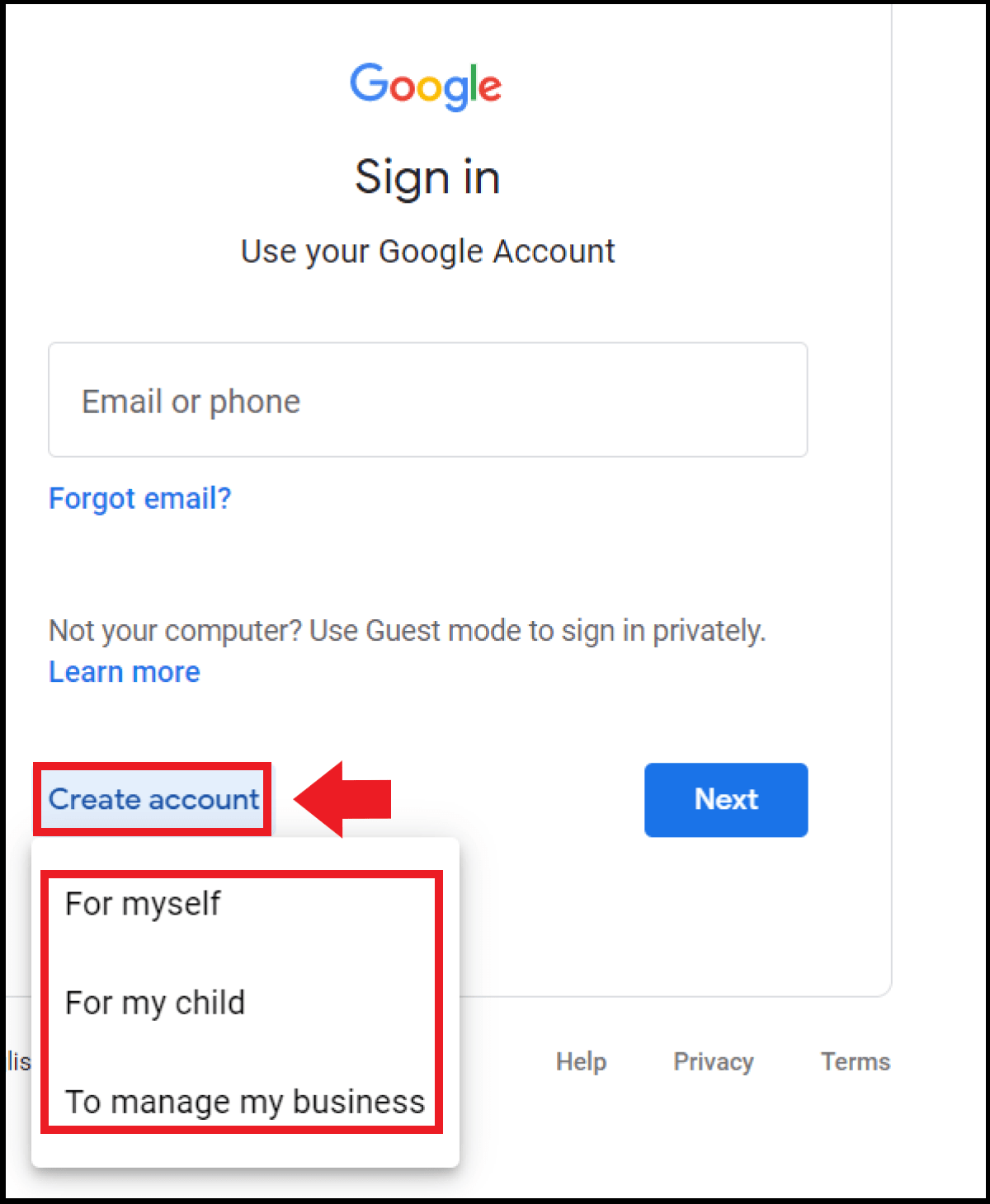
- Go to The Gmail Website: Type www.Gmail.Com in the address bar and press Enter.
- Click on “Create a New Account”: Click on the “Create a new account” button at the bottom of the page.
- Fill Out The Form: Fill out the form with your name, surname, and desired email address.
- Choose Your Password: Choose a strong password for your account.
- Add Recovery Information: Add recovery information to help you regain access to your account if you forget your password.
- Review And Accept Terms of Service: Review Google’s terms of service and accept them by clicking on the “I agree” button.
Creating a Gmail Account on Smartphone or Tablet
If you want to create a Gmail account on your smartphone or tablet, here’s what you need to do:
- Download The Gmail App: Download the Gmail app from the Google Play Store (for Android devices) or the Apple App Store (for iOS devices).
- Open The App: Open the Gmail app and click on the “Create a new account” button.
- Fill Out The Form: Fill out the form with your name, surname, and desired email address.
- Choose Your Password: Choose a strong password for your account.
- Add Recovery Information: Add recovery information to help you regain access to your account if you forget your password.
Step-by-step Guide to Creating a Gmail Account on Android Device
If you’re using an Android device, here’s how to create a Gmail account:
- Open The Gmail App: Open the Gmail app from the Google Play Store.
- Click on “Create a New Account”: Click on the “Create a new account” button at the bottom of the page.
- Fill Out The Form: Fill out the form with your name, surname, and desired email address.
- Choose Your Password: Choose a strong password for your account.
- Add Recovery Information: Add recovery information to help you regain access to your account if you forget your password.
Step-by-step Guide to Creating a Gmail Account on Iphone or Ipad
If you’re using an iPhone or iPad, here’s how to create a Gmail account:
- Download The Gmail App: Download the Gmail app from the Apple App Store.
- Open The App: Open the Gmail app and click on the “Create a new account” button.
- Fill Out The Form: Fill out the form with your name, surname, and desired email address.
- Choose Your Password: Choose a strong password for your account.
- Add Recovery Information: Add recovery information to help you regain access to your account if you forget your password.
How to Create a Gmail Account For School or Work
If you’re creating a Gmail account for school or work, here’s what you need to do:
- Create a Personal Gmail Account: Create a personal Gmail account using the steps above.
- Add a New Account: Add a new account to your existing Google account.
- Configure Your Account Settings: Configure your account settings to suit your needs.
How to Create a Gmail Account For Another Person
If you want to create a Gmail account for another person, here’s what you need to do:
- Create a Personal Gmail Account: Create a personal Gmail account using the steps above.
- Add a New Account: Add a new account to your existing Google account.
- Configure Your Account Settings: Configure your account settings to suit their needs.
How to Use Google Workspace (formerly G Suite)
Google Workspace is a suite of productivity tools that includes Gmail, Google Drive, Docs, and Calendar. Here’s how to use it:
- Sign Up For Google Workspace: Sign up for Google Workspace by visiting the Google website.
- Create a New Account: Create a new account using the steps above.
- Configure Your Account Settings: Configure your account settings to suit your needs.
Conclusion
Creating a Gmail account is a simple process that can be completed in just a few minutes. Whether you’re creating an account for personal use or for work, this guide has provided you with step-by-step instructions on how to do it. Remember to choose a strong password and configure your account settings to suit your needs.
Frequently Asked Questions
- What is Gmail?
Gmail is a free email service provided by Google that allows users to create an email address and send and receive emails online. - How do I Create a Gmail Account on my Pc?
To create a Gmail account on your PC, visit the Gmail website and click on the “Create a new account” button. - Can I Create a Gmail Account on my Smartphone or Tablet?
Yes, you can create a Gmail account on your smartphone or tablet by downloading the Gmail app from the Google Play Store (for Android devices) or the Apple App Store (for iOS devices). - How do I Add Recovery Information to my Gmail Account?
To add recovery information to your Gmail account, visit the Google website and click on the “Recovery info” button. - Can I Create a Gmail Account For School or Work?
Yes, you can create a Gmail account for school or work by following the steps outlined in this guide. - How do I Use Google Workspace (formerly G Suite)?
To use Google Workspace, sign up for an account on the Google website and configure your settings to suit your needs.
Note


