
How to Create a Icloud Account: A Step-by-step Guide
Are you looking to create an iCloud account but don’t know where to start? Look no further! In this article, we will guide you through the process of creating an iCloud account on various devices, including smartphones, tablets, computers, and more.
Why Do I Need an Icloud Account?
Before we dive into the step-by-step guide, let’s quickly cover why you might need an iCloud account. An iCloud account allows you to access various Apple services online, such as iCloud Drive, iCloud Mail, and more. You can also use it to share photos, contacts, and other data across all your Apple devices.
Creating an Icloud Account on Iphone/ipad
If you have a new iPhone or iPad, you can create an iCloud account directly from the device. Here’s how:
- Initial Configuration: When you first turn on your device, follow the initial configuration prompts.
- Select Your Language And Country/region: Choose your language and country/region.
- Configure Wi-fi: Select a Wi-Fi network to connect to.
- Confirm Privacy Settings: Review and confirm the privacy settings.
- Set Up Face ID or Touch ID: Set up Face ID or Touch ID for biometric authentication.
- Create a New Iphone/ipad: Choose to configure your device as a new one.
- Create an Apple ID: Tap on “Create a Free Apple ID” and follow the prompts to create your account.
Creating an Icloud Account on Android
If you have an Android device, you can also create an iCloud account using the Apple website or the Apple Music app. Here’s how:
- Open The Apple Website: Open the Apple website on your browser.
- Tap on “Create Your Id”: Tap on the “Create Your ID” button in the top right corner of the screen.
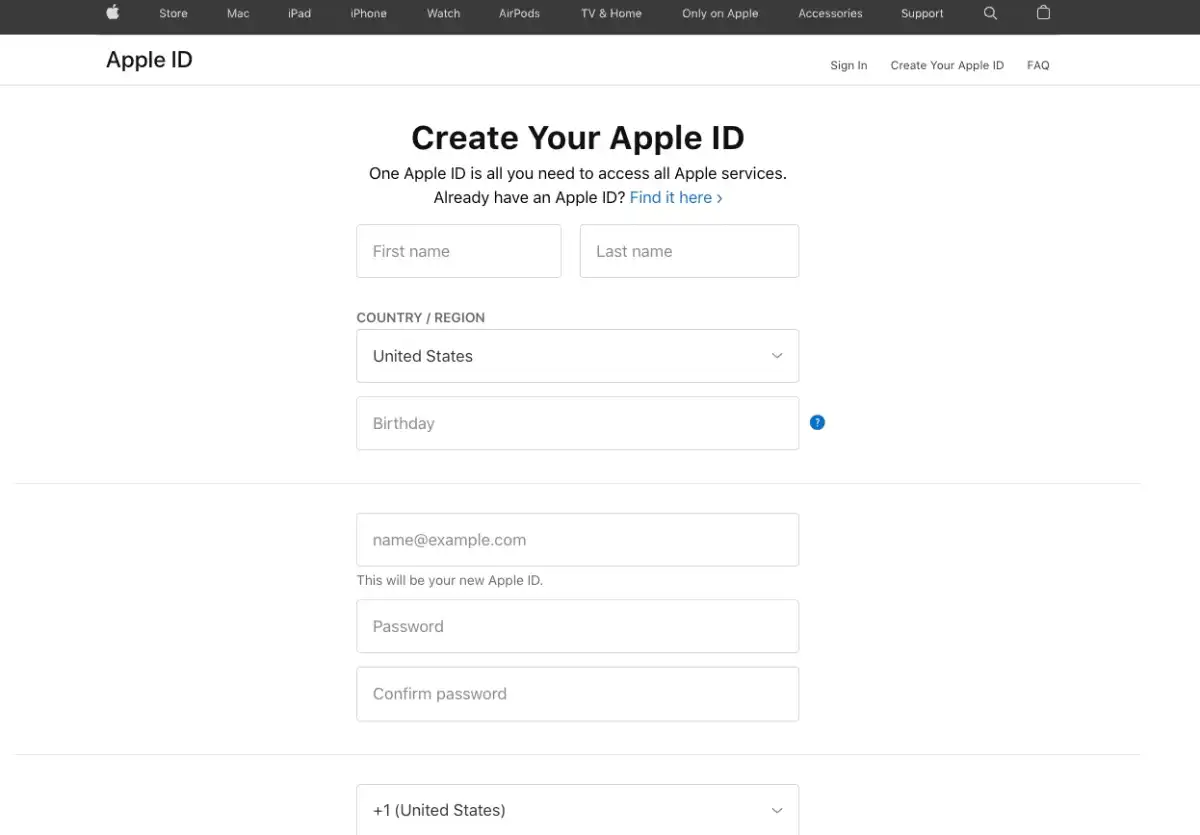
- Fill Out The Form: Fill out the form with your personal information, including name, surname, country/region, and date of birth.
- Choose an Email Address: Choose an email address to use as your iCloud account.
- Create a Password: Create a password for your iCloud account.
- Verify Your Account: Verify your account by following the instructions on the screen.
Creating an Icloud Account on Computer
If you want to create an iCloud account using your computer, here’s how:
- Go to The Apple ID Website: Go to the Apple ID website and click on “Create a new Apple ID”.
- Fill Out The Form: Fill out the form with your personal information.
- Choose an Email Address: Choose an email address to use as your iCloud account.
- Create a Password: Create a password for your iCloud account.
Creating an Icloud Account Without Credit Card
If you want to create an iCloud account without using a credit card, here’s how:
- Use The Apple ID Website: Use the Apple ID website to create an account.
- Fill Out The Form: Fill out the form with your personal information.
- Choose an Email Address: Choose an email address to use as your iCloud account.
Creating an Icloud Account Without Phone Number
Unfortunately, it is not possible to create an iCloud account without a phone number. Apple requires you to provide a phone number to verify your identity and send you a verification code.
Creating an Icloud Account For Minors
If you want to create an iCloud account for a minor (someone under 18 years old), here’s how:
- Go to The Settings App: Go to the Settings app on your iPhone or iPad.
- Tap on “Family”: Tap on the “Family” tab at the bottom of the screen.
- Add Member: Add a new member by tapping on the “+” icon.
- Create an Account For Minor: Tap on “Create an account for minor”.
- Fill Out The Form: Fill out the form with your personal information and that of the minor.
Tips And Tricks
- Make sure to choose a strong password for your iCloud account.
- Use two-factor authentication (2FA) to add an extra layer of security to your account.
- Set up Face ID or Touch ID on your device to use biometric authentication.
- Regularly review and update your account settings.
Conclusion
In conclusion, creating an iCloud account is a relatively straightforward process that can be completed using various devices. Remember to follow the step-by-step guide provided above and take necessary precautions to secure your account.
Frequently Asked Questions (FAQs)
- Q: Why do I Need an Icloud Account?
A: You need an iCloud account to access Apple services online, such as iCloud Drive, iCloud Mail, and more. - Q: Can I Create an Icloud Account Without a Credit Card?
A: Yes, you can create an iCloud account using the Apple ID website without providing a credit card information. - Q: Can I Create an Icloud Account Without a Phone Number?
A: No, it is not possible to create an iCloud account without providing a phone number. - Q: How do I Create an Icloud Account For Minors?
A: To create an iCloud account for minors, go to the Settings app on your iPhone or iPad and follow the steps outlined above. - Q: Can I Use my Existing Apple ID to Create an Icloud Account?
A: Yes, you can use your existing Apple ID to create an iCloud account.
I hope this article has provided you with a comprehensive guide to creating an iCloud account. If you have any further questions or concerns, please don’t hesitate to ask!


