
How to Create Memoji on Iphone: A Step-by-step Guide
Are you tired of using the same old emojis to express yourself in messages? Do you want to add a personal touch to your conversations? Look no further than Memoji, Apple’s innovative new feature that allows you to create custom avatars based on your face. In this article, we’ll show you how to create Memoji on iPhone and use them in popular messaging apps like Messages and WhatsApp.
What Are Memoji?
Memoji are custom emojis that allow you to create a digital representation of yourself using various features such as facial expressions, hairstyles, and accessories. Unlike traditional emojis, which are static images, Memoji can be customized to reflect your personality and style.
How to Create Memoji on Iphone 6s And Later
Creating Memoji on iPhone is a straightforward process that requires minimal effort. Here’s a step-by-step guide:
- Open The Messages App: First, open the Messages app on your iPhone.
- Access The App Drawer: Tap on the App Drawer icon (represented by four lines) in the top-left corner of the screen to access all available apps.
- Select The Memoji Icon: Tap on the Memoji icon (represented by a smiley face) to create a new message.
- Choose a Template: Select a template from the various options provided, such as a default face or a custom design.
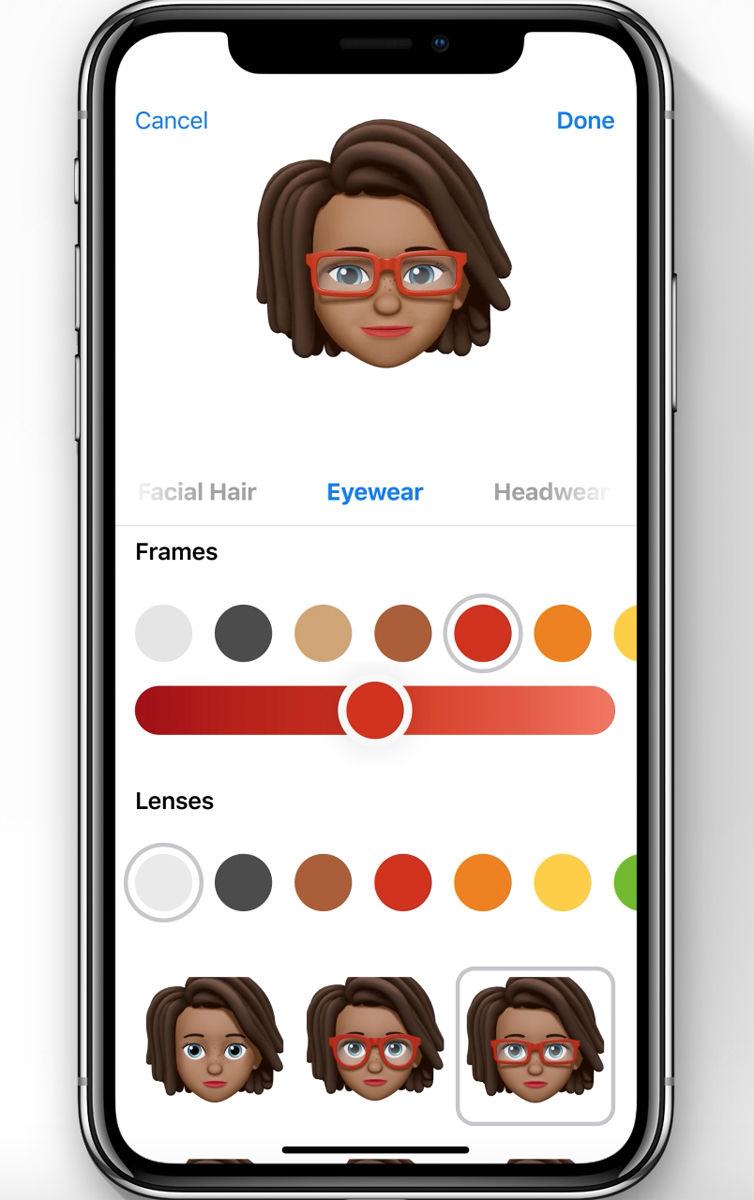
- Customize Your Memoji: Use the various features available, such as facial expressions, hairstyles, and accessories, to customize your Memoji.
Memoji Features
Memoji offer a range of features that allow you to personalize your avatar. Some of these features include:
- Facial Expressions: Choose from various facial expressions to convey emotions and attitudes.
- Hairstyles: Select from a variety of hairstyles to match your personality or style.
- Accessories: Add accessories such as hats, glasses, or jewelry to make your Memoji more distinctive.
How to Use Memoji in Messages
Once you’ve created your Memoji, you can use it in various messaging apps. Here’s how:
- Open The Messages App: Open the Messages app on your iPhone.
- Access The Memoji Section: Tap on the Memoji icon (represented by a smiley face) to access the section where you can create and customize your Memoji.
- Select Your Memoji: Choose the Memoji you’ve created from the available options.
- Send Messages With Your Memoji: Use your customized Memoji in messages to add a personal touch.
How to Create Memoji on Iphone 6 And Earlier
Unfortunately, creating Memoji on iPhone 6 and earlier is not possible due to compatibility issues with iOS versions prior to iOS 13. However, there are alternative apps available that can help you create custom avatars based on your face.
Alternative Apps For Creating Custom Avatars
If you’re unable to create Memoji on your iPhone 6 or earlier, consider using alternative apps that can provide similar functionality. Some popular options include:
- Memoji Creator: An app specifically designed for creating customized emojis.
- Emoji Maker: An app that allows you to create custom emojis using various features.
Can I Create Memoji on Android?
Unfortunately, creating Memoji on Android devices is not possible due to the exclusive nature of Apple’s technology. However, some third-party apps can provide similar functionality, allowing you to create custom avatars based on your face.
Conclusion
Creating Memoji on iPhone is a fun and creative process that allows you to express yourself in new and innovative ways. Whether you’re looking to add a personal touch to messages or simply want to have fun with emojis, Memoji are the perfect solution. With this guide, you should now be able to create your own customized avatars and use them in various messaging apps.
Faqs
- What is The Minimum Ios Version Required For Creating Memoji?
- The minimum iOS version required for creating Memoji is iOS 13.
- Can I Create Memoji on Iphone 6 And Earlier?
- Unfortunately, creating Memoji on iPhone 6 and earlier is not possible due to compatibility issues with iOS versions prior to iOS 13.
- How do I Customize my Memoji?
- To customize your Memoji, use the various features available, such as facial expressions, hairstyles, and accessories.
- Can I Use Memoji in Whatsapp?
- Yes, you can use Memoji in WhatsApp by creating a new message and selecting the Memoji icon (represented by a smiley face).
- Are There Any Alternative Apps For Creating Custom Avatars on Android?
- Yes, some third-party apps are available that can provide similar functionality to Memoji on Android devices.
We hope this guide has been helpful in teaching you how to create Memoji on iPhone and use them in various messaging apps. If you have any further questions or need additional assistance, feel free to ask!


