
How to Create Pdf Files For Free: A Step-by-step Guide
Are you searching for a free program to create files in PDF format, but don’t know which one to choose? Look no further! In this tutorial, we’ll guide you through the process of creating PDF files using various tools and services, all of which are free (at least in their basic functions).
Creating Pdf Files on Windows 10
If you’re using a PC with Windows 10 or Windows 11, you can easily create PDF files using the built-in printer feature. This virtual printer allows you to convert printable files into PDF documents.
To do this:
- Open the content you want to generate into a PDF file.
- Call up the print menu from your application’s toolbar and select the PDF printer option from the list of available printers.
- Choose the “Save as PDF” option, specify the output location, and click “Save.”
Creating Pdf Files on Mac
If you’re using a Mac, you can also create PDF files using the built-in print feature in macOS.
To do this:
- Open a printable file using an app like TextEdit or Preview.
- Click on the “File” menu and select “Print.”
- Choose the “Save as PDF” option from the list of available printers, specify the output location, and click “Save.”
Creating Pdf Files on Android
On devices running Android, you can use a built-in print feature to create PDF files.
To do this:
- Open the page Web, photo, or document you want to generate into a PDF file.
- Tap on the sharing icon (usually represented by three dots) and select the “Print” option.
- Choose the “Save as PDF” option from the list of available printers, specify the output location, and tap “Save.”
Creating Pdf Files on Iphone/ipad
If you’re using an iPhone or iPad, you can create PDF files using the built-in print feature in iOS.
To do this:
- Open a page Web, photo, or document you want to generate into a PDF file.
- Tap on the sharing icon (usually represented by a square with an arrow) and select the “Print” option.
- Choose the “Save as PDF” option from the list of available printers, specify the output location, and tap “Save.”
Creating Pdf Files Online
You can also create PDF files online using various web-based services. Some popular options include:
- Pdfescape: A user-friendly service that allows you to create and edit PDF documents online.
- Sejda: A document editor that enables you to create PDF files from scratch or edit existing ones.
- Dochub: An online platform for creating, editing, and managing PDF documents.
Creating Pdf Files From Word Documents
If you want to convert Word documents into PDF format, you can use various tools and services. Some popular options include:
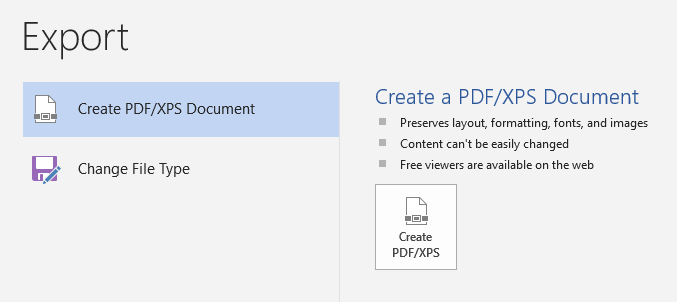
- Microsoft Word: The built-in conversion feature in Microsoft Word allows you to save your document as a PDF file.
- Online Converters: There are many online services that allow you to upload your Word document and download it in PDF format.
Creating Pdf Files From Photos
You can also create PDF files from photos using various tools and services. Some popular options include:
- Online Photo Editors: Many online photo editing platforms offer the ability to save your edited photo as a PDF file.
- Photo Sharing Apps: Some photo sharing apps, such as Google Photos or Apple Photos, allow you to export your photos as PDF files.
Creating Editable Pdf Files
If you want to create editable PDF files, you can use various tools and services that offer this feature. Some popular options include:
- Pdfescape: This service allows you to edit existing PDF documents online.
- Sejda: This document editor enables you to create and edit PDF files from scratch or edit existing ones.
- Dochub: This online platform for creating, editing, and managing PDF documents also offers editable PDF file creation.
Conclusion
Creating PDF files is a straightforward process that can be accomplished using various tools and services. Whether you’re working on Windows 10, Mac, Android, iPhone, or online, there are numerous options available to help you achieve your goal. By following the step-by-step guides provided in this tutorial, you should be able to create PDF files with ease.
Frequently Asked Questions
- Q: What is a Pdf File?
A: A PDF (Portable Document Format) file is a type of electronic document that preserves the original layout and formatting of a printed page. - Q: How do I Create a Pdf File on Windows 10?
A: You can use the built-in printer feature to convert printable files into PDF documents. - Q: Can I Create a Pdf File on Mac?
A: Yes, you can use the built-in print feature in macOS to create PDF files. - Q: How do I Create a Pdf File on Android?
A: You can use the built-in print feature to convert printable content into PDF documents. - Q: Can I Create a Pdf File on Iphone/ipad?
A: Yes, you can use the built-in print feature in iOS to create PDF files. - Q: Are There Any Online Services That Allow me to Create Pdf Files?
A: Yes, there are numerous web-based services, such as PDFescape, Sejda, and DocHub, that enable you to create and edit PDF documents online. - Q: Can I Convert Word Documents Into Pdf Format?
A: Yes, you can use Microsoft Word or various online converters to save your Word document as a PDF file. - Q: How do I Create a Pdf File From a Photo?
A: You can use online photo editors or photo sharing apps to export your edited photo as a PDF file.


