
How to Create a Pdf: A Step-by-step Guide
Are you tired of searching for ways to create a PDF from scratch? Look no further! In this article, we will guide you through the process of creating a PDF, whether you’re using a Windows, macOS, or mobile device. We’ll also explore some of the best software and apps available to help you achieve your goal.
What is a Pdf?
A PDF (Portable Document Format) is a file format that preserves the layout and formatting of a document, regardless of the device or platform used to view it. It’s an ideal format for sharing documents, reports, and presentations online.
Why Create a Pdf?
Creating a PDF offers several benefits, including:
- Preserving Formatting: A PDF ensures that your document looks exactly as intended, without any formatting issues.
- Easy Sharing: PDFs are widely supported across devices and platforms, making it easy to share documents with others.
- Professional Presentation: A well-designed PDF can make a great impression on clients, customers, or colleagues.
Software And Apps For Creating Pdfs
Here are some of the best software and apps available for creating PDFs:
- Microsoft Print to Pdf (Windows 10): This virtual printer allows you to create PDFs directly from your Windows 10 device.
- Dopdf (Windows): A free, easy-to-use virtual printer that creates high-quality PDFs.
- Wondershare Pdfelement (Windows/macOS): A comprehensive software for creating, editing, and converting PDFs.
- Libreoffice (Windows/macOS/Linux): A free, open-source office suite that includes a built-in PDF converter.
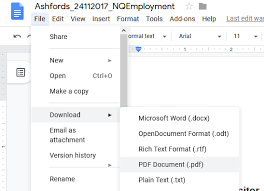
- Google Drive (Online): Google’s cloud storage service allows you to create and edit documents online, which can be easily exported as a PDF.
How to Create a Pdf on Windows 10
To create a PDF on Windows 10 using Microsoft Print to PDF:
- Open the document or webpage you want to convert.
- Click on the “Print” option (Ctrl + P).
- Select Microsoft Print to PDF as your printer.
- Choose a location and file name for your PDF.
How to Create a Pdf on Macos
To create a PDF on macOS using the built-in virtual printer:
- Open the document or webpage you want to convert.
- Click on the “File” menu and select “Save As.”
- Choose the “PDF” format from the file type dropdown.
- Select a location and file name for your PDF.
How to Create a Pdf on Mobile Devices
To create a PDF on an Android or iOS device:
- Open the document or webpage you want to convert.
- Long press on the share button.
- Select “Save as PDF” from the menu.
- Choose a location and file name for your PDF.
Tips And Tricks
Here are some additional tips and tricks for creating PDFs:
- Use High-quality Images: Ensure that your images are high-resolution to ensure a professional-looking PDF.
- Edit And Customize: Use software like Wondershare PDFelement or Adobe Acrobat to edit and customize your PDF further.
- Convert From Other Formats: If you have a document in another format, such as Word or Excel, you can easily convert it to a PDF using software like LibreOffice.
Conclusion
Creating a PDF is a straightforward process that can be achieved on various devices and platforms. By using the right software and apps, you can create high-quality PDFs that are perfect for sharing with others. Whether you’re a student, professional, or business owner, this guide has provided you with the knowledge and tools needed to create stunning PDFs.
Frequently Asked Questions
- What is The Difference Between a Pdf And an E-book?
A PDF is a file format that preserves the layout and formatting of a document, while an e-book is a self-contained digital book that can be read on various devices. - Can I Create a Pdf From a Webpage?
Yes, you can create a PDF from a webpage by selecting “Print” or using a virtual printer like Microsoft Print to PDF. - How do I Edit a Pdf?
You can edit a PDF using software like Wondershare PDFelement or Adobe Acrobat, which allow you to make changes to the text, images, and layout of your document. - Can I Convert a Pdf to Another Format?
Yes, most software and apps allow you to convert a PDF to other formats, such as Word, Excel, or PowerPoint. - What is The Best Software For Creating Pdfs?
The best software for creating PDFs depends on your specific needs and preferences. However, Wondershare PDFelement and LibreOffice are popular choices among users.
I hope this article has provided you with a comprehensive guide to creating PDFs. Remember to explore different software and apps to find the one that suits your needs best!


