
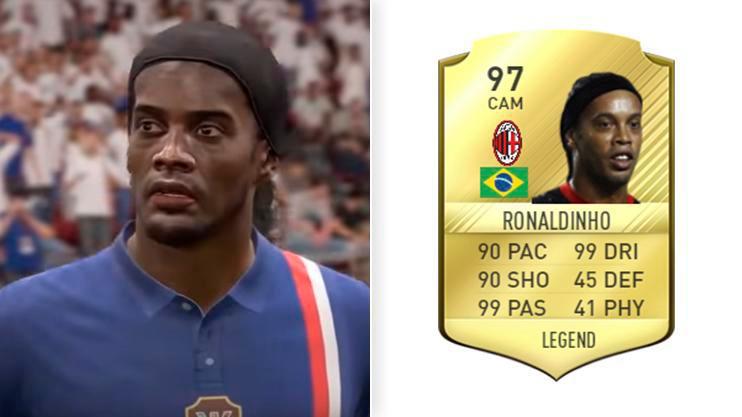
How to Create Ronaldinho on Fifa 22: A Step-by-step Guide
Are you a big fan of the Brazilian soccer legend Ronaldinho? do you want to play with him in fifa 22? look no further! in this article, we will guide you through the process of creating ronaldinho on fifa 22.
Why Created Ronaldinho in Fifa 22?
Creating ronaldinho on fifa 22 is a great way to relive his amazing soccer career and experience what it’s like to play with him. You can use him in offline modes such as friendly matches or the career mode, where you can create your own story and manage his team.
Step 1: Create an Avatar
To start creating ronaldinho on fifa 22, first, go to the “customize” section of the game. Then, select the male avatar option. Don’t worry; this is just a step to create a new player profile for ronaldinho.
Step 2: Insert Player Information
Now that you have created a new player profile, it’s time to insert some information about ronaldinho. In the “info” section, enter his name as ronaldo, surname as assis, and alias as ronaldinho. Leave the first name in offline mode blank.
Step 3: Set Player Details
In the next step, set up some basic details for ronaldinho. Select brazil as his country / region di lui, choose one of his former teams (such as psg or barcelona), and enter his date of birth di lui as march 21, 1980.
Step 4: Create Ronaldinho’s Face on Fifa 22
To create ronaldinho’s face on fifa 22, navigate to the “head” section under the player details. Choose a tone and complexion that resembles ronaldinho’s, select brown dark eyebrows, and enter the color of his eyes as brown dark.
Step 5: Set Player Attributes
In this step, you’ll set ronaldinho’s attributes, which include attack, defense, ability, power, motion, mentality, and pace. Here are some recommended settings:
-
Attack:
-
Crosses: 90
-
Finishing: 93
-
Heading accuracy: 54
-
Short passes: 92
-
Volleys: 83
-
Weak foot: 4
-
Defense:
-
Standing tackles: 41
-
Slipped: 31
-
Ability:
-
Dribbling: 96
-
Effect: 90
-
Free kick accuracy: 90
-
Long passes: 86
-
Ball control: 95
-
Power:
-
Shooting power and elevation: 86
-
Resistance: 83
-
Strength: 84
-
Long shots: 89
-
Motion:
-
Acceleration: 94
-
Sprint speed: 91
-
Agility: 94
-
Reflex: 93
-
Balance: 89
-
Mentality:
-
Aggression: 70
-
Interventions: 26
-
Position: 90
-
Vision: 93
-
Penalties: 88
Step 6: Save Your Player
Once you have completed all the previous steps, go to the “save” button to save ronaldinho as a new player on fifa 22.
Conclusion
Creating ronaldinho on fifa 22 is a fun and easy process that allows you to relive his amazing soccer career. By following these steps, you can create an authentic version of him with unique attributes and abilities. Happy gaming!
Frequently Asked Questions (faqs)
Q: Why did you create ronaldinho in fifa 22?
A: Creating ronaldinho on fifa 22 is a great way to relive his amazing soccer career and experience what it’s like to play with him.
Q: What are the benefits of creating a player on fifa 22?
A: Creating a player on fifa 22 allows you to customize their attributes, abilities, and appearance, making them unique and authentic.
Q: Can i use ronaldinho in online modes?
A: No, ronaldinho can only be used in offline modes such as friendly matches or the career mode.
Q: How do i save my player?
A: To save your player, go to the “save” button after completing all the previous steps.


