
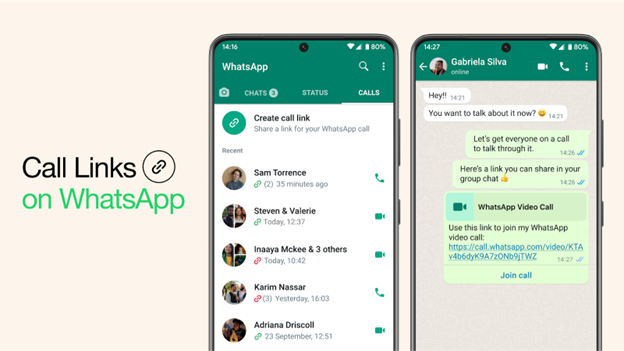
How to Create a Whatsapp Link on Your Android Device
Are you tired of manually entering phone numbers every time you want to make a group call or video conference with friends? Look no further! In this article, we will guide you through the simple process of creating a WhatsApp link that can be shared with others.
What is a Whatsapp Link?
A WhatsApp link allows you to share a direct link to a group call or video conference with your contacts. This feature was introduced by WhatsApp to make it easier for users to communicate with each other. With this feature, you can create a link and share it with others, who can then join the call by simply clicking on the link.
How to Create a Whatsapp Link on Your Android Device
Creating a WhatsApp link on your Android device is a straightforward process. Here’s how:
- Open Whatsapp: First, open the WhatsApp app on your Android device.
- Tap on The Calls Tab: Tap on the calls tab at the top of the screen.
- Create a Link: Tap on the “Create a link” option.
- Choose a Type: Choose the type of call you want to create (video or voice).
- Share The Link: Share the link with your contacts.
How to Create a Whatsapp Link on Your Iphone
Creating a WhatsApp link on your iPhone is also easy and similar to creating one on an Android device. Here’s how:
- Open Whatsapp: Open the WhatsApp app on your iPhone.
- Tap on The Calls Tab: Tap on the calls tab at the bottom of the screen.
- Create a Link: Tap on the “Create a link” option.
- Choose a Type: Choose the type of call you want to create (video or voice).
- Share The Link: Share the link with your contacts.
How to Create a Whatsapp Link on Your Computer
Unfortunately, it is not currently possible to create a WhatsApp link on your computer and use it to join a group call or video conference. However, if this feature becomes available in the future, we will update this article with instructions on how to do so.
Tips And Tricks
Here are some tips and tricks to keep in mind when creating and sharing WhatsApp links:
- Make sure you have the latest version of WhatsApp installed on your device.
- Only share the link with people you trust, as it can be used to join a group call or video conference.
- Keep the link private and do not share it publicly.
Conclusion
Creating a WhatsApp link is a simple process that allows you to share a direct link to a group call or video conference with your contacts. Whether you’re using an Android device, iPhone, or computer, we hope this article has been helpful in guiding you through the process. Remember to always keep the link private and only share it with people you trust.


