
How to Disable Your Facebook Profile: A Step-by-step Guide
Are you tired of Facebook and thinking of deleting your account? Before taking the plunge, consider temporarily disabling your profile instead. This way, you can still preserve the possibility of reactivating it later if needed.
Why Disabling Your Profile is a Better Option
Disabling your Facebook profile temporarily allows you to take a break from the social network without losing access to your data. Unlike deleting your account, which is irreversible, disabling it gives you a chance to reconsider and reactivate it within 30 days.
How to Disable Your Facebook Profile Temporarily
To disable your Facebook profile temporarily:
- Access Facebook: Open the Facebook app on your smartphone or tablet, or access it via your computer’s web browser.
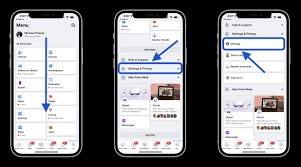
- Go to Settings: Tap or click on the three horizontal lines (☰) in the top right corner of the screen. Select “Settings and Privacy” from the dropdown menu.
- Select Account: Choose “Account” from the left-hand menu, then select “Personal Details.”
- Deactivation Option: Click on “Property and Control of the Account,” followed by “Deactivation or Elimination.” Select “Disable Account” from the options provided.
How to Disable Your Facebook Profile Permanently
If you’re sure you want to delete your account permanently:
- Access Facebook: Repeat the same steps as before to access Facebook on your smartphone, tablet, or computer.
- Go to Settings: Tap or click on the three horizontal lines (☰) in the top right corner of the screen. Select “Settings and Privacy” from the dropdown menu.
- Select Account: Choose “Account” from the left-hand menu, then select “Personal Details.”
- Deactivation Option: Click on “Property and Control of the Account,” followed by “Deactivation or Elimination.” Select “Delete Account” from the options provided.
How to Back Up Your Facebook Data
Before disabling or deleting your account, it’s essential to back up your data. This way, you can still access your photos, messages, and other information even after deactivating or deleting your profile.
To backup your Facebook data:
- Click on The Three Horizontal Lines: Tap or click on the three horizontal lines (☰) in the top right corner of the screen.
- Select Settings And Privacy: Choose “Settings and Privacy” from the dropdown menu.
- Backup Option: Click on “See Another in the Centre Management Account,” followed by “Personal Details.” Select “Property and Control of the Account,” then click on “Deactivation or Elimination.”
- Download Your Data: Select the option to download a copy of your Facebook data.
How to Disable Your Facebook Profile on Smartphone or Tablet
To disable your Facebook profile on your smartphone or tablet:
- Open The Facebook App: Tap on the Facebook icon to open the app.
- Tap on The Three Horizontal Lines: Tap on the three horizontal lines (☰) in the top right corner of the screen.
- Select Settings And Privacy: Choose “Settings and Privacy” from the dropdown menu.
- Deactivate Account: Select “Disable Account” from the options provided.
How to Disable Your Facebook Profile on Computer
To disable your Facebook profile on your computer:
- Access Facebook Website: Open the Facebook website in your web browser.
- Click on The Three Horizontal Lines: Tap or click on the three horizontal lines (☰) in the top right corner of the screen.
- Select Settings And Privacy: Choose “Settings and Privacy” from the dropdown menu.
- Deactivate Account: Select “Disable Account” from the options provided.
How to Delete Your Facebook Profile Permanently
If you’re sure you want to delete your account permanently:
- Access Facebook Website: Open the Facebook website in your web browser.
- Click on The Three Horizontal Lines: Tap or click on the three horizontal lines (☰) in the top right corner of the screen.
- Select Settings And Privacy: Choose “Settings and Privacy” from the dropdown menu.
- Delete Account: Select “Delete Account” from the options provided.
Conclusion
Disabling your Facebook profile temporarily is a great option if you’re thinking of taking a break from the social network. By following these step-by-step guides, you can ensure that you don’t lose access to your data and have the opportunity to reconsider later. If you’re sure you want to delete your account permanently, be aware that this action is irreversible and should only be taken after careful consideration.


