
Optimizing Your Gaming Experience: A Guide to Boosting Performance
Are you tired of lagging video game performance? Do you want to enhance your gaming experience without sacrificing quality? Look no further! In this article, we’ll explore the best ways to optimize your gaming setup and boost performance. From software solutions to hardware upgrades, we’ll cover it all.
Understanding The Problem
Modern video games require significant system resources to run smoothly. This can lead to lagging performance, decreased frame rates, and overall frustration. But what’s behind this problem? Is it a lack of RAM, outdated graphics cards, or perhaps inefficient software?
Ram: The Unsung Hero of Gaming Performance
Random Access Memory (RAM) is a crucial component in any gaming setup. It’s responsible for storing data that the game processor needs to access quickly. However, as games become more complex, they require more RAM to run smoothly.
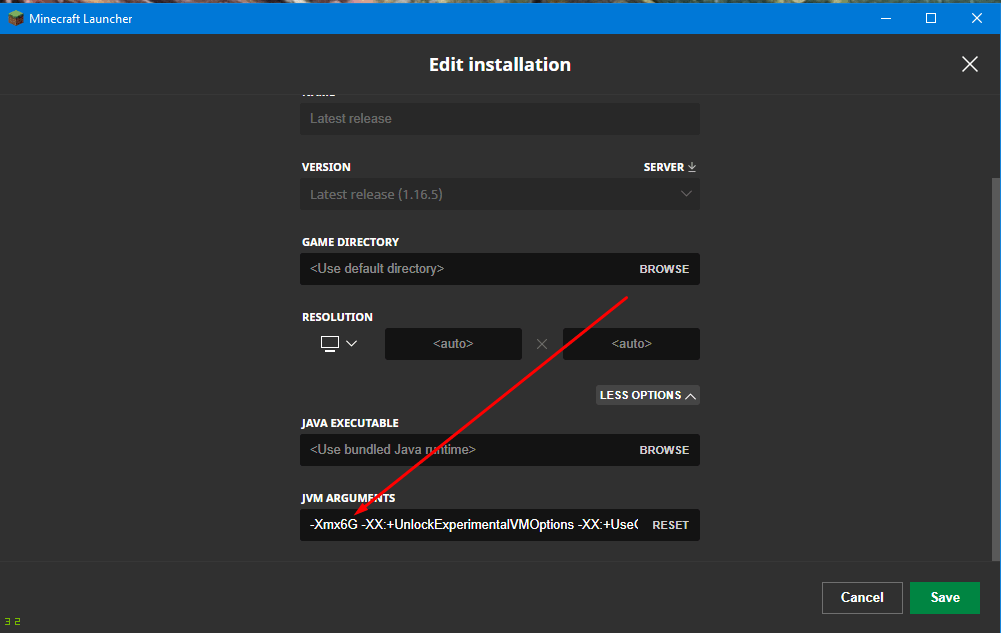
How to Dedicate More Ram to Your Games
You can’t simply assign more RAM to your games like you would a task on your computer. The operating system manages memory allocation automatically. But there are ways to free up RAM and ensure it’s dedicated to your games.
Software Solutions For Optimizing Gaming Performance
Fortunately, there are software solutions available that can help optimize gaming performance. Here are some of the best ones:
- Razer Cortex: This free software is designed specifically for gamers. It optimizes system resources, closes unnecessary processes, and ensures RAM is dedicated to your games.
- Wise Game Booster: Another popular option, Wise Game Booster frees up RAM by closing unnecessary processes and ensuring system resources are allocated efficiently.
- Game Fire: With its advanced optimization features, Game Fire boosts gaming performance by prioritizing system resources for your games.
Memory Clean: A Simple Yet Effective Solution
If you’re using a Mac, don’t worry – there’s still hope! Memory Clean is a free application that helps optimize RAM usage and ensure smooth gaming performance. It’s easy to use and can be set up to automatically clean memory when needed.
Other Tips For Optimizing Gaming Performance
While software solutions are great, they’re not the only way to boost gaming performance. Here are some other tips:
- Close Unnecessary Programs: Make sure to close any unnecessary programs or background applications that might be consuming system resources.
- Update Your Graphics Drivers: Ensure your graphics drivers are up-to-date for optimal performance.
- Adjust In-game Settings: Adjusting in-game settings can also help improve performance.
Conclusion
Optimizing gaming performance is within reach. By understanding the problem, dedicating more RAM to your games, and using software solutions like Razer Cortex, Wise Game Booster, and Game Fire, you can enjoy a smoother gaming experience. Don’t forget to close unnecessary programs, update your graphics drivers, and adjust in-game settings for optimal performance.
Frequently Asked Questions
- Q: What’s the best way to optimize gaming performance?
- A: The best way is to use software solutions like Razer Cortex, Wise Game Booster, and Game Fire.
- Q: Can I dedicate more RAM to my games manually?
- A: No, the operating system manages memory allocation automatically. However, you can free up RAM by closing unnecessary processes and ensuring system resources are allocated efficiently.
- Q: Are there any other tips for optimizing gaming performance?
- A: Yes! Close unnecessary programs, update your graphics drivers, and adjust in-game settings for optimal performance.
I hope this article has helped you understand the importance of optimizing gaming performance. By following these tips, you’ll be able to enjoy a smoother gaming experience with better performance.


